You've already forked Curso-lenguaje-python
Compare commits
28 Commits
898da84dc3
...
main
| Author | SHA1 | Date | |
|---|---|---|---|
| 92e473fdfe | |||
| 6e97f2bea1 | |||
| fa1ee4dd64 | |||
| b9884d6560 | |||
| 9245dbb9af | |||
| 2c4f14a886 | |||
| 1fa360a109 | |||
| a2badd511d | |||
| 68b9bf32a3 | |||
| 21c7e1e6c6 | |||
| dc9e81f06e | |||
| dd48618093 | |||
| 3e47d5a7ee | |||
| d59e31205b | |||
| e2767e99af | |||
| 65468e4115 | |||
| 4f2264748e | |||
| a73e8a0222 | |||
| 84a2519f6c | |||
| 88a26dae34 | |||
| b672828792 | |||
| 40fad6bae8 | |||
| 17a7e04180 | |||
| 6cb79e3418 | |||
| 28f9bb389d | |||
| f525beaf11 | |||
| 4756d756ac | |||
| 89959d29ee |

4
.gitignore
vendored
4
.gitignore
vendored
@@ -127,9 +127,11 @@ celerybeat.pid
|
||||
|
||||
# Environments
|
||||
.env
|
||||
*.env
|
||||
.venv
|
||||
env/
|
||||
venv/
|
||||
myenv/
|
||||
ENV/
|
||||
env.bak/
|
||||
venv.bak/
|
||||
@@ -193,3 +195,5 @@ rss.db
|
||||
# Ignore volume files
|
||||
rabbitmq/
|
||||
rabbitmq/*
|
||||
*_data
|
||||
*_data/*
|
||||
|
||||
@@ -8,6 +8,9 @@ services:
|
||||
- .env
|
||||
ports:
|
||||
- '5000:5000'
|
||||
volumes:
|
||||
- /etc/localtime:/etc/localtime:ro
|
||||
- /etc/timezone:/etc/timezone:ro
|
||||
depends_on:
|
||||
- redis
|
||||
|
||||
@@ -16,4 +19,7 @@ services:
|
||||
container_name: redis-python
|
||||
ports:
|
||||
- '6379:6379'
|
||||
volumes:
|
||||
- /etc/localtime:/etc/localtime:ro
|
||||
- /etc/timezone:/etc/timezone:ro
|
||||
|
||||
|
||||
113
catch-all/05_infra_test/02_rabbitmq/06_rpc/rpc_client.py
Normal file
113
catch-all/05_infra_test/02_rabbitmq/06_rpc/rpc_client.py
Normal file
@@ -0,0 +1,113 @@
|
||||
#!/usr/bin/env python
|
||||
import pika
|
||||
import uuid
|
||||
import sys
|
||||
import argparse
|
||||
|
||||
|
||||
class FibonacciRpcClient:
|
||||
def __init__(self, host='localhost'):
|
||||
# Establece la conexión con RabbitMQ
|
||||
try:
|
||||
self.connection = pika.BlockingConnection(
|
||||
pika.ConnectionParameters(host=host)
|
||||
)
|
||||
except pika.exceptions.AMQPConnectionError as e:
|
||||
print(f"[!] Error al conectar con RabbitMQ: {e}")
|
||||
sys.exit(1)
|
||||
|
||||
# Crea un canal de comunicación
|
||||
self.channel = self.connection.channel()
|
||||
|
||||
# Declara una cola exclusiva para recibir las respuestas del servidor RPC
|
||||
result = self.channel.queue_declare(queue='', exclusive=True)
|
||||
self.callback_queue = result.method.queue
|
||||
|
||||
# Configura el canal para consumir mensajes de la cola de respuestas
|
||||
self.channel.basic_consume(
|
||||
queue=self.callback_queue,
|
||||
on_message_callback=self.on_response,
|
||||
auto_ack=True
|
||||
)
|
||||
|
||||
# Inicializa las variables para manejar la respuesta RPC
|
||||
self.response = None
|
||||
self.corr_id = None
|
||||
|
||||
def on_response(self, ch, method, props, body):
|
||||
"""Callback ejecutado al recibir una respuesta del servidor RPC."""
|
||||
# Verifica si el ID de correlación coincide con el esperado
|
||||
if self.corr_id == props.correlation_id:
|
||||
self.response = body
|
||||
|
||||
def call(self, n):
|
||||
"""
|
||||
Envía una solicitud RPC para calcular el número de Fibonacci de n.
|
||||
|
||||
:param n: Número entero no negativo para calcular su Fibonacci.
|
||||
:return: Resultado del cálculo de Fibonacci.
|
||||
:raises ValueError: Si n no es un número entero no negativo.
|
||||
"""
|
||||
# Verifica que la entrada sea un número entero no negativo
|
||||
if not isinstance(n, int) or n < 0:
|
||||
raise ValueError("[!] El argumento debe ser un entero no negativo.")
|
||||
|
||||
# Resetea la respuesta y genera un nuevo ID de correlación único
|
||||
self.response = None
|
||||
self.corr_id = str(uuid.uuid4())
|
||||
|
||||
# Publica un mensaje en la cola 'rpc_queue' con las propiedades necesarias
|
||||
self.channel.basic_publish(
|
||||
exchange='',
|
||||
routing_key='rpc_queue',
|
||||
properties=pika.BasicProperties(
|
||||
reply_to=self.callback_queue, # Cola de retorno para recibir la respuesta
|
||||
correlation_id=self.corr_id, # ID único para correlacionar la respuesta
|
||||
),
|
||||
body=str(n)
|
||||
)
|
||||
|
||||
# Espera hasta que se reciba la respuesta del servidor
|
||||
while self.response is None:
|
||||
self.connection.process_data_events(time_limit=None)
|
||||
|
||||
# Devuelve la respuesta convertida a un entero
|
||||
return int(self.response)
|
||||
|
||||
def close(self):
|
||||
"""Cierra la conexión con el servidor de RabbitMQ."""
|
||||
self.connection.close()
|
||||
|
||||
|
||||
if __name__ == "__main__":
|
||||
# Configura el analizador de argumentos para recibir el número de Fibonacci
|
||||
parser = argparse.ArgumentParser(
|
||||
description="Calcula números de Fibonacci mediante RPC.")
|
||||
parser.add_argument(
|
||||
"number",
|
||||
type=int,
|
||||
help="Número entero no negativo para calcular su Fibonacci."
|
||||
)
|
||||
args = parser.parse_args()
|
||||
|
||||
# Inicializa el cliente RPC de Fibonacci
|
||||
fibonacci_rpc = FibonacciRpcClient()
|
||||
|
||||
# Número para el cual se desea calcular el Fibonacci
|
||||
n = args.number
|
||||
|
||||
try:
|
||||
print(f" [+] Solicitando fib({n})")
|
||||
# Realiza la llamada RPC y obtiene el resultado
|
||||
response = fibonacci_rpc.call(n)
|
||||
print(f" [+] Resultado fib({n}) = {response}")
|
||||
|
||||
except ValueError as e:
|
||||
print(f"[!] Error de valor: {e}")
|
||||
|
||||
except Exception as e:
|
||||
print(f"[!] Error inesperado: {e}")
|
||||
|
||||
finally:
|
||||
# Cierra la conexión del cliente RPC
|
||||
fibonacci_rpc.close()
|
||||
92
catch-all/05_infra_test/02_rabbitmq/06_rpc/rpc_server.py
Normal file
92
catch-all/05_infra_test/02_rabbitmq/06_rpc/rpc_server.py
Normal file
@@ -0,0 +1,92 @@
|
||||
#!/usr/bin/env python
|
||||
import pika
|
||||
from functools import lru_cache
|
||||
import time
|
||||
|
||||
# Establecemos la conexión a RabbitMQ
|
||||
|
||||
|
||||
def create_connection():
|
||||
|
||||
try:
|
||||
connection = pika.BlockingConnection(
|
||||
pika.ConnectionParameters(host='localhost')
|
||||
)
|
||||
|
||||
return connection
|
||||
|
||||
except pika.exceptions.AMQPConnectionError as e:
|
||||
print(f"[!] Error al conectar a RabbitMQ: {e}")
|
||||
|
||||
return None
|
||||
|
||||
|
||||
# Conexión a RabbitMQ
|
||||
connection = create_connection()
|
||||
|
||||
if not connection:
|
||||
exit(1)
|
||||
|
||||
# Canal de comunicación con RabbitMQ
|
||||
channel = connection.channel()
|
||||
|
||||
# Declaración de la cola 'rpc_queue'
|
||||
channel.queue_declare(queue='rpc_queue')
|
||||
|
||||
# Implementación mejorada de Fibonacci con memoización
|
||||
|
||||
|
||||
@lru_cache(maxsize=None)
|
||||
def fib(n):
|
||||
|
||||
if n < 0:
|
||||
raise ValueError("\n[!] El número no puede ser negativo.")
|
||||
|
||||
elif n == 0:
|
||||
return 0
|
||||
|
||||
elif n == 1:
|
||||
return 1
|
||||
|
||||
else:
|
||||
return fib(n - 1) + fib(n - 2)
|
||||
|
||||
# Callback para procesar solicitudes RPC
|
||||
|
||||
|
||||
def on_request(ch, method, props, body):
|
||||
|
||||
try:
|
||||
n = int(body)
|
||||
print(f" [+] Calculando fib({n})")
|
||||
|
||||
# Simula un tiempo de procesamiento de 2 segundos
|
||||
time.sleep(2)
|
||||
|
||||
response = fib(n)
|
||||
print(f" [+] Resultado: {response}")
|
||||
|
||||
except ValueError as e:
|
||||
response = f"\n[!] Error: {str(e)}"
|
||||
|
||||
except Exception as e:
|
||||
response = f"\n[!] Error inesperado: {str(e)}"
|
||||
|
||||
# Publicar la respuesta al cliente
|
||||
ch.basic_publish(
|
||||
exchange='',
|
||||
routing_key=props.reply_to,
|
||||
properties=pika.BasicProperties(correlation_id=props.correlation_id),
|
||||
body=str(response)
|
||||
)
|
||||
|
||||
# Confirmar la recepción del mensaje
|
||||
ch.basic_ack(delivery_tag=method.delivery_tag)
|
||||
|
||||
|
||||
# Configuración de calidad de servicio y consumo de mensajes
|
||||
channel.basic_qos(prefetch_count=1)
|
||||
channel.basic_consume(queue='rpc_queue', on_message_callback=on_request)
|
||||
|
||||
print("\n[i] Esperando solicitudes RPC")
|
||||
channel.start_consuming()
|
||||
@@ -21,7 +21,12 @@
|
||||
- [Ejemplo de uso](#ejemplo-de-uso)
|
||||
- [Características del intercambio de temas](#características-del-intercambio-de-temas)
|
||||
- [Implementación del sistema de registro](#implementación-del-sistema-de-registro)
|
||||
- [RPC (Próximamente)](#rpc-próximamente)
|
||||
- [RPC](#rpc)
|
||||
- [Interfaz del cliente](#interfaz-del-cliente)
|
||||
- [Cola de retorno (*Callback queue*)](#cola-de-retorno-callback-queue)
|
||||
- [ID de correlación (*Correlation id*)](#id-de-correlación-correlation-id)
|
||||
- [Resumen](#resumen)
|
||||
- [Poniéndolo todo junto](#poniéndolo-todo-junto)
|
||||
|
||||
|
||||
## Despliegue rabbitmq con docker
|
||||
@@ -322,14 +327,136 @@ El código es casi el mismo que en el tutorial anterior.
|
||||
- **[receive_logs_topic.py](./05_topics/receive_logs_topic)**
|
||||
|
||||
|
||||
### RPC (Próximamente)
|
||||
### RPC
|
||||
|
||||
En el segundo tutorial aprendimos a usar *Work Queues* para distribuir tareas que consumen tiempo entre múltiples trabajadores.
|
||||
|
||||
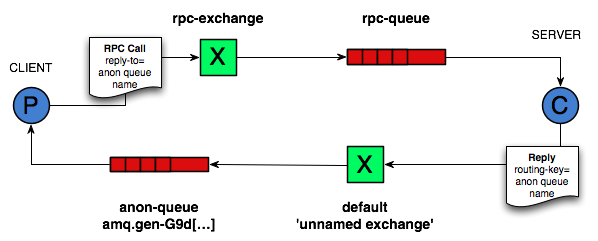
Pero, ¿qué pasa si necesitamos ejecutar una función en una computadora remota y esperar el resultado? Eso es una historia diferente. Este patrón es comúnmente conocido como *Remote Procedure Call* o RPC.
|
||||
|
||||
|
||||
|
||||
En este tutorial vamos a usar RabbitMQ para construir un sistema RPC: un cliente y un servidor RPC escalable. Como no tenemos tareas que consuman tiempo que valga la pena distribuir, vamos a crear un servicio RPC ficticio que devuelva números de Fibonacci.
|
||||
|
||||
|
||||

|
||||
#### Interfaz del cliente
|
||||
|
||||
Para ilustrar cómo se podría usar un servicio RPC, vamos a crear una clase de cliente simple. Va a exponer un método llamado `call` que envía una solicitud RPC y se bloquea hasta que se recibe la respuesta:
|
||||
|
||||
```python
|
||||
fibonacci_rpc = FibonacciRpcClient()
|
||||
result = fibonacci_rpc.call(4)
|
||||
print(f"fib(4) is {result}")
|
||||
```
|
||||
|
||||
**Una nota sobre RPC**
|
||||
|
||||
Aunque RPC es un patrón bastante común en informática, a menudo se critica. Los problemas surgen cuando un programador no está al tanto de si una llamada a función es local o si es un RPC lento. Confusiones como esas resultan en un sistema impredecible y añaden una complejidad innecesaria a la depuración. En lugar de simplificar el software, el uso indebido de RPC puede resultar en un código enredado e inmantenible.
|
||||
|
||||
Teniendo esto en cuenta, considere los siguientes consejos:
|
||||
|
||||
- Asegúrese de que sea obvio qué llamada a función es local y cuál es remota.
|
||||
- Documente su sistema. Haga claras las dependencias entre componentes.
|
||||
- Maneje los casos de error. ¿Cómo debería reaccionar el cliente cuando el servidor RPC está caído por mucho tiempo?
|
||||
|
||||
En caso de duda, evite RPC. Si puede, debe usar un canal asincrónico: en lugar de un bloqueo estilo RPC, los resultados se envían asincrónicamente a la siguiente etapa de computación.
|
||||
|
||||
|
||||
#### Cola de retorno (*Callback queue*)
|
||||
|
||||
En general, hacer RPC sobre RabbitMQ es fácil. Un cliente envía un mensaje de solicitud y un servidor responde con un mensaje de respuesta. Para recibir una respuesta, el cliente necesita enviar una dirección de una cola de retorno (*callback queue*) con la solicitud. Vamos a intentarlo:
|
||||
|
||||
```python
|
||||
result = channel.queue_declare(queue='', exclusive=True)
|
||||
callback_queue = result.method.queue
|
||||
|
||||
channel.basic_publish(exchange='',
|
||||
routing_key='rpc_queue',
|
||||
properties=pika.BasicProperties(
|
||||
reply_to = callback_queue,
|
||||
),
|
||||
body=request)
|
||||
|
||||
# ... y algo de código para leer un mensaje de respuesta de la callback_queue ...
|
||||
```
|
||||
|
||||
**Propiedades del mensaje**
|
||||
|
||||
El protocolo AMQP 0-9-1 predefine un conjunto de 14 propiedades que acompañan un mensaje. La mayoría de las propiedades rara vez se utilizan, con la excepción de las siguientes:
|
||||
|
||||
- `delivery_mode`: Marca un mensaje como persistente (con un valor de 2) o transitorio (cualquier otro valor). Puede recordar esta propiedad del segundo tutorial.
|
||||
- `content_type`: Se utiliza para describir el tipo MIME de la codificación. Por ejemplo, para la codificación JSON a menudo utilizada, es una buena práctica establecer esta propiedad en: `application/json`.
|
||||
- `reply_to`: Comúnmente utilizado para nombrar una cola de retorno (*callback queue*).
|
||||
- `correlation_id`: Útil para correlacionar respuestas RPC con solicitudes.
|
||||
|
||||
|
||||
#### ID de correlación (*Correlation id*)
|
||||
|
||||
En el método presentado anteriormente, sugerimos crear una cola de retorno para cada solicitud RPC. Eso es bastante ineficiente, pero afortunadamente hay una mejor manera: crear una única cola de retorno por cliente.
|
||||
|
||||
Eso plantea un nuevo problema: al recibir una respuesta en esa cola, no está claro a qué solicitud pertenece la respuesta. Es entonces cuando se usa la propiedad `correlation_id`. Vamos a configurarla a un valor único para cada solicitud. Más tarde, cuando recibamos un mensaje en la cola de retorno, miraremos esta propiedad, y con base en eso podremos coincidir una respuesta con una solicitud. Si vemos un valor de `correlation_id` desconocido, podemos descartar el mensaje de manera segura: no pertenece a nuestras solicitudes.
|
||||
|
||||
Puede preguntar, ¿por qué deberíamos ignorar los mensajes desconocidos en la cola de retorno en lugar de fallar con un error? Se debe a la posibilidad de una condición de carrera en el lado del servidor. Aunque es poco probable, es posible que el servidor RPC muera justo después de enviarnos la respuesta, pero antes de enviar un mensaje de confirmación para la solicitud. Si eso sucede, el servidor RPC reiniciado procesará la solicitud nuevamente. Es por eso que, en el cliente, debemos manejar las respuestas duplicadas de manera prudente, y el RPC idealmente debería ser idempotente.
|
||||
|
||||
|
||||
#### Resumen
|
||||
|
||||
Nuestro RPC funcionará así:
|
||||
|
||||
- Cuando el cliente se inicia, crea una cola de retorno anónima exclusiva.
|
||||
- Para una solicitud RPC, el cliente envía un mensaje con dos propiedades: `reply_to`, que se establece en la cola de retorno, y `correlation_id`, que se establece en un valor único para cada solicitud.
|
||||
- La solicitud se envía a una cola llamada `rpc_queue`.
|
||||
- El trabajador RPC (también conocido como servidor) está esperando solicitudes en esa cola. Cuando aparece una solicitud, hace el trabajo y envía un mensaje con el resultado de vuelta al cliente, usando la cola del campo `reply_to`.
|
||||
- El cliente espera datos en la cola de retorno. Cuando aparece un mensaje, verifica la propiedad `correlation_id`. Si coincide con el valor de la solicitud, devuelve la respuesta a la aplicación.
|
||||
|
||||
|
||||
#### Poniéndolo todo junto
|
||||
|
||||
- [rpc_server.py](./06_rpc/rpc_client.py)
|
||||
|
||||
El código del servidor es bastante sencillo:
|
||||
|
||||
- Como de costumbre, comenzamos estableciendo la conexión y declarando la cola `rpc_queue`.
|
||||
- Declaramos nuestra función de Fibonacci. Asume solo una entrada de entero positivo válida. (No espere que funcione para números grandes, probablemente sea la implementación recursiva más lenta posible).
|
||||
- Declaramos un *callback* `on_request` para `basic_consume`, el núcleo del servidor RPC. Se ejecuta cuando se recibe la solicitud. Hace el trabajo y envía la respuesta de vuelta.
|
||||
- Podríamos querer ejecutar más de un proceso de servidor. Para distribuir la carga de manera equitativa entre varios servidores, necesitamos establecer el ajuste `prefetch_count`.
|
||||
|
||||
[rpc_client.py](-/06_rpc/rpc_client.py)
|
||||
|
||||
El código del cliente es un poco más complejo:
|
||||
|
||||
- Establecemos una conexión, un canal y declaramos una `callback_queue` exclusiva para las respuestas.
|
||||
- Nos suscribimos a la `callback_queue`, para que podamos recibir respuestas RPC.
|
||||
- El *callback* `on_response` que se ejecuta en cada respuesta está haciendo un trabajo muy simple: para cada mensaje de respuesta, verifica si el `correlation_id` es el que estamos buscando. Si es así, guarda la respuesta en `self.response` y sale del bucle de consumo.
|
||||
- A continuación, definimos nuestro método principal `call`: realiza la solicitud RPC real.
|
||||
- En el método `call`, generamos un número de `correlation_id` único y lo guardamos: la función de *callback* `on_response` usará este valor para capturar
|
||||
|
||||
la respuesta apropiada.
|
||||
- También en el método `call`, publicamos el mensaje de solicitud, con dos propiedades: `reply_to` y `correlation_id`.
|
||||
- Al final, esperamos hasta que llegue la respuesta adecuada y devolvemos la respuesta al usuario.
|
||||
|
||||
Nuestro servicio RPC ya está listo. Podemos iniciar el servidor:
|
||||
|
||||
```bash
|
||||
python rpc_server.py
|
||||
```
|
||||
|
||||
Para solicitar un número de Fibonacci, ejecute el cliente con el número como argumento:
|
||||
|
||||
```bash
|
||||
python rpc_client.py <numero>
|
||||
```
|
||||
|
||||
El diseño presentado no es la única implementación posible de un servicio RPC, pero tiene algunas ventajas importantes:
|
||||
|
||||
- Si el servidor RPC es demasiado lento, puede escalar simplemente ejecutando otro. Intente ejecutar un segundo `rpc_server.py` en una nueva consola.
|
||||
- En el lado del cliente, el RPC requiere enviar y recibir solo un mensaje. No se requieren llamadas sincrónicas como `queue_declare`. Como resultado, el cliente RPC necesita solo un viaje de ida y vuelta por la red para una única solicitud RPC.
|
||||
|
||||
Nuestro código sigue siendo bastante simplista y no intenta resolver problemas más complejos (pero importantes), como:
|
||||
|
||||
- ¿Cómo debería reaccionar el cliente si no hay servidores en funcionamiento?
|
||||
- ¿Debería un cliente tener algún tipo de tiempo de espera para el RPC?
|
||||
- Si el servidor funciona mal y genera una excepción, ¿debería enviarse al cliente?
|
||||
- Proteger contra mensajes entrantes no válidos (por ejemplo, verificando límites) antes de procesar.
|
||||
|
||||
---
|
||||
|
||||
|
||||
@@ -7,6 +7,8 @@ services:
|
||||
- 5672:5672
|
||||
- 15672:15672
|
||||
volumes:
|
||||
- /etc/localtime:/etc/localtime:ro
|
||||
- /etc/timezone:/etc/timezone:ro
|
||||
- ./rabbitmq/data/:/var/lib/rabbitmq/
|
||||
- ./rabbitmq/log/:/var/log/rabbitmq
|
||||
# environment:
|
||||
|
||||
318
catch-all/05_infra_test/03_kafka/README.md
Normal file
318
catch-all/05_infra_test/03_kafka/README.md
Normal file
@@ -0,0 +1,318 @@
|
||||
# Empezando con Apache Kafka en Python
|
||||
|
||||
En este artículo, voy a hablar sobre Apache Kafka y cómo los programadores de Python pueden usarlo para construir sistemas distribuidos.
|
||||
|
||||
|
||||
## ¿Qué es Apache Kafka?
|
||||
|
||||
Apache Kafka es una plataforma de streaming de código abierto que fue inicialmente desarrollada por LinkedIn. Más tarde fue entregada a la fundación Apache y se convirtió en código abierto en 2011.
|
||||
|
||||
Según [Wikipedia](https://en.wikipedia.org/wiki/Apache_Kafka):
|
||||
|
||||
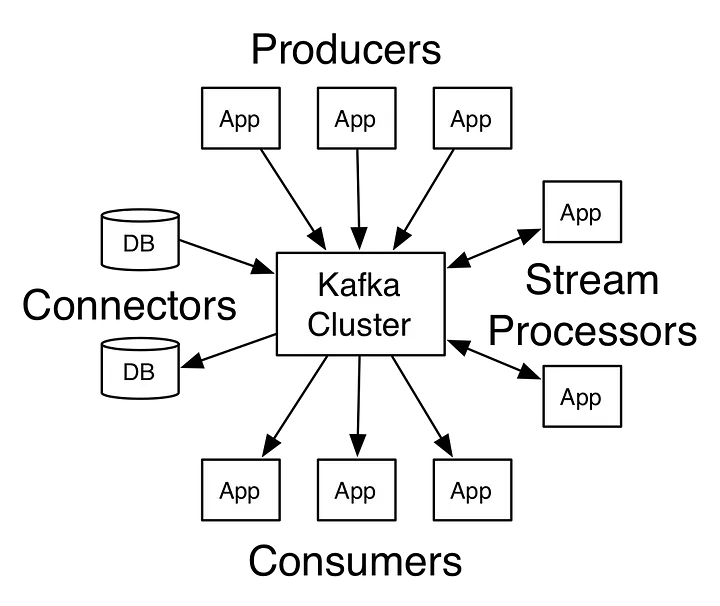
__Apache Kafka es una plataforma de software de procesamiento de flujos de código abierto desarrollada por la Fundación Apache, escrita en Scala y Java. El proyecto tiene como objetivo proporcionar una plataforma unificada, de alto rendimiento y baja latencia para manejar flujos de datos en tiempo real. Su capa de almacenamiento es esencialmente una "cola de mensajes pub/sub masivamente escalable arquitectada como un registro de transacciones distribuidas", lo que la hace altamente valiosa para las infraestructuras empresariales para procesar datos de streaming. Además, Kafka se conecta a sistemas externos (para importación/exportación de datos) a través de Kafka Connect y proporciona Kafka Streams, una biblioteca de procesamiento de flujos en Java.__
|
||||
|
||||
|
||||
|
||||
Piense en él como un gran registro de commits donde los datos se almacenan en secuencia a medida que ocurren. Los usuarios de este registro pueden acceder y usarlo según sus necesidades.
|
||||
|
||||
|
||||
## Casos de uso de Kafka
|
||||
|
||||
Los usos de Kafka son múltiples. Aquí hay algunos casos de uso que podrían ayudarte a comprender su aplicación:
|
||||
|
||||
- **Monitoreo de Actividad**: Kafka puede ser utilizado para el monitoreo de actividad. La actividad puede pertenecer a un sitio web o a sensores y dispositivos físicos. Los productores pueden publicar datos en bruto de las fuentes de datos que luego pueden usarse para encontrar tendencias y patrones.
|
||||
- **Mensajería**: Kafka puede ser utilizado como un intermediario de mensajes entre servicios. Si estás implementando una arquitectura de microservicios, puedes tener un microservicio como productor y otro como consumidor. Por ejemplo, tienes un microservicio responsable de crear nuevas cuentas y otro para enviar correos electrónicos a los usuarios sobre la creación de la cuenta.
|
||||
- **Agregación de Logs**: Puedes usar Kafka para recopilar logs de diferentes sistemas y almacenarlos en un sistema centralizado para un procesamiento posterior.
|
||||
- **ETL**: Kafka tiene una característica de streaming casi en tiempo real, por lo que puedes crear un ETL basado en tus necesidades.
|
||||
- **Base de Datos**: Basado en lo que mencioné antes, podrías decir que Kafka también actúa como una base de datos. No una base de datos típica que tiene una característica de consulta de datos según sea necesario, lo que quise decir es que puedes mantener datos en Kafka todo el tiempo que quieras sin consumirlos.
|
||||
|
||||
|
||||
## Conceptos de Kafka
|
||||
|
||||
|
||||
|
||||
|
||||
### Topics
|
||||
|
||||
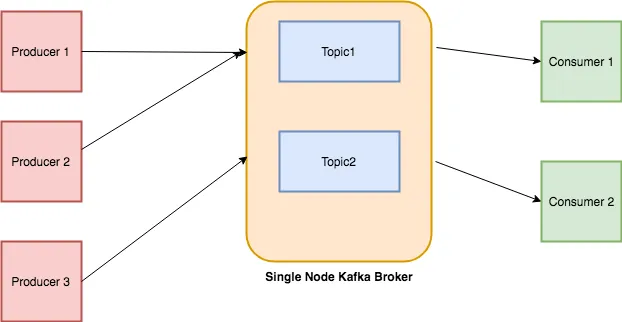
Cada mensaje que se introduce en el sistema debe ser parte de algún topic. El topic no es más que un flujo de registros. Los mensajes se almacenan en formato clave-valor. A cada mensaje se le asigna una secuencia, llamada Offset. La salida de un mensaje podría ser una entrada de otro para un procesamiento posterior.
|
||||
|
||||
|
||||
### Producers
|
||||
|
||||
Los Producers son las aplicaciones responsables de publicar datos en el sistema Kafka. Publican datos en el topic de su elección.
|
||||
|
||||
|
||||
### Consumers
|
||||
|
||||
Los mensajes publicados en los topics son luego utilizados por las aplicaciones Consumers. Un consumer se suscribe al topic de su elección y consume datos.
|
||||
|
||||
|
||||
### Broker
|
||||
|
||||
Cada instancia de Kafka que es responsable del intercambio de mensajes se llama Broker. Kafka puede ser utilizado como una máquina independiente o como parte de un cluster.
|
||||
|
||||
Trataré de explicar todo con un ejemplo simple: hay un almacén de un restaurante donde se almacenan todos los ingredientes como arroz, verduras, etc. El restaurante sirve diferentes tipos de platos: chino, desi, italiano, etc. Los chefs de cada cocina pueden referirse al almacén, elegir lo que desean y preparar los platos. Existe la posibilidad de que lo que se haga con el material crudo pueda ser usado más tarde por todos los chefs de los diferentes departamentos, por ejemplo, una salsa secreta que se usa en TODO tipo de platos. Aquí, el almacén es un broker, los proveedores de bienes son los producers, los bienes y la salsa secreta hecha por los chefs son los topics, mientras que los chefs son los consumers. Mi analogía puede sonar divertida e inexacta, pero al menos te habría ayudado a entender todo :-)
|
||||
|
||||
|
||||
## Configuración y Ejecución
|
||||
|
||||
La forma más sencilla de instalar Kafka es descargar los binarios y ejecutarlo. Dado que está basado en lenguajes JVM como Scala y Java, debes asegurarte de estar usando Java 7 o superior.
|
||||
|
||||
Kafka está disponible en dos versiones diferentes: Una por la [fundación Apache](https://kafka.apache.org/downloads) y otra por [Confluent](https://www.confluent.io/about/) como un [paquete](https://www.confluent.io/download/). Para este tutorial, utilizaré la proporcionada por la fundación Apache. Por cierto, Confluent fue fundada por los [desarrolladores originales](https://www.confluent.io/about/) de Kafka.
|
||||
|
||||
|
||||
## Iniciando Zookeeper
|
||||
|
||||
Kafka depende de Zookeeper, para hacerlo funcionar primero tendremos que ejecutar Zookeeper.
|
||||
|
||||
```
|
||||
bin/zookeeper-server-start.sh config/zookeeper.properties
|
||||
```
|
||||
|
||||
mostrará muchos textos en la pantalla, si ves lo siguiente significa que está correctamente configurado.
|
||||
|
||||
```
|
||||
2018-06-10 06:36:15,023] INFO maxSessionTimeout set to -1 (org.apache.zookeeper.server.ZooKeeperServer)
|
||||
[2018-06-10 06:36:15,044] INFO binding to port 0.0.0.0/0.0.0.0:2181 (org.apache.zookeeper.server.NIOServerCnxnFactory)
|
||||
```
|
||||
|
||||
|
||||
## Iniciando el Servidor Kafka
|
||||
|
||||
A continuación, tenemos que iniciar el servidor broker de Kafka:
|
||||
|
||||
```
|
||||
bin/kafka-server-start.sh config/server.properties
|
||||
```
|
||||
|
||||
Y si ves el siguiente texto en la consola significa que está en funcionamiento.
|
||||
|
||||
```
|
||||
2018-06-10 06:38:44,477] INFO Kafka commitId : fdcf75ea326b8e07 (org.apache.kafka.common.utils.AppInfoParser)
|
||||
[2018-06-10 06:38:44,478] INFO [KafkaServer id=0] started (kafka.server.KafkaServer)
|
||||
```
|
||||
|
||||
|
||||
## Crear Topics
|
||||
|
||||
Los mensajes se publican en topics. Usa este comando para crear un nuevo topic.
|
||||
|
||||
```
|
||||
➜ kafka_2.11-1.1.0 bin/kafka-topics.sh --create --zookeeper localhost:2181 --replication-factor 1 --partitions 1 --topic test
|
||||
Created topic "test".
|
||||
```
|
||||
|
||||
También puedes listar todos los topics disponibles ejecutando el siguiente comando.
|
||||
|
||||
```
|
||||
➜ kafka_2.11-1.1.0 bin/kafka-topics.sh --list --zookeeper localhost:2181
|
||||
test
|
||||
```
|
||||
|
||||
Como ves, imprime, test.
|
||||
|
||||
|
||||
## Enviar Mensajes
|
||||
|
||||
A continuación, tenemos que enviar mensajes, los *producers* se utilizan para ese propósito. Vamos a iniciar un *producer*.
|
||||
|
||||
```
|
||||
➜ kafka_2.11-1.1.0 bin/kafka-console-producer.sh --broker-list localhost:9092 --topic test
|
||||
>Hello
|
||||
>World
|
||||
```
|
||||
|
||||
Inicias la interfaz del *producer* basada en consola que se ejecuta en el puerto 9092 por defecto. `--topic` te permite establecer el *topic* en el que se publicarán los mensajes. En nuestro caso, el *topic* es `test`.
|
||||
|
||||
Te muestra un prompt `>` y puedes ingresar lo que quieras.
|
||||
|
||||
Los mensajes se almacenan localmente en tu disco. Puedes conocer la ruta de almacenamiento verificando el valor de `log.dirs` en el archivo `config/server.properties`. Por defecto, están configurados en `/tmp/kafka-logs/`.
|
||||
|
||||
Si listamos esta carpeta, encontraremos una carpeta con el nombre `test-0`. Al listar su contenido encontrarás 3 archivos: `00000000000000000000.index 00000000000000000000.log 00000000000000000000.timeindex`.
|
||||
|
||||
Si abres `00000000000000000000.log` en un editor, muestra algo como:
|
||||
|
||||
```
|
||||
^@^@^@^@^@^@^@^@^@^@^@=^@^@^@^@^BÐØR^V^@^@^@^@^@^@^@^@^Acça<9a>o^@^@^Acça<9a>oÿÿÿÿÿÿÿÿÿÿÿÿÿÿ^@^@^@^A^V^@^@^@^A
|
||||
Hello^@^@^@^@^@^@^@^@^A^@^@^@=^@^@^@^@^BÉJ^B^@^@^@^@^@^@^@^@^Acça<9f>^?^@^@^Acça<9f>^?ÿÿÿÿÿÿÿÿÿÿÿÿÿÿ^@^@^@^A^V^@^@^@^A
|
||||
World^@
|
||||
~
|
||||
```
|
||||
|
||||
Parece que los datos están codificados o delimitados por separadores, no estoy seguro. Si alguien conoce este formato, que me lo haga saber.
|
||||
|
||||
De todos modos, Kafka proporciona una utilidad que te permite examinar cada mensaje entrante.
|
||||
|
||||
```
|
||||
➜ kafka_2.11-1.1.0 bin/kafka-run-class.sh kafka.tools.DumpLogSegments --deep-iteration --print-data-log --files /tmp/kafka-logs/test-0/00000000000000000000.log
|
||||
Dumping /tmp/kafka-logs/test-0/00000000000000000000.log
|
||||
Starting offset: 0
|
||||
offset: 0 position: 0 CreateTime: 1528595323503 isvalid: true keysize: -1 valuesize: 5 magic: 2 compresscodec: NONE producerId: -1 producerEpoch: -1 sequence: -1 isTransactional: false headerKeys: [] payload: Hello
|
||||
offset: 1 position: 73 CreateTime: 1528595324799 isvalid: true keysize: -1 valuesize: 5 magic: 2 compresscodec: NONE producerId: -1 producerEpoch: -1 sequence: -1 isTransactional: false headerKeys: [] payload: World
|
||||
```
|
||||
|
||||
Puedes ver el mensaje con otros detalles como `offset`, `position` y `CreateTime`, etc.
|
||||
|
||||
|
||||
## Consumir Mensajes
|
||||
|
||||
Los mensajes que se almacenan también deben ser consumidos. Vamos a iniciar un *consumer* basado en consola.
|
||||
|
||||
```
|
||||
➜ kafka_2.11-1.1.0 bin/kafka-console-consumer.sh --bootstrap-server localhost:9092 --topic test --from-beginning
|
||||
```
|
||||
|
||||
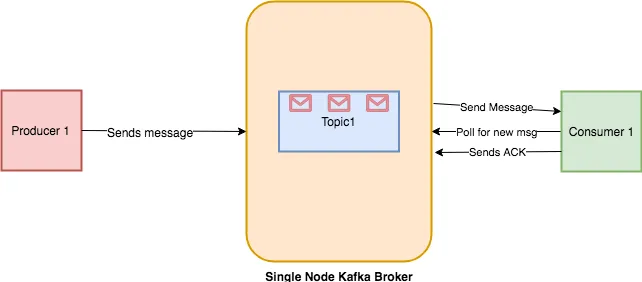
Si lo ejecutas, volcará todos los mensajes desde el principio hasta ahora. Si solo estás interesado en consumir los mensajes después de ejecutar el *consumer*, entonces puedes simplemente omitir el interruptor `--from-beginning` y ejecutarlo. La razón por la cual no muestra los mensajes antiguos es porque el *offset* se actualiza una vez que el *consumer* envía un ACK al *broker* de Kafka sobre el procesamiento de mensajes. Puedes ver el flujo de trabajo a continuación.
|
||||
|
||||
|
||||
|
||||
|
||||
## Acceder a Kafka en Python
|
||||
|
||||
Hay múltiples librerías de Python disponibles para su uso:
|
||||
|
||||
- **Kafka-Python** — Una librería de código abierto basada en la comunidad.
|
||||
- **PyKafka** — Esta librería es mantenida por Parsly y se dice que es una API Pythónica. A diferencia de Kafka-Python, no puedes crear *topics* dinámicos.
|
||||
- **Confluent Python Kafka**:— Es ofrecida por Confluent como un contenedor delgado alrededor de **librdkafka**, por lo tanto, su rendimiento es mejor que el de las dos anteriores.
|
||||
|
||||
Para este artículo, usaremos la librería de código abierto Kafka-Python.
|
||||
|
||||
|
||||
## Sistema de Alerta de Recetas en Kafka
|
||||
|
||||
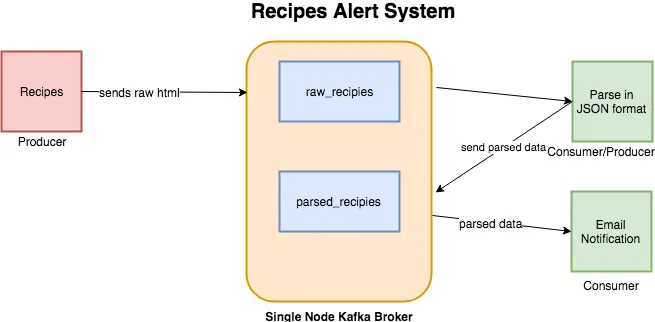
En el último artículo sobre Elasticsearch, extraje datos de Allrecipes. En este artículo, voy a usar el mismo scraper como fuente de datos. El sistema que vamos a construir es un sistema de alertas que enviará notificaciones sobre las recetas si cumplen con cierto umbral de calorías. Habrá dos *topics*:
|
||||
|
||||
- **raw_recipes**:— Almacenará el HTML en bruto de cada receta. La idea es usar este *topic* como la fuente principal de nuestros datos que luego pueden ser procesados y transformados según sea necesario.
|
||||
- **parsed_recipes**:— Como su nombre indica, este será el dato analizado de cada receta en formato JSON.
|
||||
|
||||
La longitud del nombre de un *topic* en Kafka no debe exceder los 249 caracteres.
|
||||
|
||||
Un flujo de trabajo típico se verá así:
|
||||
|
||||
|
||||
|
||||
|
||||
Instala `kafka-python` mediante `pip`.
|
||||
|
||||
```
|
||||
pip install kafka-python
|
||||
```
|
||||
|
||||
|
||||
## Productor de Recetas en Bruto
|
||||
|
||||
El primer programa que vamos a escribir es el *producer*. Accederá a Allrecipes.com y obtendrá el HTML en bruto y lo almacenará en el *topic* `raw_recipes`. Archivo [producer-raw-recipes.py](./producer-raw-recipes/producer-raw-recipies.py).
|
||||
|
||||
Este fragmento de código extraerá el marcado de cada receta y lo devolverá en formato `list`.
|
||||
|
||||
A continuación, debemos crear un objeto *producer*. Antes de proceder, haremos cambios en el archivo `config/server.properties`. Debemos establecer `advertised.listeners` en `PLAINTEXT://localhost:9092`, de lo contrario, podrías experimentar el siguiente error:
|
||||
|
||||
```
|
||||
Error encountered when producing to broker b'adnans-mbp':9092. Retrying.
|
||||
```
|
||||
|
||||
Ahora añadiremos dos métodos: `connect_kafka_producer()` que te dará una instancia del *producer* de Kafka y `publish_message()` que solo almacenará el HTML en bruto de recetas individuales.
|
||||
|
||||
El __main__ se verá así.
|
||||
|
||||
Si funciona bien, mostrará la siguiente salida:
|
||||
|
||||
```
|
||||
/anaconda3/anaconda/bin/python /Development/DataScience/Kafka/kafka-recipie-alert/producer-raw-recipies.py
|
||||
Accessing list
|
||||
Processing..https://www.allrecipes.com/recipe/20762/california-coleslaw/
|
||||
Processing..https://www.allrecipes.com/recipe/8584/holiday-chicken-salad/
|
||||
Processing..https://www.allrecipes.com/recipe/80867/cran-broccoli-salad/
|
||||
Message published successfully.
|
||||
Message published successfully.
|
||||
Message published successfully.Process finished with exit code 0
|
||||
```
|
||||
|
||||
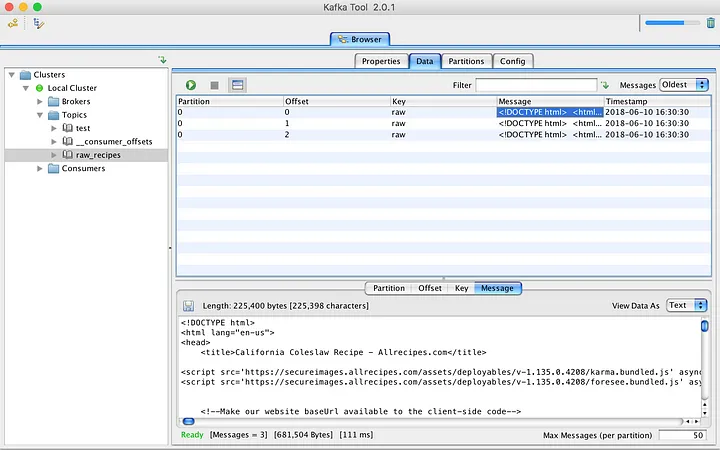
Estoy usando una herramienta GUI, llamada Kafka Tool, para navegar por los mensajes publicados recientemente. Está disponible para OSX, Windows y Linux.
|
||||
|
||||
|
||||
|
||||
|
||||
## Analizador de Recetas
|
||||
|
||||
Archivo [producer-consumer-parse-recipes.py](./producer-consumer-parse-recipes/producer-consumer-parse-recipes.py).
|
||||
|
||||
El siguiente script que vamos a escribir servirá como *consumer* y *producer*. Primero consumirá datos del *topic* `raw_recipes`, analizará y transformará los datos en JSON, y luego los publicará en el *topic* `parsed_recipes`. A continuación se muestra el código que obtendrá datos HTML del *topic* `raw_recipes`, los analizará y luego los alimentará al *topic* `parsed_recipes`.
|
||||
|
||||
`KafkaConsumer` acepta algunos parámetros además del nombre del *topic* y la dirección del host. Al proporcionar `auto_offset_reset='earliest'` le estás diciendo a Kafka que devuelva mensajes desde el principio. El parámetro `consumer_timeout_ms` ayuda al *consumer* a desconectarse después de cierto período de tiempo. Una vez desconectado, puedes cerrar el flujo del *consumer* llamando a `consumer.close()`.
|
||||
|
||||
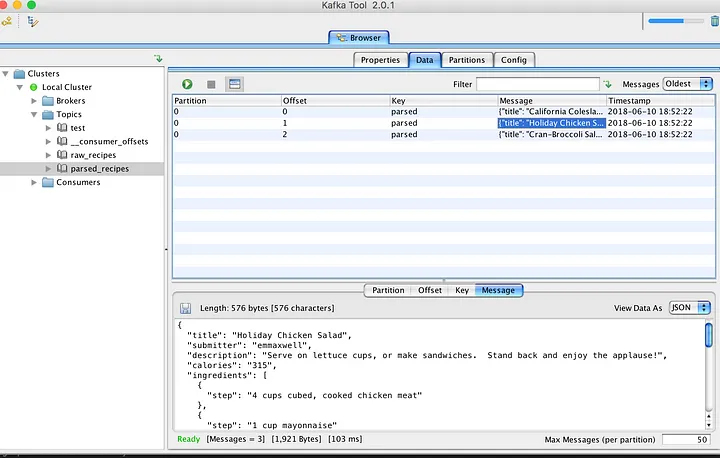
Después de esto, estoy utilizando las mismas rutinas para conectar *producers* y publicar datos analizados en el nuevo *topic*. El navegador KafkaTool da buenas noticias sobre los mensajes almacenados recientemente.
|
||||
|
||||
|
||||
|
||||
Hasta ahora, todo bien. Almacenamos las recetas en formato bruto y JSON para uso futuro. A continuación, tenemos que escribir un *consumer* que se conecte con el *topic* `parsed_recipes` y genere una alerta si se cumple cierto criterio de `calories`.
|
||||
|
||||
El JSON se decodifica y luego se verifica la cantidad de calorías, se emite una notificación una vez que se cumple el criterio.
|
||||
|
||||
|
||||
## Ya lo hemos probado en local, ¡ahora a dockerizarlo!
|
||||
|
||||
Ahora que hemos probado el sistema localmente, es hora de dockerizarlo para facilitar su despliegue y escalabilidad. Vamos a crear imágenes Docker para cada uno de los scripts de Python y configurar un entorno de Docker Compose para orquestar todo.
|
||||
|
||||
Esctrutura de directorios:
|
||||
|
||||
```
|
||||
.
|
||||
├── docker-compose.yml
|
||||
├── producer-raw-recipes/
|
||||
│ ├── Dockerfile
|
||||
│ └── producer-raw-recipes.py
|
||||
├── producer-consumer-parse-recipes/
|
||||
│ ├── Dockerfile
|
||||
│ └── producer_consumer_parse_recipes.py
|
||||
└── consumer-notification/
|
||||
├── Dockerfile
|
||||
└── consumer-notification.py
|
||||
```
|
||||
|
||||
Ficheros docker:
|
||||
- [docker-compose.yaml](./docker-compose.yml)
|
||||
- [Dockerfile producer-raw-recipes](./producer-raw-recipes/Dockerfile)
|
||||
- [Dockerfile producer-consumer-parse-recipes](./producer-consumer-parse-recipes/Dockerfile)
|
||||
- [Dockerfile consumer-notification](./consumer-notification/Dockerfile)
|
||||
|
||||
Los ficheros Dockerfile construye las imágenes Docker para cada uno de los scripts de Python.
|
||||
|
||||
El archivo Docker Compose configura los siguientes servicios y las aplicaciones que se ejecutarán:
|
||||
|
||||
- **Zookeeper**: Para coordinar el cluster de Kafka.
|
||||
- **Kafka**: El broker de Kafka.
|
||||
- **Kafdrop**: Una interfaz web para Kafka.
|
||||
- **producer-raw-recipes**: El productor que envía recetas en bruto.
|
||||
- **producer-consumer-parse-recipes**: El productor-consumidor que analiza las recetas y las envía a un nuevo topic.
|
||||
- **consumer-notification**: El consumidor que emite alertas sobre recetas con alto contenido calórico.
|
||||
|
||||
El docker-compose es muy completo con healthchecks, dependencias, volumenes, etc.
|
||||
|
||||
### Construir y Ejecutar los Contenedores
|
||||
|
||||
Para construir y ejecutar los contenedores, usa el siguiente comando en el directorio raíz del proyecto:
|
||||
|
||||
```bash
|
||||
docker-compose up --build
|
||||
```
|
||||
|
||||
Este comando construye las imágenes Docker y levanta los contenedores definidos en `docker-compose.yml`.
|
||||
|
||||
|
||||
### Verificación
|
||||
|
||||
Para verificar que todo está funcionando correctamente:
|
||||
|
||||
1. Asegúrate de que todos los contenedores están en ejecución usando `docker ps`.
|
||||
2. Revisa los logs de cada contenedor con `docker logs <container_name>` para asegurar que no haya errores. Con lazydocker puedes ver los logs de todos los contenedores rápidamente.
|
||||
3. Puedes usar herramientas GUI como Kafka Tool o `kafka-console-consumer.sh` y `kafka-console-producer.sh` para interactuar con los topics y los mensajes.
|
||||
4. Panel de control de Kafdrop en `http://localhost:9000`.
|
||||
|
||||
|
||||
## Conclusión
|
||||
|
||||
Kafka es un sistema de mensajería de publicación-suscripción escalable y tolerante a fallos que te permite construir aplicaciones distribuidas. Debido a su [alto rendimiento y eficiencia](http://searene.me/2017/07/09/Why-is-Kafka-so-fast/), se está volviendo popular entre las empresas que producen grandes cantidades de datos desde diversas fuentes externas y desean proporcionar resultados en tiempo real a partir de ellos. Solo he cubierto lo esencial. Explora los documentos y las implementaciones existentes, y te ayudará a entender cómo podría ser la mejor opción para tu próximo sistema.
|
||||
|
||||
---
|
||||
|
||||
@@ -0,0 +1,17 @@
|
||||
# Usa una imagen base de Python
|
||||
FROM python:3.9-slim
|
||||
|
||||
# Configura el directorio de trabajo
|
||||
WORKDIR /app
|
||||
|
||||
# Copia el archivo de requisitos al contenedor
|
||||
COPY requirements.txt /app/
|
||||
|
||||
# Instala las dependencias
|
||||
RUN pip install --no-cache-dir -r requirements.txt
|
||||
|
||||
# Copia el script de Python al contenedor
|
||||
COPY consumer-notification.py /app/
|
||||
|
||||
# Comando por defecto para ejecutar el script
|
||||
CMD ["python", "consumer-notification.py"]
|
||||
@@ -0,0 +1,66 @@
|
||||
import json
|
||||
import logging
|
||||
from time import sleep
|
||||
from kafka import KafkaConsumer
|
||||
|
||||
# Configuración del registro
|
||||
logging.basicConfig(
|
||||
level=logging.INFO,
|
||||
format='%(asctime)s - %(levelname)s - %(message)s'
|
||||
)
|
||||
|
||||
|
||||
def main():
|
||||
|
||||
# Nombre del tema de Kafka del que se consumen los mensajes
|
||||
parsed_topic_name = 'parsed_recipes'
|
||||
|
||||
# Umbral de calorías para la notificación
|
||||
calories_threshold = 200
|
||||
|
||||
# Crear un consumidor de Kafka
|
||||
consumer = KafkaConsumer(
|
||||
parsed_topic_name,
|
||||
auto_offset_reset='earliest', # Inicia desde el 1er mensaje si es nuevo
|
||||
bootstrap_servers=['kafka:9092'], # Servidor Kafka
|
||||
api_version=(0, 10), # Versión de la API de Kafka
|
||||
# Tiempo máx. de espera mensajes (milisegundos)
|
||||
consumer_timeout_ms=2000
|
||||
)
|
||||
|
||||
logging.info('[+] Iniciando el consumidor de notificaciones...')
|
||||
|
||||
try:
|
||||
|
||||
for msg in consumer:
|
||||
|
||||
# Decodificar el mensaje de JSON
|
||||
record = json.loads(msg.value)
|
||||
|
||||
# Obtener el valor de calorías
|
||||
calories = int(record.get('calories', 0))
|
||||
title = record.get('title', 'Sin título') # Obtener el título
|
||||
|
||||
# Verificar si las calorías exceden el umbral
|
||||
if calories > calories_threshold:
|
||||
logging.warning(
|
||||
f'[!] Alerta: {title} tiene {calories} calorías')
|
||||
|
||||
# Esperar 5 segundos antes de procesar el siguiente mensaje
|
||||
sleep(5)
|
||||
|
||||
except Exception as ex:
|
||||
|
||||
logging.error(
|
||||
'[!] Error en el consumidor de notificaciones', exc_info=True)
|
||||
|
||||
finally:
|
||||
|
||||
if consumer is not None:
|
||||
consumer.close() # Cerrar el consumidor al finalizar
|
||||
logging.info('[i] Consumidor cerrado.')
|
||||
|
||||
|
||||
if __name__ == '__main__':
|
||||
|
||||
main()
|
||||
@@ -0,0 +1 @@
|
||||
kafka-python
|
||||
153
catch-all/05_infra_test/03_kafka/docker-compose.yaml
Normal file
153
catch-all/05_infra_test/03_kafka/docker-compose.yaml
Normal file
@@ -0,0 +1,153 @@
|
||||
services:
|
||||
zookeeper:
|
||||
image: bitnami/zookeeper:latest
|
||||
container_name: zookeeper
|
||||
ports:
|
||||
- "2181:2181"
|
||||
volumes:
|
||||
- /etc/localtime:/etc/localtime:ro
|
||||
- /etc/timezone:/etc/timezone:ro
|
||||
- "zookeeper_data:/bitnami"
|
||||
environment:
|
||||
ALLOW_ANONYMOUS_LOGIN: "yes"
|
||||
networks:
|
||||
- kafka-network
|
||||
healthcheck:
|
||||
test: ["CMD-SHELL", "nc -z localhost 2181"]
|
||||
interval: 10s
|
||||
retries: 5
|
||||
start_period: 10s
|
||||
timeout: 5s
|
||||
|
||||
kafka:
|
||||
image: bitnami/kafka:latest
|
||||
container_name: kafka
|
||||
ports:
|
||||
- "9092:9092"
|
||||
volumes:
|
||||
- /etc/localtime:/etc/localtime:ro
|
||||
- /etc/timezone:/etc/timezone:ro
|
||||
- "kafka_data:/bitnami"
|
||||
environment:
|
||||
KAFKA_ADVERTISED_LISTENERS: INSIDE://kafka:9092,OUTSIDE://localhost:9093
|
||||
KAFKA_LISTENERS: INSIDE://0.0.0.0:9092,OUTSIDE://0.0.0.0:9093
|
||||
KAFKA_LISTENER_NAME: INSIDE
|
||||
KAFKA_LISTENER_SECURITY_PROTOCOL_MAP: INSIDE:PLAINTEXT,OUTSIDE:PLAINTEXT
|
||||
KAFKA_LISTENER_SECURITY_PROTOCOL: PLAINTEXT
|
||||
KAFKA_INTER_BROKER_LISTENER_NAME: INSIDE
|
||||
KAFKA_ZOOKEEPER_CONNECT: zookeeper:2181
|
||||
networks:
|
||||
- kafka-network
|
||||
depends_on:
|
||||
zookeeper:
|
||||
condition: service_healthy
|
||||
healthcheck:
|
||||
test: ["CMD-SHELL", "kafka-broker-api-versions.sh --bootstrap-server localhost:9092"]
|
||||
interval: 10s
|
||||
retries: 10
|
||||
start_period: 60s
|
||||
timeout: 10s
|
||||
|
||||
kafdrop:
|
||||
image: obsidiandynamics/kafdrop:latest
|
||||
container_name: kafdrop
|
||||
ports:
|
||||
- "9000:9000"
|
||||
environment:
|
||||
KAFKA_BROKERCONNECT: kafka:9092
|
||||
networks:
|
||||
- kafka-network
|
||||
volumes:
|
||||
- /etc/localtime:/etc/localtime:ro
|
||||
- /etc/timezone:/etc/timezone:ro
|
||||
depends_on:
|
||||
kafka:
|
||||
condition: service_healthy
|
||||
healthcheck:
|
||||
test: ["CMD-SHELL", "curl -f http://localhost:9000/ || exit 1"]
|
||||
interval: 10s
|
||||
retries: 5
|
||||
start_period: 10s
|
||||
timeout: 5s
|
||||
|
||||
producer_raw_recipes:
|
||||
container_name: producer-raw-recipes
|
||||
build:
|
||||
context: ./producer-raw-recipes
|
||||
networks:
|
||||
- kafka-network
|
||||
volumes:
|
||||
- /etc/localtime:/etc/localtime:ro
|
||||
- /etc/timezone:/etc/timezone:ro
|
||||
depends_on:
|
||||
kafdrop:
|
||||
condition: service_healthy
|
||||
kafka:
|
||||
condition: service_healthy
|
||||
zookeeper:
|
||||
condition: service_healthy
|
||||
healthcheck:
|
||||
test: ["CMD-SHELL", "bash -c 'echo > /dev/tcp/kafka/9092' || exit 1"]
|
||||
interval: 10s
|
||||
retries: 5
|
||||
start_period: 10s
|
||||
timeout: 5s
|
||||
|
||||
|
||||
producer_consumer_parse_recipes:
|
||||
container_name: producer-consumer-parse-recipes
|
||||
build:
|
||||
context: ./producer-consumer-parse-recipes
|
||||
networks:
|
||||
- kafka-network
|
||||
volumes:
|
||||
- /etc/localtime:/etc/localtime:ro
|
||||
- /etc/timezone:/etc/timezone:ro
|
||||
depends_on:
|
||||
kafdrop:
|
||||
condition: service_healthy
|
||||
kafka:
|
||||
condition: service_healthy
|
||||
zookeeper:
|
||||
condition: service_healthy
|
||||
producer_raw_recipes:
|
||||
condition: service_healthy
|
||||
healthcheck:
|
||||
test: ["CMD-SHELL", "bash -c 'echo > /dev/tcp/kafka/9092' || exit 1"]
|
||||
interval: 10s
|
||||
retries: 5
|
||||
start_period: 10s
|
||||
timeout: 5s
|
||||
|
||||
consumer_notification:
|
||||
container_name: consumer-notification
|
||||
build:
|
||||
context: ./consumer-notification
|
||||
networks:
|
||||
- kafka-network
|
||||
volumes:
|
||||
- /etc/localtime:/etc/localtime:ro
|
||||
- /etc/timezone:/etc/timezone:ro
|
||||
depends_on:
|
||||
kafdrop:
|
||||
condition: service_healthy
|
||||
kafka:
|
||||
condition: service_healthy
|
||||
zookeeper:
|
||||
condition: service_healthy
|
||||
healthcheck:
|
||||
test: ["CMD-SHELL", "bash -c 'echo > /dev/tcp/kafka/9092' || exit 1"]
|
||||
interval: 10s
|
||||
retries: 5
|
||||
start_period: 10s
|
||||
timeout: 5s
|
||||
|
||||
networks:
|
||||
kafka-network:
|
||||
driver: bridge
|
||||
|
||||
volumes:
|
||||
zookeeper_data:
|
||||
driver: local
|
||||
kafka_data:
|
||||
driver: local
|
||||
@@ -0,0 +1,17 @@
|
||||
# Usa una imagen base de Python
|
||||
FROM python:3.9-slim
|
||||
|
||||
# Configura el directorio de trabajo
|
||||
WORKDIR /app
|
||||
|
||||
# Copia el archivo de requisitos al contenedor
|
||||
COPY requirements.txt /app/
|
||||
|
||||
# Instala las dependencias
|
||||
RUN pip install --no-cache-dir -r requirements.txt
|
||||
|
||||
# Copia el script de Python al contenedor
|
||||
COPY producer-consumer-parse-recipes.py /app/
|
||||
|
||||
# Comando por defecto para ejecutar el script
|
||||
CMD ["python", "producer-consumer-parse-recipes.py"]
|
||||
@@ -0,0 +1,165 @@
|
||||
import json
|
||||
import logging
|
||||
from time import sleep
|
||||
from bs4 import BeautifulSoup
|
||||
from kafka import KafkaConsumer, KafkaProducer
|
||||
|
||||
# Configuración del registro
|
||||
logging.basicConfig(level=logging.INFO,
|
||||
format='%(asctime)s - %(levelname)s - %(message)s')
|
||||
|
||||
|
||||
def publish_message(producer_instance, topic_name, key, value):
|
||||
"""
|
||||
Publica un mensaje en el tema de Kafka especificado.
|
||||
"""
|
||||
|
||||
try:
|
||||
key_bytes = bytes(key, encoding='utf-8') # Convertir clave a bytes
|
||||
value_bytes = bytes(value, encoding='utf-8') # Convertir valor a bytes
|
||||
producer_instance.send( # Enviar mensaje
|
||||
topic_name, key=key_bytes,
|
||||
value=value_bytes
|
||||
)
|
||||
producer_instance.flush() # Asegurar que el mensaje ha sido enviado
|
||||
|
||||
logging.info('[i] Mensaje publicado con éxito.')
|
||||
|
||||
except Exception as ex:
|
||||
|
||||
logging.error('[!] Error al publicar mensaje', exc_info=True)
|
||||
|
||||
|
||||
def connect_kafka_producer():
|
||||
"""
|
||||
Conecta y devuelve una instancia del productor de Kafka.
|
||||
"""
|
||||
|
||||
try:
|
||||
producer = KafkaProducer(
|
||||
bootstrap_servers=['kafka:9092'], # Servidor Kafka
|
||||
api_version=(0, 10) # Versión de la API de Kafka
|
||||
)
|
||||
|
||||
logging.info('[i] Conectado con éxito al productor de Kafka.')
|
||||
|
||||
return producer
|
||||
|
||||
except Exception as ex:
|
||||
|
||||
logging.error('[!] Error al conectar con Kafka', exc_info=True)
|
||||
|
||||
return None
|
||||
|
||||
|
||||
def parse(markup):
|
||||
"""
|
||||
Analiza el HTML y extrae la información de la receta.
|
||||
"""
|
||||
|
||||
title = '-'
|
||||
submit_by = '-'
|
||||
description = '-'
|
||||
calories = 0
|
||||
ingredients = []
|
||||
rec = {}
|
||||
|
||||
try:
|
||||
soup = BeautifulSoup(markup, 'lxml') # Analizar HTML con BeautifulSoup
|
||||
|
||||
# Actualizar selectores CSS para el título, descripción, ingredientes y calorías
|
||||
title_section = soup.select_one('h1.headline.heading-content') # Título
|
||||
submitter_section = soup.select_one('span.author-name') # Autor
|
||||
description_section = soup.select_one('div.recipe-summary > p') # Descripción
|
||||
ingredients_section = soup.select('li.ingredients-item') # Ingredientes
|
||||
calories_section = soup.select_one('span.calorie-count') # Calorías
|
||||
|
||||
# Extraer calorías
|
||||
if calories_section:
|
||||
calories = calories_section.get_text(strip=True).replace('cals', '').strip()
|
||||
|
||||
# Extraer ingredientes
|
||||
if ingredients_section:
|
||||
for ingredient in ingredients_section:
|
||||
ingredient_text = ingredient.get_text(strip=True)
|
||||
if 'Add all ingredients to list' not in ingredient_text and ingredient_text != '':
|
||||
ingredients.append({'step': ingredient_text})
|
||||
|
||||
# Extraer descripción
|
||||
if description_section:
|
||||
description = description_section.get_text(strip=True)
|
||||
|
||||
# Extraer nombre del autor
|
||||
if submitter_section:
|
||||
submit_by = submitter_section.get_text(strip=True)
|
||||
|
||||
# Extraer título
|
||||
if title_section:
|
||||
title = title_section.get_text(strip=True)
|
||||
|
||||
# Crear diccionario con la información de la receta
|
||||
rec = {
|
||||
'title': title,
|
||||
'submitter': submit_by,
|
||||
'description': description,
|
||||
'calories': calories,
|
||||
'ingredients': ingredients
|
||||
}
|
||||
|
||||
logging.info(f"[i] Receta extraída: {rec}")
|
||||
|
||||
except Exception as ex:
|
||||
|
||||
logging.error('[!] Error en parsing', exc_info=True)
|
||||
|
||||
return json.dumps(rec)
|
||||
|
||||
|
||||
def main():
|
||||
"""
|
||||
Ejecuta el proceso de consumo y publicación de mensajes.
|
||||
"""
|
||||
|
||||
topic_name = 'raw_recipes'
|
||||
parsed_topic_name = 'parsed_recipes'
|
||||
parsed_records = []
|
||||
|
||||
# Crear un consumidor de Kafka
|
||||
consumer = KafkaConsumer(
|
||||
topic_name,
|
||||
auto_offset_reset='earliest',
|
||||
bootstrap_servers=['kafka:9092'],
|
||||
api_version=(0, 10),
|
||||
consumer_timeout_ms=2000
|
||||
)
|
||||
|
||||
logging.info('[i] Iniciando el consumidor para parsing...')
|
||||
|
||||
try:
|
||||
for msg in consumer:
|
||||
html = msg.value
|
||||
result = parse(html) # Analizar el HTML
|
||||
parsed_records.append(result)
|
||||
|
||||
consumer.close() # Cerrar el consumidor
|
||||
|
||||
logging.info('[i] Consumidor cerrado.')
|
||||
|
||||
if parsed_records:
|
||||
logging.info('[+] Publicando registros...')
|
||||
producer = connect_kafka_producer()
|
||||
|
||||
if producer:
|
||||
for rec in parsed_records:
|
||||
publish_message(producer, parsed_topic_name, 'parsed', rec)
|
||||
|
||||
producer.close() # Cerrar el productor
|
||||
else:
|
||||
logging.error('[!] El productor de Kafka no está disponible.')
|
||||
|
||||
except Exception as ex:
|
||||
logging.error('[!] Error en el productor-consumer', exc_info=True)
|
||||
|
||||
|
||||
if __name__ == '__main__':
|
||||
main()
|
||||
@@ -0,0 +1,3 @@
|
||||
kafka-python
|
||||
requests
|
||||
beautifulsoup4
|
||||
@@ -0,0 +1,17 @@
|
||||
# Usa una imagen base de Python
|
||||
FROM python:3.9-slim
|
||||
|
||||
# Configura el directorio de trabajo
|
||||
WORKDIR /app
|
||||
|
||||
# Copia el archivo de requisitos al contenedor
|
||||
COPY requirements.txt /app/
|
||||
|
||||
# Instala las dependencias
|
||||
RUN pip install --no-cache-dir -r requirements.txt
|
||||
|
||||
# Copia el script de Python al contenedor
|
||||
COPY producer-raw-recipes.py /app/
|
||||
|
||||
# Comando por defecto para ejecutar el script
|
||||
CMD ["python", "producer-raw-recipes.py"]
|
||||
@@ -0,0 +1,168 @@
|
||||
import requests
|
||||
from time import sleep
|
||||
import logging
|
||||
from bs4 import BeautifulSoup
|
||||
from kafka import KafkaProducer
|
||||
|
||||
|
||||
# Configuración del registro
|
||||
logging.basicConfig(level=logging.INFO,
|
||||
format='%(asctime)s - %(levelname)s - %(message)s')
|
||||
|
||||
|
||||
def publish_message(producer_instance, topic_name, key, value):
|
||||
"""
|
||||
Publica un mensaje en el tema de Kafka especificado.
|
||||
"""
|
||||
|
||||
try:
|
||||
|
||||
key_bytes = bytes(key, encoding='utf-8') # Convertir clave a bytes
|
||||
value_bytes = bytes(value, encoding='utf-8') # Convertir valor a bytes
|
||||
producer_instance.send( # Enviar mensaje
|
||||
topic_name, key=key_bytes, value=value_bytes
|
||||
)
|
||||
producer_instance.flush() # Asegurar que el mensaje ha sido enviado
|
||||
logging.info('[+] Mensaje publicado con éxito.')
|
||||
|
||||
except Exception as ex:
|
||||
|
||||
logging.error('[!] Error al publicar mensaje', exc_info=True)
|
||||
|
||||
|
||||
def connect_kafka_producer():
|
||||
"""
|
||||
Conecta y devuelve una instancia del productor de Kafka.
|
||||
"""
|
||||
|
||||
try:
|
||||
|
||||
producer = KafkaProducer(
|
||||
bootstrap_servers=['kafka:9092'], # Servidor Kafka
|
||||
api_version=(0, 10) # Versión de la API de Kafka
|
||||
)
|
||||
|
||||
logging.info('[i] Conectado con éxito al productor de Kafka.')
|
||||
|
||||
return producer
|
||||
|
||||
except Exception as ex:
|
||||
|
||||
logging.error('[!] Error al conectar con Kafka', exc_info=True)
|
||||
|
||||
return None
|
||||
|
||||
|
||||
def fetch_raw(recipe_url):
|
||||
"""
|
||||
Obtiene el HTML sin procesar de la URL de la receta.
|
||||
"""
|
||||
|
||||
html = None
|
||||
logging.info('[i] Procesando... {}'.format(recipe_url))
|
||||
|
||||
try:
|
||||
|
||||
r = requests.get(recipe_url, headers=headers)
|
||||
|
||||
if r.status_code == 200:
|
||||
html = r.text
|
||||
|
||||
except Exception as ex:
|
||||
|
||||
logging.error(
|
||||
'[!] Error al acceder al HTML sin procesar',
|
||||
exc_info=True
|
||||
)
|
||||
|
||||
return html.strip() if html else ''
|
||||
|
||||
|
||||
def get_recipes():
|
||||
"""
|
||||
Obtiene una lista de recetas de la URL de origen.
|
||||
"""
|
||||
|
||||
recipes = []
|
||||
url = 'https://www.allrecipes.com/recipes/96/salad/'
|
||||
|
||||
logging.info('[i] Accediendo a la lista de recetas...')
|
||||
|
||||
try:
|
||||
r = requests.get(url, headers=headers)
|
||||
logging.info('[i] Código de respuesta: {}'.format(r.status_code))
|
||||
|
||||
if r.status_code == 200:
|
||||
logging.info('[i] Página accesible, procesando...')
|
||||
|
||||
html = r.text
|
||||
soup = BeautifulSoup(html, 'lxml')
|
||||
|
||||
# Selecciona los elementos <a> con la clase mntl-card-list-items
|
||||
links = soup.select('a.mntl-card-list-items')
|
||||
|
||||
logging.info('[i] Se encontraron {} recetas'.format(len(links)))
|
||||
|
||||
for link in links:
|
||||
# Obtiene el título del texto de card__title-text
|
||||
recipe_title = link.select_one(
|
||||
'.card__title-text').get_text(strip=True)
|
||||
recipe_url = link['href']
|
||||
logging.info(
|
||||
f'[i] Procesando receta: {recipe_title}, enlace: {recipe_url}'
|
||||
)
|
||||
|
||||
sleep(2)
|
||||
recipe_html = fetch_raw(recipe_url)
|
||||
|
||||
if recipe_html:
|
||||
recipes.append(recipe_html)
|
||||
|
||||
logging.info(
|
||||
'[i] Se obtuvieron {} recetas en total.'.format(len(recipes)))
|
||||
|
||||
else:
|
||||
logging.error(
|
||||
'[!] No se pudo acceder a la página de recetas, código de respuesta: {}'.format(r.status_code))
|
||||
|
||||
except Exception as ex:
|
||||
logging.error('[!] Error en get_recipes', exc_info=True)
|
||||
|
||||
return recipes
|
||||
|
||||
|
||||
def main():
|
||||
"""
|
||||
Ejecuta el proceso de obtención y publicación de recetas.
|
||||
"""
|
||||
|
||||
global headers
|
||||
headers = {
|
||||
'User-Agent': 'Mozilla/5.0 (Macintosh; Intel Mac OS X 10_11_6) AppleWebKit/537.36 (KHTML, like Gecko) Chrome/66.0.3359.181 Safari/537.36',
|
||||
'Pragma': 'no-cache'
|
||||
}
|
||||
|
||||
logging.info('Iniciando el productor de recetas...')
|
||||
|
||||
all_recipes = get_recipes() # Obtener recetas
|
||||
|
||||
if all_recipes:
|
||||
|
||||
producer = connect_kafka_producer() # Conectar con Kafka
|
||||
|
||||
if producer:
|
||||
|
||||
for recipe in all_recipes:
|
||||
|
||||
publish_message(producer, 'raw_recipes', 'raw', recipe.strip())
|
||||
|
||||
producer.close() # Cerrar el productor
|
||||
|
||||
else:
|
||||
|
||||
logging.error('[!] El productor de Kafka no está disponible.')
|
||||
|
||||
|
||||
if __name__ == '__main__':
|
||||
|
||||
main()
|
||||
@@ -0,0 +1,4 @@
|
||||
kafka-python
|
||||
requests
|
||||
beautifulsoup4
|
||||
lxml
|
||||
191
catch-all/05_infra_test/04_elastic_stack/README.md
Normal file
191
catch-all/05_infra_test/04_elastic_stack/README.md
Normal file
@@ -0,0 +1,191 @@
|
||||
|
||||
# Cómo Usar Elasticsearch en Python con Docker
|
||||
|
||||
|
||||
|
||||
**Índice**
|
||||
- [Cómo Usar Elasticsearch en Python con Docker](#cómo-usar-elasticsearch-en-python-con-docker)
|
||||
- [¿Qué es Elasticsearch?](#qué-es-elasticsearch)
|
||||
- [Requisitos Previos](#requisitos-previos)
|
||||
- [Crear un Clúster Local del Elastic Stack con Docker Compose](#crear-un-clúster-local-del-elastic-stack-con-docker-compose)
|
||||
- [Desplegar el Elastic Stack](#desplegar-el-elastic-stack)
|
||||
- [Dockerizar el Programa Python](#dockerizar-el-programa-python)
|
||||
- [Programa Python](#programa-python)
|
||||
- [Conectar a Tu Clúster desde el Contenedor Python](#conectar-a-tu-clúster-desde-el-contenedor-python)
|
||||
- [Ejecutar los Scripts Python en Docker](#ejecutar-los-scripts-python-en-docker)
|
||||
- [Construir y Ejecutar el Contenedor Python](#construir-y-ejecutar-el-contenedor-python)
|
||||
- [Visualización de Datos con Kibana](#visualización-de-datos-con-kibana)
|
||||
- [Usar Logstash para Ingestión de Datos](#usar-logstash-para-ingestión-de-datos)
|
||||
- [Recopilar Métricas con Metricbeat](#recopilar-métricas-con-metricbeat)
|
||||
- [Eliminar Documentos del Índice](#eliminar-documentos-del-índice)
|
||||
- [Eliminar un Índice](#eliminar-un-índice)
|
||||
- [Conclusión](#conclusión)
|
||||
|
||||
[Elasticsearch](https://www.elastic.co/elasticsearch/) (ES) es una tecnología utilizada por muchas empresas, incluyendo GitHub, Uber y Facebook. Aunque no se enseña con frecuencia en cursos de Ciencia de Datos, es probable que te encuentres con ella en tu carrera profesional.
|
||||
|
||||
Muchos científicos de datos enfrentan dificultades al configurar un entorno local o al intentar interactuar con Elasticsearch en Python. Además, no hay muchos recursos actualizados disponibles.
|
||||
|
||||
Por eso, decidí crear este tutorial. Te enseñará lo básico y podrás configurar un clúster de Elasticsearch en tu máquina para el desarrollo local rápidamente. También aprenderás a crear un índice, almacenar datos en él y usarlo para buscar información.
|
||||
|
||||
¡Vamos a empezar!
|
||||
|
||||
|
||||
## ¿Qué es Elasticsearch?
|
||||
|
||||
Elasticsearch es un motor de búsqueda distribuido, rápido y fácil de escalar, capaz de manejar datos textuales, numéricos, geoespaciales, estructurados y no estructurados. Es un motor de búsqueda popular para aplicaciones, sitios web y análisis de registros. También es un componente clave del Elastic Stack (también conocido como ELK Stack), que incluye Logstash y Kibana, junto con Beats para la recolección de datos.
|
||||
|
||||
Para entender el funcionamiento interno de Elasticsearch, piensa en él como dos procesos distintos. Uno es la ingestión, que normaliza y enriquece los datos brutos antes de indexarlos usando un [índice invertido](https://www.elastic.co/guide/en/elasticsearch/reference/current/documents-indices.html). El segundo es la recuperación, que permite a los usuarios recuperar datos escribiendo consultas que se ejecutan contra el índice.
|
||||
|
||||
Eso es todo lo que necesitas saber por ahora. A continuación, prepararás tu entorno local para ejecutar un clúster del Elastic Stack.
|
||||
|
||||
## Requisitos Previos
|
||||
|
||||
Debes configurar algunas cosas antes de comenzar. Asegúrate de tener lo siguiente listo:
|
||||
|
||||
1. Instala Docker y Docker Compose.
|
||||
2. Descarga los datos necesarios.
|
||||
|
||||
## Crear un Clúster Local del Elastic Stack con Docker Compose
|
||||
|
||||
Para desplegar el Elastic Stack (Elasticsearch, Kibana, Logstash y Beats) en tu máquina local, utilizaremos Docker Compose. Este enfoque simplifica el despliegue y la administración de múltiples servicios.
|
||||
|
||||
Mediante el fichero [docker-compose.yaml](docker-compose.yaml) vamos a configurar los servicios para Elasticsearch, Kibana, Logstash, Metricbeat, y la aplicación Python, todos conectados a una red llamada `elastic`.
|
||||
|
||||
|
||||
### Desplegar el Elastic Stack
|
||||
|
||||
Para iniciar los servicios, abre una terminal en el directorio donde se encuentra `docker-compose.yml` y ejecuta el siguiente comando:
|
||||
|
||||
```bash
|
||||
docker compose up -d
|
||||
```
|
||||
|
||||
Este comando iniciará Elasticsearch, Kibana, Logstash, Metricbeat y la aplicación Python en contenedores separados. Aquí tienes un desglose de los servicios:
|
||||
|
||||
- **Elasticsearch**: El motor de búsqueda que almacena y analiza los datos.
|
||||
- **Kibana**: Una interfaz de usuario para visualizar y explorar datos en Elasticsearch.
|
||||
- **Logstash**: Una herramienta de procesamiento de datos que ingiere datos desde múltiples fuentes, los transforma y los envía a un destino como Elasticsearch.
|
||||
- **Metricbeat**: Un agente de monitoreo que recopila métricas del sistema y las envía a Elasticsearch.
|
||||
- **Python App**: Un contenedor que ejecutará tus scripts de Python para interactuar con Elasticsearch. (Hasta que no construyamos el contenedor, este servicio fallará).
|
||||
|
||||
|
||||
## Dockerizar el Programa Python
|
||||
|
||||
Para dockerizar la aplicación Python, utilizaremos el archivo [Dockerfile](./app/Dockerfile) del directorio `app`. El directorio `app` también debe contener el programa Python y un archivo [requirements.txt](./app/requirements.txt) para manejar las dependencias.
|
||||
|
||||
### Programa Python
|
||||
|
||||
El archivo [main.py](./app/main.py) en el directorio `app` manejará la conexión a Elasticsearch, la creación de índices y la carga de datos.
|
||||
|
||||
Este programa realiza las siguientes acciones:
|
||||
|
||||
1. **Crea un índice** en Elasticsearch con las configuraciones de mapeo necesarias.
|
||||
2. **Carga datos** desde un archivo CSV (`wiki_movie_plots_deduped.csv`) al índice creado.
|
||||
|
||||
|
||||
## Conectar a Tu Clúster desde el Contenedor Python
|
||||
|
||||
Tu aplicación Python se conectará al clúster de Elasticsearch usando el hostname `elasticsearch`, que es el nombre del servicio definido en `docker-compose.yml`.
|
||||
|
||||
|
||||
## Ejecutar los Scripts Python en Docker
|
||||
|
||||
Una vez que hayas creado los archivos `Dockerfile`, `requirements.txt` y `main.py`, puedes construir la imagen de Docker para tu aplicación Python y ejecutarla usando Docker Compose.
|
||||
|
||||
|
||||
### Construir y Ejecutar el Contenedor Python
|
||||
|
||||
1. Construye la imagen de Docker para tu aplicación Python:
|
||||
|
||||
```bash
|
||||
docker compose build python-app
|
||||
```
|
||||
|
||||
2. Ejecuta el contenedor:
|
||||
|
||||
```bash
|
||||
docker compose up python-app
|
||||
```
|
||||
|
||||
La aplicación Python se ejecutará y cargará los datos en Elasticsearch. Puedes verificar que los datos se hayan indexado correctamente ejecutando una consulta en Elasticsearch o usando Kibana para explorar los datos:
|
||||
|
||||
```python
|
||||
es.search(index="movies", body={"query": {"match_all": {}}})
|
||||
```
|
||||
|
||||
|
||||
## Visualización de Datos con Kibana
|
||||
|
||||
Kibana es una herramienta de visualización que se conecta a Elasticsearch y te permite explorar y visualizar tus datos.
|
||||
|
||||
Para acceder a Kibana, abre un navegador web y navega a `http://localhost:5601`. Deberías ver la interfaz de Kibana, donde puedes crear visualizaciones y dashboards.
|
||||
|
||||
1. **Crea un índice en Kibana**: Ve a *Management > Index Patterns* y crea un nuevo patrón de índice para el índice `movies`.
|
||||
2. **Explora tus datos**: Usa la herramienta *Discover* para buscar y explorar los datos que has indexado.
|
||||
3. **Crea visualizaciones**: En la sección *Visualize*, crea gráficos y tablas que te permitan entender mejor tus datos.
|
||||
|
||||
|
||||
## Usar Logstash para Ingestión de Datos
|
||||
|
||||
Logstash es una herramienta para procesar y transformar datos antes de enviarlos a Elasticsearch. Aquí tienes un ejemplo básico de cómo configurar Logstash para que procese y envíe datos a Elasticsearch.
|
||||
|
||||
Mediante el archivo de configuración en la carpeta `logstash-config/` llamado [pipeline.conf](./logstash-config/pipeline.conf) realizaremos los siguientes pasos:
|
||||
|
||||
- Lee un archivo CSV de entrada.
|
||||
- Usa el filtro `csv` para descomponer cada línea en campos separados.
|
||||
- Usa `mutate` para convertir el año de lanzamiento en un número entero.
|
||||
- Envía los datos procesados a Elasticsearch.
|
||||
|
||||
Para usar Logstash con esta configuración, asegúrate de que el archivo `wiki_movie_plots_deduped.csv` esté accesible en tu sistema y modifica la ruta en el archivo de configuración según sea necesario. Luego, reinicia el contenedor de Logstash para aplicar los cambios.
|
||||
|
||||
```bash
|
||||
docker compose restart logstash
|
||||
```
|
||||
|
||||
|
||||
## Recopilar Métricas con Metricbeat
|
||||
|
||||
Metricbeat es un agente ligero que recopila métricas del sistema y las envía a Elasticsearch. Está configurado en el archivo `docker-compose.yml` que has creado anteriormente.
|
||||
|
||||
Para ver las métricas en Kibana:
|
||||
|
||||
1. **Configura Metricbeat**: Edita el archivo de configuración de Metricbeat si necesitas recopilar métricas específicas.
|
||||
2. **Importa dashboards preconfigurados**: En Kibana, navega a *Add Data > Metricbeat* y sigue las instrucciones para importar los dashboards preconfigurados.
|
||||
3. **Explora las métricas**: Usa los dashboards importados para explorar las métricas de tu sistema.
|
||||
|
||||
|
||||
## Eliminar Documentos del Índice
|
||||
|
||||
Puedes usar el siguiente código para eliminar documentos del índice:
|
||||
|
||||
```python
|
||||
es.delete(index="movies", id="2500")
|
||||
```
|
||||
|
||||
El código anterior eliminará el documento con ID 2500 del índice `movies`.
|
||||
|
||||
|
||||
## Eliminar un Índice
|
||||
|
||||
Finalmente, si por alguna razón deseas eliminar un índice (y todos sus documentos), aquí te mostramos cómo hacerlo:
|
||||
|
||||
```python
|
||||
es.indices.delete(index='movies')
|
||||
```
|
||||
|
||||
|
||||
## Conclusión
|
||||
|
||||
Este tutorial te enseñó los conceptos básicos de Elasticsearch y cómo usarlo junto con el Elastic Stack y Docker. Esto será útil en tu carrera, ya que seguramente te encontrarás con Elasticsearch en algún momento.
|
||||
|
||||
En este tutorial, has aprendido:
|
||||
|
||||
- Cómo configurar un clúster del Elastic Stack en tu máquina usando Docker Compose.
|
||||
- Cómo dockerizar una aplicación Python para interactuar con Elasticsearch.
|
||||
- Cómo crear un índice y almacenar datos en él.
|
||||
- Cómo buscar tus datos usando Elasticsearch.
|
||||
- Cómo visualizar datos con Kibana.
|
||||
- Cómo procesar datos con Logstash.
|
||||
- Cómo recopilar métricas con Metricbeat.
|
||||
|
||||
Explora más funcionalidades de Elasticsearch y el Elastic Stack para sacar el máximo provecho de tus datos.
|
||||
15
catch-all/05_infra_test/04_elastic_stack/app/Dockerfile
Normal file
15
catch-all/05_infra_test/04_elastic_stack/app/Dockerfile
Normal file
@@ -0,0 +1,15 @@
|
||||
# Usa la imagen base de Python
|
||||
FROM python:3.9-slim
|
||||
|
||||
# Establece el directorio de trabajo
|
||||
WORKDIR /app
|
||||
|
||||
# Copia el archivo requirements.txt e instala las dependencias
|
||||
COPY requirements.txt /app/
|
||||
RUN pip install --no-cache-dir -r requirements.txt
|
||||
|
||||
# Copia el código fuente a /app
|
||||
COPY . /app/
|
||||
|
||||
# Comando para ejecutar la aplicación
|
||||
CMD ["python", "main.py"]
|
||||
114
catch-all/05_infra_test/04_elastic_stack/app/main.py
Normal file
114
catch-all/05_infra_test/04_elastic_stack/app/main.py
Normal file
@@ -0,0 +1,114 @@
|
||||
import pandas as pd
|
||||
from elasticsearch import Elasticsearch
|
||||
from elasticsearch.helpers import bulk
|
||||
|
||||
# Configura la conexión a Elasticsearch
|
||||
es = Elasticsearch("http://elasticsearch:9200")
|
||||
|
||||
|
||||
def create_index():
|
||||
"""
|
||||
Crea un índice en Elasticsearch con el nombre 'movies' si no existe.
|
||||
Define el mapeo del índice para los campos de los documentos.
|
||||
"""
|
||||
|
||||
# Define el mapeo del índice 'movies'
|
||||
mappings = {
|
||||
"properties": {
|
||||
# Campo para el título de la película
|
||||
"title": {"type": "text", "analyzer": "english"},
|
||||
# Campo para la etnicidad
|
||||
"ethnicity": {"type": "text", "analyzer": "standard"},
|
||||
# Campo para el director
|
||||
"director": {"type": "text", "analyzer": "standard"},
|
||||
# Campo para el elenco
|
||||
"cast": {"type": "text", "analyzer": "standard"},
|
||||
# Campo para el género
|
||||
"genre": {"type": "text", "analyzer": "standard"},
|
||||
# Campo para el argumento de la película
|
||||
"plot": {"type": "text", "analyzer": "english"},
|
||||
# Campo para el año de lanzamiento
|
||||
"year": {"type": "integer"},
|
||||
# Campo para la página de Wikipedia
|
||||
"wiki_page": {"type": "keyword"}
|
||||
}
|
||||
}
|
||||
|
||||
# Verifica si el índice 'movies' ya existe
|
||||
if not es.indices.exists(index="movies"):
|
||||
|
||||
# Crea el índice 'movies' si no existe
|
||||
es.indices.create(index="movies", mappings=mappings)
|
||||
print("\n[+] Índice 'movies' creado.")
|
||||
|
||||
else:
|
||||
|
||||
print("\n[!] El índice 'movies' ya existe.")
|
||||
|
||||
|
||||
def load_data():
|
||||
"""
|
||||
Carga datos desde un archivo CSV a Elasticsearch.
|
||||
"""
|
||||
|
||||
try:
|
||||
|
||||
# Lee el archivo CSV
|
||||
df = pd.read_csv("/app/wiki_movie_plots_deduped.csv", quoting=1)
|
||||
|
||||
# Verifica el número de filas en el DataFrame
|
||||
num_rows = len(df)
|
||||
sample_size = min(5000, num_rows)
|
||||
|
||||
# Elimina filas con valores nulos y toma una muestra
|
||||
df = df.dropna().sample(sample_size, random_state=42).reset_index(drop=True)
|
||||
|
||||
except Exception as e:
|
||||
|
||||
print(f"\n[!] Error al leer el archivo CSV: {e}")
|
||||
|
||||
return
|
||||
|
||||
# Prepara los datos para la carga en Elasticsearch
|
||||
bulk_data = [
|
||||
{
|
||||
"_index": "movies", # Nombre del índice en Elasticsearch
|
||||
"_id": i, # ID del documento en Elasticsearch
|
||||
"_source": {
|
||||
"title": row["Title"], # Título de la película
|
||||
"ethnicity": row["Origin/Ethnicity"], # Etnicidad
|
||||
"director": row["Director"], # Director
|
||||
"cast": row["Cast"], # Elenco
|
||||
"genre": row["Genre"], # Género
|
||||
"plot": row["Plot"], # Argumento
|
||||
"year": row["Release Year"], # Año de lanzamiento
|
||||
"wiki_page": row["Wiki Page"], # Página de Wikipedia
|
||||
}
|
||||
}
|
||||
for i, row in df.iterrows() # Itera sobre cada fila del DataFrame
|
||||
]
|
||||
|
||||
try:
|
||||
|
||||
# Carga los datos en Elasticsearch en bloques
|
||||
bulk(es, bulk_data)
|
||||
print("\n[+] Datos cargados en Elasticsearch.")
|
||||
|
||||
except Exception as e:
|
||||
|
||||
print(f"\n[!] Error al cargar datos en Elasticsearch: {e}")
|
||||
|
||||
|
||||
def main():
|
||||
"""
|
||||
Función principal que crea el índice y carga los datos.
|
||||
"""
|
||||
|
||||
create_index() # Crea el índice en Elasticsearch
|
||||
load_data() # Carga los datos en Elasticsearch
|
||||
|
||||
|
||||
if __name__ == "__main__":
|
||||
# Ejecuta la función principal si el script se ejecuta directamente
|
||||
|
||||
main()
|
||||
@@ -0,0 +1,3 @@
|
||||
pandas==2.0.1
|
||||
numpy==1.24.2
|
||||
elasticsearch==8.8.0
|
||||
@@ -0,0 +1,7 @@
|
||||
Title,Origin/Ethnicity,Director,Cast,Genre,Plot,Release Year,Wiki Page
|
||||
The Shawshank Redemption,American,Frank Darabont,"Tim Robbins, Morgan Freeman",Drama,"Two imprisoned men bond over a number of years, finding solace and eventual redemption through acts of common decency.",1994,https://en.wikipedia.org/wiki/The_Shawshank_Redemption
|
||||
The Godfather,American,Francis Ford Coppola,"Marlon Brando, Al Pacino",Crime,"The aging patriarch of an organized crime dynasty transfers control of his clandestine empire to his reluctant son.",1972,https://en.wikipedia.org/wiki/The_Godfather
|
||||
The Dark Knight,American,Christopher Nolan,"Christian Bale, Heath Ledger",Action,"When the menace known as the Joker emerges from his mysterious past, he wreaks havoc and chaos on the people of Gotham.",2008,https://en.wikipedia.org/wiki/The_Dark_Knight
|
||||
Pulp Fiction,American,Quentin Tarantino,"John Travolta, Uma Thurman",Crime,"The lives of two mob hitmen, a boxer, a gangster's wife, and a pair of diner bandits intertwine in four tales of violence and redemption.",1994,https://en.wikipedia.org/wiki/Pulp_Fiction
|
||||
The Lord of the Rings: The Return of the King,American,Peter Jackson,"Elijah Wood, Viggo Mortensen",Fantasy,"The final battle for Middle-earth begins. The forces of good and evil are drawn into a confrontation and the outcome will determine the fate of the world.",2003,https://en.wikipedia.org/wiki/The_Lord_of_the_Rings:_The_Return_of_the_King
|
||||
Inception,American,Christopher Nolan,"Leonardo DiCaprio, Joseph Gordon-Levitt",Sci-Fi,"A thief who enters the dreams of others to steal secrets from their subconscious is given the inverse task of planting an idea into the mind of a CEO.",2010,https://en.wikipedia.org/wiki/Inception
|
||||
|
72
catch-all/05_infra_test/04_elastic_stack/docker-compose.yaml
Normal file
72
catch-all/05_infra_test/04_elastic_stack/docker-compose.yaml
Normal file
@@ -0,0 +1,72 @@
|
||||
version: '3.8'
|
||||
|
||||
services:
|
||||
elasticsearch:
|
||||
image: docker.elastic.co/elasticsearch/elasticsearch:7.15.2
|
||||
container_name: elasticsearch
|
||||
environment:
|
||||
- discovery.type=single-node
|
||||
- xpack.security.enabled=false
|
||||
ports:
|
||||
- "9200:9200"
|
||||
networks:
|
||||
- elastic
|
||||
volumes:
|
||||
- /etc/localtime:/etc/localtime:ro
|
||||
- /etc/timezone:/etc/timezone:ro
|
||||
|
||||
kibana:
|
||||
image: docker.elastic.co/kibana/kibana:7.15.2
|
||||
container_name: kibana
|
||||
environment:
|
||||
ELASTICSEARCH_HOSTS: http://elasticsearch:9200
|
||||
ports:
|
||||
- "5601:5601"
|
||||
networks:
|
||||
- elastic
|
||||
volumes:
|
||||
- /etc/localtime:/etc/localtime:ro
|
||||
- /etc/timezone:/etc/timezone:ro
|
||||
|
||||
logstash:
|
||||
image: docker.elastic.co/logstash/logstash:7.15.2
|
||||
container_name: logstash
|
||||
volumes:
|
||||
- /etc/localtime:/etc/localtime:ro
|
||||
- /etc/timezone:/etc/timezone:ro
|
||||
- ./logstash-config/:/usr/share/logstash/pipeline/
|
||||
environment:
|
||||
LS_JAVA_OPTS: "-Xmx256m -Xms256m"
|
||||
ports:
|
||||
- "5000:5000"
|
||||
- "9600:9600"
|
||||
networks:
|
||||
- elastic
|
||||
|
||||
metricbeat:
|
||||
image: docker.elastic.co/beats/metricbeat:7.15.2
|
||||
container_name: metricbeat
|
||||
command: metricbeat -e -E output.elasticsearch.hosts=["http://elasticsearch:9200"]
|
||||
depends_on:
|
||||
- elasticsearch
|
||||
networks:
|
||||
- elastic
|
||||
volumes:
|
||||
- /etc/localtime:/etc/localtime:ro
|
||||
- /etc/timezone:/etc/timezone:ro
|
||||
|
||||
python-app:
|
||||
build:
|
||||
context: ./app
|
||||
dockerfile: Dockerfile
|
||||
container_name: python-app
|
||||
volumes:
|
||||
- /etc/localtime:/etc/localtime:ro
|
||||
- /etc/timezone:/etc/timezone:ro
|
||||
- ./app:/app
|
||||
networks:
|
||||
- elastic
|
||||
|
||||
networks:
|
||||
elastic:
|
||||
driver: bridge
|
||||
@@ -0,0 +1,26 @@
|
||||
input {
|
||||
file {
|
||||
path => "/path/to/your/data/wiki_movie_plots_deduped.csv"
|
||||
start_position => "beginning"
|
||||
sincedb_path => "/dev/null"
|
||||
}
|
||||
}
|
||||
|
||||
filter {
|
||||
csv {
|
||||
separator => ","
|
||||
columns => ["Release Year", "Title", "Origin/Ethnicity", "Director", "Cast", "Genre", "Wiki Page", "Plot"]
|
||||
}
|
||||
|
||||
mutate {
|
||||
convert => { "Release Year" => "integer" }
|
||||
}
|
||||
}
|
||||
|
||||
output {
|
||||
elasticsearch {
|
||||
hosts => ["http://elasticsearch:9200"]
|
||||
index => "movies"
|
||||
}
|
||||
stdout { codec => rubydebug }
|
||||
}
|
||||
19
catch-all/05_infra_test/05_prometheus_grafana/Dockerfile
Normal file
19
catch-all/05_infra_test/05_prometheus_grafana/Dockerfile
Normal file
@@ -0,0 +1,19 @@
|
||||
# Usar imagen de python 3.9 slim
|
||||
FROM python:3.9-slim
|
||||
|
||||
# Establece el directorio de trabajo
|
||||
WORKDIR /app
|
||||
|
||||
# Copia el archivo requirements.txt e instala las dependencias
|
||||
COPY requirements.txt .
|
||||
RUN pip install --no-cache-dir -r requirements.txt
|
||||
|
||||
# Copia el código fuente a /app
|
||||
COPY app app
|
||||
|
||||
# Variables de entorno
|
||||
ENV PYTHONUNBUFFERED 1
|
||||
ENV PYTHONPATH=/app
|
||||
|
||||
# Comando para ejecutar la aplicación
|
||||
CMD ["python", "app/main.py"]
|
||||
251
catch-all/05_infra_test/05_prometheus_grafana/README.md
Normal file
251
catch-all/05_infra_test/05_prometheus_grafana/README.md
Normal file
@@ -0,0 +1,251 @@
|
||||
|
||||
# Configuración de Grafana con Prometheus para proyectos Python usando Docker
|
||||
|
||||
En este artículo, cubriremos cómo configurar el monitoreo de servicios para proyectos Python con Prometheus y Grafana utilizando contenedores Docker.
|
||||
|
||||
El monitoreo de servicios nos permite analizar eventos específicos en nuestros proyectos, tales como llamadas a bases de datos, interacción con API, seguimiento del rendimiento de recursos, etc. Puedes detectar fácilmente comportamientos inusuales o descubrir pistas útiles detrás de los problemas.
|
||||
|
||||
## Escenario de Caso Real
|
||||
|
||||
Teníamos un servicio temporal que redirigía las solicitudes entrantes de sitios web específicos hasta que Google dejara de indexar estas páginas web. Utilizando el monitoreo de servicios, podemos ver fácilmente el conteo de redirecciones de forma regular. En un momento determinado en el futuro, el número de redirecciones disminuirá, lo que significa que el tráfico se ha migrado al sitio web objetivo, y ya no necesitaremos que este servicio esté en funcionamiento.
|
||||
|
||||
## Configuración de contenedores Docker
|
||||
|
||||
Vamos a ejecutar todos nuestros servicios localmente en contenedores Docker. En las grandes empresas, existe un servicio global para Prometheus y Grafana que incluye todos los proyectos de monitoreo de microservicios. Probablemente ni siquiera necesites escribir ningún pipeline de despliegue para las herramientas de monitoreo de servicios.
|
||||
|
||||
### Archivo docker-compose.yml
|
||||
|
||||
Comencemos creando un archivo `docker-compose.yml` con los servicios necesarios:
|
||||
|
||||
```yaml
|
||||
services:
|
||||
prometheus:
|
||||
image: prom/prometheus:latest
|
||||
container_name: prometheus
|
||||
ports:
|
||||
- "9090:9090"
|
||||
volumes:
|
||||
- ${PWD}/prometheus.yml:/etc/prometheus/prometheus.yml
|
||||
restart: unless-stopped
|
||||
networks:
|
||||
- monitoring-net
|
||||
healthcheck:
|
||||
test: ["CMD", "wget", "--spider", "http://localhost:9090/-/healthy"]
|
||||
interval: 1m30s
|
||||
timeout: 30s
|
||||
retries: 3
|
||||
start_period: 30s
|
||||
|
||||
grafana:
|
||||
hostname: grafana
|
||||
image: grafana/grafana:latest
|
||||
container_name: grafana
|
||||
ports:
|
||||
- 3001:3000
|
||||
restart: unless-stopped
|
||||
networks:
|
||||
- monitoring-net
|
||||
healthcheck:
|
||||
test: ["CMD", "wget", "--spider", "http://localhost:3000/api/health"]
|
||||
interval: 1m30s
|
||||
timeout: 30s
|
||||
retries: 3
|
||||
start_period: 30s
|
||||
|
||||
app:
|
||||
build:
|
||||
context: .
|
||||
dockerfile: Dockerfile
|
||||
depends_on:
|
||||
- prometheus
|
||||
ports:
|
||||
- "8080:8080"
|
||||
networks:
|
||||
- monitoring-net
|
||||
command: ["python3", "app/main.py"]
|
||||
|
||||
networks:
|
||||
monitoring-net:
|
||||
driver: bridge
|
||||
```
|
||||
|
||||
El punto más importante de la configuración anterior es montar el archivo `prometheus.yml` desde nuestra máquina local al contenedor Docker. Este archivo incluye la configuración para obtener datos (métricas) de nuestro servicio de aplicación o proyecto Python. Sin el archivo, no podrás ver las métricas personalizadas que incluye tu proyecto.
|
||||
|
||||
Por lo tanto, crea un nuevo archivo llamado `prometheus.yml` en el nivel raíz de tu proyecto.
|
||||
|
||||
### Archivo prometheus.yml
|
||||
|
||||
```yaml
|
||||
global:
|
||||
scrape_interval: 15s
|
||||
|
||||
scrape_configs:
|
||||
- job_name: 'app'
|
||||
static_configs:
|
||||
- targets: ['app:8080']
|
||||
```
|
||||
|
||||
Ahora, Prometheus obtendrá datos de nuestro proyecto.
|
||||
|
||||
Todas las demás configuraciones en el archivo de composición son autoexplicativas y no son muy críticas, como mencionamos para Prometheus.
|
||||
|
||||
## Crear un nuevo proyecto Python
|
||||
|
||||
Ahora, vamos a crear una aplicación Python muy sencilla que creará una métrica para rastrear el tiempo empleado y las solicitudes realizadas. Crea una nueva carpeta llamada `app` en el nivel raíz del proyecto. También incluye `__init__.py` para marcarla como un paquete Python.
|
||||
|
||||
A continuación, crea otro archivo llamado `main.py` que contendrá la lógica principal del programa, como se muestra a continuación:
|
||||
|
||||
### Archivo app/main.py
|
||||
|
||||
```python
|
||||
from prometheus_client import start_http_server, Summary, Counter, Gauge, Histogram
|
||||
import random
|
||||
import time
|
||||
|
||||
# Create metrics to track time spent, requests made, and other events.
|
||||
REQUEST_TIME = Summary('request_processing_seconds', 'Time spent processing request')
|
||||
UPDATE_COUNT = Counter('update_count', 'Number of updates')
|
||||
ACTIVE_REQUESTS = Gauge('active_requests', 'Number of active requests')
|
||||
REQUEST_LATENCY = Histogram('request_latency_seconds', 'Request latency in seconds')
|
||||
|
||||
# Decorate function with metrics.
|
||||
@REQUEST_TIME.time()
|
||||
@REQUEST_LATENCY.time()
|
||||
def process_request(t):
|
||||
"""A dummy function that takes some time."""
|
||||
ACTIVE_REQUESTS.inc()
|
||||
time.sleep(t)
|
||||
ACTIVE_REQUESTS.dec()
|
||||
|
||||
def main():
|
||||
# Start up the server to expose the metrics.
|
||||
start_http_server(8000)
|
||||
print("[*] Starting server on port 8000...")
|
||||
|
||||
# Generate some requests.
|
||||
while True:
|
||||
msg = random.random()
|
||||
process_request(msg)
|
||||
update_increment = random.randint(1, 100)
|
||||
UPDATE_COUNT.inc(update_increment)
|
||||
print(f'[+] Processing request: {msg:.4f} | Updates: {update_increment}')
|
||||
time.sleep(random.uniform(0.5, 2.0)) # Random delay between requests
|
||||
|
||||
if __name__ == '__main__':
|
||||
main()
|
||||
```
|
||||
|
||||
Aquí, estamos utilizando un paquete de Python llamado `prometheus_client` para interactuar con Prometheus. Permite fácilmente la creación de diferentes tipos de métricas que nuestro proyecto requiere.
|
||||
|
||||
El código anterior se copió de la documentación oficial de `prometheus_client`, que simplemente crea una nueva métrica llamada `request_processing_seconds` que mide el tiempo empleado en esa solicitud en particular. Cubriremos otros tipos de métricas más adelante en este artículo.
|
||||
|
||||
Ahora, vamos a crear un `Dockerfile` y un `requirements.txt` para construir nuestro proyecto.
|
||||
|
||||
### Archivo Dockerfile
|
||||
|
||||
```dockerfile
|
||||
# Usa la imagen base oficial de Python
|
||||
FROM python:3.9-slim
|
||||
|
||||
# Establece el directorio de trabajo
|
||||
WORKDIR /app
|
||||
|
||||
# Copia los archivos de requerimientos
|
||||
COPY requirements.txt .
|
||||
|
||||
# Instala las dependencias
|
||||
RUN pip install --no-cache-dir -r requirements.txt
|
||||
|
||||
# Copia el código de la aplicación
|
||||
COPY app/ /app
|
||||
|
||||
# Expone el puerto de la aplicación
|
||||
EXPOSE 8000
|
||||
|
||||
# Comando por defecto para ejecutar la aplicación
|
||||
CMD ["python", "main.py"]
|
||||
```
|
||||
|
||||
### Archivo requirements.txt
|
||||
|
||||
```txt
|
||||
prometheus_client
|
||||
```
|
||||
|
||||
Ahora estamos listos para construir y ejecutar los servicios.
|
||||
|
||||
## Ejecución de los servicios
|
||||
|
||||
Para ver todo en acción, ejecuta los siguientes comandos:
|
||||
|
||||
```bash
|
||||
docker-compose up -d --build
|
||||
```
|
||||
|
||||
Esto levantará todos los servicios definidos en `docker-compose.yml`, compilando la imagen de la aplicación en el proceso.
|
||||
|
||||
## Configuración de Grafana
|
||||
|
||||
En esta sección, usaremos Prometheus como fuente de datos para mostrar métricas en gráficos de Grafana.
|
||||
|
||||
1. Navega a `http://localhost:3001` para ver la página de inicio de sesión de Grafana y utiliza `admin` tanto para el nombre de usuario como para la contraseña. Luego, requerirá agregar una nueva contraseña, y puedes mantenerla igual ya que estamos probando localmente.
|
||||
|
||||
2. Después de iniciar sesión correctamente, deberías ver el panel predeterminado de Grafana. Luego selecciona **Data Sources** en la página.
|
||||
|
||||

|
||||
|
||||
3. A continuación, selecciona Prometheus como fuente de datos:
|
||||
|
||||

|
||||
|
||||
4. Luego requerirá la URL en la que se está ejecutando el servicio de Prometheus, que será el nombre del servicio de Docker que creamos `http://prometheus:9090`.
|
||||
|
||||

|
||||
|
||||
5. Finalmente, haz clic en el botón **Save & Test** para verificar la conexión de la fuente de datos.
|
||||
|
||||

|
||||
|
||||
¡Genial! Ahora nuestro Grafana está listo para ilustrar las métricas que provienen de Prometheus.
|
||||
|
||||
## Creación de un nuevo dashboard en Grafana
|
||||
|
||||
1. Navega a `http://localhost:3001/dashboards` para crear un nuevo dashboard y agregar un nuevo panel. Haz clic en **New Dashboard** y luego en **Add New Panel** para la inicialización.
|
||||
|
||||

|
||||
|
||||
2. A continuación, seleccionamos código dentro del panel de consultas y escribimos `request_processing_seconds`. Podrás ver 3 tipos diferentes de sufijos con los datos de tus métricas personalizadas. Prometheus simplemente aplica diferentes tipos de cálculos a tus datos de manera predeterminada.
|
||||
|
||||
3. Selecciona una de las opciones y haz clic en **Run Query** para verla en el gráfico.
|
||||
|
||||

|
||||
|
||||
Finalmente, podemos ver las métricas de nuestro proyecto ilustradas muy bien por Grafana.
|
||||
|
||||
## Otras métricas
|
||||
|
||||
Hay muchos tipos de métricas disponibles según lo que requiera el proyecto. Si queremos contar un evento específico, como actualizaciones de registros en la base de datos, podemos usar `Counter()`.
|
||||
|
||||
Si tenemos una cola de mensajes como Kafka o RabbitMQ, podemos usar `Gauge()` para ilustrar el número de elementos que esperan en la cola.
|
||||
|
||||
Intenta agregar otra métrica en `main.py` como se muestra a continuación y aplica los mismos pasos para conectar Prometheus con Grafana:
|
||||
|
||||
### Ejemplo de una nueva métrica con Counter
|
||||
|
||||
```python
|
||||
UPDATE_COUNT = Counter('update_count', 'Number of updates')
|
||||
|
||||
# Dentro de tu función de procesamiento
|
||||
update_increment = random.randint(1, 100)
|
||||
UPDATE_COUNT.inc(update_increment)
|
||||
```
|
||||
|
||||
No olvides construir nuevamente la imagen de Docker para todos los servicios:
|
||||
|
||||
```bash
|
||||
docker-compose up -d --build
|
||||
```
|
||||
|
||||
---
|
||||
42
catch-all/05_infra_test/05_prometheus_grafana/app/main.py
Normal file
42
catch-all/05_infra_test/05_prometheus_grafana/app/main.py
Normal file
@@ -0,0 +1,42 @@
|
||||
from prometheus_client import start_http_server, Summary, Counter, Gauge, Histogram
|
||||
import random
|
||||
import time
|
||||
|
||||
# Create metrics to track time spent, requests made, and other events.
|
||||
REQUEST_TIME = Summary('request_processing_seconds',
|
||||
'Time spent processing request')
|
||||
UPDATE_COUNT = Counter('update_count', 'Number of updates')
|
||||
ACTIVE_REQUESTS = Gauge('active_requests', 'Number of active requests')
|
||||
REQUEST_LATENCY = Histogram(
|
||||
'request_latency_seconds', 'Request latency in seconds')
|
||||
|
||||
# Decorate function with metrics.
|
||||
|
||||
|
||||
@REQUEST_TIME.time()
|
||||
@REQUEST_LATENCY.time()
|
||||
def process_request(t):
|
||||
"""A dummy function that takes some time."""
|
||||
ACTIVE_REQUESTS.inc()
|
||||
time.sleep(t)
|
||||
ACTIVE_REQUESTS.dec()
|
||||
|
||||
|
||||
def main():
|
||||
# Start up the server to expose the metrics.
|
||||
start_http_server(8000)
|
||||
print("[*] Starting server on port 8000...")
|
||||
|
||||
# Generate some requests.
|
||||
while True:
|
||||
msg = random.random()
|
||||
process_request(msg)
|
||||
update_increment = random.randint(1, 100)
|
||||
UPDATE_COUNT.inc(update_increment)
|
||||
print(
|
||||
f'[+] Processing request: {msg:.4f} | Updates: {update_increment}')
|
||||
time.sleep(random.uniform(0.5, 2.0)) # Random delay between requests
|
||||
|
||||
|
||||
if __name__ == '__main__':
|
||||
main()
|
||||
@@ -0,0 +1,58 @@
|
||||
services:
|
||||
|
||||
prometheus:
|
||||
image: prom/prometheus:latest
|
||||
container_name: prometheus
|
||||
ports:
|
||||
- "9090:9090"
|
||||
volumes:
|
||||
- /etc/localtime:/etc/localtime:ro
|
||||
- /etc/timezone:/etc/timezone:ro
|
||||
- ${PWD}/prometheus.yml:/etc/prometheus/prometheus.yml
|
||||
restart: unless-stopped
|
||||
networks:
|
||||
- monitoring-net
|
||||
healthcheck:
|
||||
test: ["CMD", "wget", "--spider", "http://localhost:9090/-/healthy"]
|
||||
interval: 1m30s
|
||||
timeout: 30s
|
||||
retries: 3
|
||||
start_period: 30s
|
||||
|
||||
grafana:
|
||||
hostname: grafana
|
||||
image: grafana/grafana:latest
|
||||
container_name: grafana
|
||||
ports:
|
||||
- 3001:3000
|
||||
restart: unless-stopped
|
||||
networks:
|
||||
- monitoring-net
|
||||
volumes:
|
||||
- /etc/localtime:/etc/localtime:ro
|
||||
- /etc/timezone:/etc/timezone:ro
|
||||
healthcheck:
|
||||
test: ["CMD", "wget", "--spider", "http://localhost:3000/api/health"]
|
||||
interval: 1m30s
|
||||
timeout: 30s
|
||||
retries: 3
|
||||
start_period: 30s
|
||||
|
||||
app:
|
||||
build:
|
||||
context: .
|
||||
dockerfile: Dockerfile
|
||||
depends_on:
|
||||
- prometheus
|
||||
ports:
|
||||
- "8080:8080"
|
||||
networks:
|
||||
- monitoring-net
|
||||
volumes:
|
||||
- /etc/localtime:/etc/localtime:ro
|
||||
- /etc/timezone:/etc/timezone:ro
|
||||
command: ["python3", "app/main.py"]
|
||||
|
||||
networks:
|
||||
monitoring-net:
|
||||
driver: bridge
|
||||
10
catch-all/05_infra_test/05_prometheus_grafana/prometheus.yml
Normal file
10
catch-all/05_infra_test/05_prometheus_grafana/prometheus.yml
Normal file
@@ -0,0 +1,10 @@
|
||||
|
||||
global:
|
||||
scrape_interval: 15s # when Prometheus is pulling data from exporters etc
|
||||
evaluation_interval: 30s # time between each evaluation of Prometheus' alerting rules
|
||||
|
||||
scrape_configs:
|
||||
- job_name: app # your project name
|
||||
static_configs:
|
||||
- targets:
|
||||
- app:8000
|
||||
@@ -0,0 +1 @@
|
||||
prometheus-client
|
||||
203
catch-all/05_infra_test/06_sonarqube/README.md
Normal file
203
catch-all/05_infra_test/06_sonarqube/README.md
Normal file
@@ -0,0 +1,203 @@
|
||||
|
||||
# SonarQube Python Analysis con Docker
|
||||
|
||||
Este tutorial te guía a través de la configuración y ejecución de un análisis de calidad de código de un proyecto Python utilizando SonarQube y Docker Compose.
|
||||
|
||||
## Requisitos previos
|
||||
|
||||
- Docker y Docker Compose instalados en tu máquina.
|
||||
|
||||
## Estructura del proyecto
|
||||
|
||||
Asegúrate de que tu directorio de proyecto tenga la siguiente estructura:
|
||||
|
||||
```
|
||||
my-python-project/
|
||||
│
|
||||
├── app/
|
||||
│ ├── __init__.py
|
||||
│ ├── main.py
|
||||
│ └── utils.py
|
||||
│
|
||||
├── sonar-project.properties
|
||||
├── docker-compose.yaml
|
||||
└── README.md
|
||||
```
|
||||
|
||||
## Paso 1: Crear un Proyecto Python de Ejemplo
|
||||
|
||||
Dentro de la carpeta `app`, crea los siguientes archivos:
|
||||
|
||||
### `main.py`
|
||||
|
||||
```python
|
||||
def greet(name):
|
||||
return f"Hola, {name}!"
|
||||
|
||||
if __name__ == "__main__":
|
||||
print(greet("mundo"))
|
||||
```
|
||||
|
||||
### `utils.py`
|
||||
|
||||
```python
|
||||
def add(a, b):
|
||||
return a + b
|
||||
|
||||
def subtract(a, b):
|
||||
return a - b
|
||||
```
|
||||
|
||||
### `__init__.py`
|
||||
|
||||
Este archivo puede estar vacío, simplemente indica que `app` es un paquete Python.
|
||||
|
||||
## Paso 2: Configurar SonarQube y SonarScanner
|
||||
|
||||
### 2.1. Archivo `sonar-project.properties`
|
||||
|
||||
En la raíz de tu proyecto, crea un archivo llamado `sonar-project.properties` con el siguiente contenido:
|
||||
|
||||
```properties
|
||||
sonar.projectKey=my-python-project
|
||||
sonar.projectName=My Python Project
|
||||
sonar.projectVersion=1.0
|
||||
sonar.sources=./app
|
||||
sonar.language=py
|
||||
sonar.python.version=3.8
|
||||
sonar.host.url=http://sonarqube:9000
|
||||
sonar.login=admin
|
||||
sonar.password=admin
|
||||
```
|
||||
|
||||
Asegúrate de reemplazar `my-python-project`, `My Python Project`, y la ruta del código fuente según corresponda.
|
||||
|
||||
## Paso 3: Crear `docker-compose.yaml`
|
||||
|
||||
Crea un archivo `docker-compose.yaml` en la raíz de tu proyecto con el siguiente contenido:
|
||||
|
||||
```yaml
|
||||
services:
|
||||
sonarqube:
|
||||
image: sonarqube:lts-community
|
||||
container_name: sonarqube
|
||||
ports:
|
||||
- "9001:9000"
|
||||
environment:
|
||||
- SONARQUBE_JDBC_URL=jdbc:postgresql://sonarqube-db:5432/sonar
|
||||
- SONARQUBE_JDBC_USERNAME=sonar
|
||||
- SONARQUBE_JDBC_PASSWORD=sonar
|
||||
- SONAR_ES_BOOTSTRAP_CHECKS_DISABLE=true
|
||||
volumes:
|
||||
- sonarqube_data:/opt/sonarqube/data
|
||||
- sonarqube_logs:/opt/sonarqube/logs
|
||||
- sonarqube_extensions:/opt/sonarqube/extensions
|
||||
networks:
|
||||
- sonarnet
|
||||
depends_on:
|
||||
- elasticsearch
|
||||
- sonarqube-db
|
||||
|
||||
elasticsearch:
|
||||
image: docker.elastic.co/elasticsearch/elasticsearch:7.10.2
|
||||
container_name: elasticsearch
|
||||
environment:
|
||||
- discovery.type=single-node
|
||||
- ES_JAVA_OPTS=-Xms512m -Xmx512m
|
||||
volumes:
|
||||
- elasticsearch_data:/usr/share/elasticsearch/data
|
||||
networks:
|
||||
- sonarnet
|
||||
|
||||
sonarqube-db:
|
||||
image: postgres:16.3-alpine3.20
|
||||
container_name: sonarqube-db
|
||||
environment:
|
||||
- POSTGRES_USER=sonar
|
||||
- POSTGRES_PASSWORD=sonar
|
||||
- POSTGRES_DB=sonar
|
||||
networks:
|
||||
- sonarnet
|
||||
volumes:
|
||||
- sonar_db:/var/lib/postgresql
|
||||
- sonar_db_data:/var/lib/postgresql/data
|
||||
|
||||
sonarscanner:
|
||||
image: sonarsource/sonar-scanner-cli
|
||||
container_name: sonarscanner
|
||||
depends_on:
|
||||
- sonarqube
|
||||
volumes:
|
||||
- .:/usr/src
|
||||
working_dir: /usr/src
|
||||
networks:
|
||||
- sonarnet
|
||||
entrypoint: ["sonar-scanner"]
|
||||
|
||||
networks:
|
||||
sonarnet:
|
||||
driver: bridge
|
||||
|
||||
volumes:
|
||||
sonarqube_data:
|
||||
sonarqube_logs:
|
||||
sonarqube_extensions:
|
||||
elasticsearch_data:
|
||||
sonar_db:
|
||||
sonar_db_data:
|
||||
```
|
||||
|
||||
### Explicación
|
||||
|
||||
- **SonarQube**: Configurado para depender de Elasticsearch y PostgreSQL. Usa el contenedor `sonarqube:lts-community` que incluye SonarQube.
|
||||
- **Elasticsearch**: Usa una imagen oficial de Elasticsearch (versión 7.10.2) adecuada para la versión de SonarQube que estás utilizando. Configurado para funcionar en modo de nodo único (`discovery.type=single-node`).
|
||||
- **PostgreSQL**: Configurado para servir como la base de datos para SonarQube.
|
||||
- **SonarScanner**: Configurado para ejecutar el análisis de código.
|
||||
|
||||
## Paso 4: Ejecutar el Análisis
|
||||
|
||||
1. **Inicia SonarQube, Elasticsearch y PostgreSQL**:
|
||||
|
||||
En el directorio raíz de tu proyecto, ejecuta el siguiente comando para iniciar los servicios:
|
||||
|
||||
```bash
|
||||
docker-compose up -d
|
||||
```
|
||||
|
||||
Esto levantará los contenedores de SonarQube, Elasticsearch y PostgreSQL. Dale unos minutos para que se inicien completamente.
|
||||
|
||||
2. **Ejecuta el Análisis**:
|
||||
|
||||
Una vez que SonarQube, Elasticsearch y PostgreSQL estén listos, ejecuta el siguiente comando para iniciar el análisis del código:
|
||||
|
||||
```bash
|
||||
docker-compose run sonarscanner
|
||||
```
|
||||
|
||||
## Paso 5: Ver los Resultados
|
||||
|
||||
Accede a la interfaz de SonarQube en [http://localhost:9000](http://localhost:9000). Inicia sesión con las credenciales predeterminadas:
|
||||
|
||||
- Usuario: `admin`
|
||||
- Contraseña: `admin`
|
||||
|
||||
Aquí podrás ver los resultados del análisis de calidad de tu código, incluyendo cualquier vulnerabilidad o deuda técnica identificada.
|
||||
|
||||
## Paso 6: Detener y Limpiar los Contenedores
|
||||
|
||||
Para detener y eliminar los contenedores, ejecuta:
|
||||
|
||||
```bash
|
||||
docker-compose down
|
||||
```
|
||||
|
||||
Esto detendrá los servicios y limpiará los recursos.
|
||||
|
||||
## Notas Finales
|
||||
|
||||
- Asegúrate de ajustar el archivo `sonar-project.properties` para que coincida con las especificaciones de tu proyecto.
|
||||
- Puedes personalizar la configuración del contenedor de SonarQube en el archivo `docker-compose.yaml` según sea necesario.
|
||||
|
||||
¡Disfruta de un análisis de código más limpio y seguro con SonarQube!
|
||||
|
||||
|
||||
6
catch-all/05_infra_test/06_sonarqube/app/main.py
Normal file
6
catch-all/05_infra_test/06_sonarqube/app/main.py
Normal file
@@ -0,0 +1,6 @@
|
||||
def greet(name):
|
||||
return f"Hola, {name}!"
|
||||
|
||||
|
||||
if __name__ == "__main__":
|
||||
print(greet("Mundo"))
|
||||
6
catch-all/05_infra_test/06_sonarqube/app/utils.py
Normal file
6
catch-all/05_infra_test/06_sonarqube/app/utils.py
Normal file
@@ -0,0 +1,6 @@
|
||||
def add(a, b):
|
||||
return a + b
|
||||
|
||||
|
||||
def subtract(a, b):
|
||||
return a - b
|
||||
76
catch-all/05_infra_test/06_sonarqube/docker-compose.yaml
Normal file
76
catch-all/05_infra_test/06_sonarqube/docker-compose.yaml
Normal file
@@ -0,0 +1,76 @@
|
||||
services:
|
||||
sonarqube:
|
||||
image: sonarqube:lts-community
|
||||
container_name: sonarqube
|
||||
ports:
|
||||
- "9001:9000"
|
||||
environment:
|
||||
- SONARQUBE_JDBC_URL=jdbc:postgresql://sonarqube-db:5432/sonar
|
||||
- SONARQUBE_JDBC_USERNAME=sonar
|
||||
- SONARQUBE_JDBC_PASSWORD=sonar
|
||||
- SONAR_ES_BOOTSTRAP_CHECKS_DISABLE=true
|
||||
volumes:
|
||||
- /etc/localtime:/etc/localtime:ro
|
||||
- /etc/timezone:/etc/timezone:ro
|
||||
- sonarqube_data:/opt/sonarqube/data
|
||||
- sonarqube_logs:/opt/sonarqube/logs
|
||||
- sonarqube_extensions:/opt/sonarqube/extensions
|
||||
networks:
|
||||
- sonarnet
|
||||
depends_on:
|
||||
- elasticsearch
|
||||
- sonarqube-db
|
||||
|
||||
elasticsearch:
|
||||
image: docker.elastic.co/elasticsearch/elasticsearch:7.10.2
|
||||
container_name: elasticsearch
|
||||
environment:
|
||||
- discovery.type=single-node
|
||||
- ES_JAVA_OPTS=-Xms512m -Xmx512m
|
||||
volumes:
|
||||
- /etc/localtime:/etc/localtime:ro
|
||||
- /etc/timezone:/etc/timezone:ro
|
||||
- elasticsearch_data:/usr/share/elasticsearch/data
|
||||
networks:
|
||||
- sonarnet
|
||||
|
||||
sonarqube-db:
|
||||
image: postgres:16.3-alpine3.20
|
||||
container_name: sonarqube-db
|
||||
environment:
|
||||
- POSTGRES_USER=sonar
|
||||
- POSTGRES_PASSWORD=sonar
|
||||
- POSTGRES_DB=sonar
|
||||
networks:
|
||||
- sonarnet
|
||||
volumes:
|
||||
- /etc/localtime:/etc/localtime:ro
|
||||
- /etc/timezone:/etc/timezone:ro
|
||||
- sonar_db:/var/lib/postgresql
|
||||
- sonar_db_data:/var/lib/postgresql/data
|
||||
|
||||
sonarscanner:
|
||||
image: sonarsource/sonar-scanner-cli
|
||||
container_name: sonarscanner
|
||||
depends_on:
|
||||
- sonarqube
|
||||
volumes:
|
||||
- /etc/localtime:/etc/localtime:ro
|
||||
- /etc/timezone:/etc/timezone:ro
|
||||
- .:/usr/src
|
||||
working_dir: /usr/src
|
||||
networks:
|
||||
- sonarnet
|
||||
entrypoint: ["sonar-scanner"]
|
||||
|
||||
networks:
|
||||
sonarnet:
|
||||
driver: bridge
|
||||
|
||||
volumes:
|
||||
sonarqube_data:
|
||||
sonarqube_logs:
|
||||
sonarqube_extensions:
|
||||
elasticsearch_data:
|
||||
sonar_db:
|
||||
sonar_db_data:
|
||||
@@ -0,0 +1,9 @@
|
||||
sonar.projectKey=my-python-project
|
||||
sonar.projectName=My Python Project
|
||||
sonar.projectVersion=1.0
|
||||
sonar.sources=./app
|
||||
sonar.language=py
|
||||
sonar.python.version=3.8
|
||||
sonar.host.url=http://sonarqube:9000
|
||||
sonar.login=admin
|
||||
sonar.password=admin1
|
||||
@@ -6,10 +6,11 @@
|
||||
|
||||
</div>
|
||||
|
||||
| Nombre | Descripción | Nivel |
|
||||
| --------------------------------- | --------------------------------------------------- | ---------- |
|
||||
| [redis](./01_redis_flask_docker/) | Despliegue de un contenedor de redis y flask | Básico |
|
||||
| [rabbit](./02_rabbitmq/README.md) | Despliegue de distintas arquitecturas para rabbitmq | Intermedio |
|
||||
| Apache Kafka (proximamente) | Despliegue de un contenedor de Apache Kafka | Básico |
|
||||
| Prometheus Grafana (proximamente) | Despliegue de un contenedor de Prometheus Grafana | Básico |
|
||||
| SonarQube (proximamente) | Despliegue de un contenedor de SonarQube | Básico |
|
||||
| Nombre | Descripción | Nivel |
|
||||
| ------------------------------------------------------- | ----------------------------------------------------- | ---------- |
|
||||
| [redis](./01_redis_flask_docker/) | Despliegue de redis y flask | Básico |
|
||||
| [rabbit](./02_rabbitmq/README.md) | Despliegue de distintas arquitecturas para rabbitmq | Intermedio |
|
||||
| [Apache Kafka](./03_kafka/README.md) | Despliegue de Apache Kafka con productor y consumidor | Intermedio |
|
||||
| [Elastic stack](./04_elastic_stack/README.md) | Despliegue de Elastic Stack | Básico |
|
||||
| [Prometheus Grafana](./05_prometheus_grafana/README.md) | Despliegue de Prometheus y Grafana para medir Python | Básico |
|
||||
| [SonarQube](./06_sonarqube/README.md) | Despliegue de SonarQube para analisis de Python | Básico |
|
||||
|
||||
13
catch-all/06_bots_telegram/04_clima_bot/docker-compose.yaml
Normal file
13
catch-all/06_bots_telegram/04_clima_bot/docker-compose.yaml
Normal file
@@ -0,0 +1,13 @@
|
||||
services:
|
||||
clima-app:
|
||||
build: .
|
||||
container_name: clima-app
|
||||
restart: unless-stopped
|
||||
volumes:
|
||||
- /etc/localtime:/etc/localtime:ro
|
||||
- /etc/timezone:/etc/timezone:ro
|
||||
healthcheck:
|
||||
test: ["CMD-SHELL", "pgrep -f bot.py || exit 1"]
|
||||
interval: 10s
|
||||
retries: 3
|
||||
start_period: 5s
|
||||
@@ -11,6 +11,9 @@ services:
|
||||
- PGID=1000
|
||||
- TZ=Europe/Madrid
|
||||
restart: unless-stopped
|
||||
volumes:
|
||||
- /etc/localtime:/etc/localtime:ro
|
||||
- /etc/timezone:/etc/timezone:ro
|
||||
depends_on:
|
||||
bbdd:
|
||||
condition: service_healthy
|
||||
@@ -28,6 +31,9 @@ services:
|
||||
ports:
|
||||
- "3306:3306"
|
||||
restart: unless-stopped
|
||||
volumes:
|
||||
- /etc/localtime:/etc/localtime:ro
|
||||
- /etc/timezone:/etc/timezone:ro
|
||||
healthcheck:
|
||||
test: ["CMD-SHELL", "mysqladmin ping -h localhost -u root -p${MYSQL_ROOT_PASSWORD}"]
|
||||
interval: 10s
|
||||
|
||||
@@ -11,6 +11,8 @@ services:
|
||||
- PGID=1000
|
||||
- TZ=Europe/Madrid
|
||||
volumes:
|
||||
- /etc/localtime:/etc/localtime:ro
|
||||
- /etc/timezone:/etc/timezone:ro
|
||||
- ./movie2_bot_data:/app/db
|
||||
- ./logs:/app/logs
|
||||
restart: unless-stopped
|
||||
|
||||
1
catch-all/06_bots_telegram/08_chatgpt_bot/.dockerignore
Normal file
1
catch-all/06_bots_telegram/08_chatgpt_bot/.dockerignore
Normal file
@@ -0,0 +1 @@
|
||||
mongodb
|
||||
138
catch-all/06_bots_telegram/08_chatgpt_bot/.gitignore
vendored
Normal file
138
catch-all/06_bots_telegram/08_chatgpt_bot/.gitignore
vendored
Normal file
@@ -0,0 +1,138 @@
|
||||
# Byte-compiled / optimized / DLL files
|
||||
__pycache__/
|
||||
*.py[cod]
|
||||
*$py.class
|
||||
|
||||
# C extensions
|
||||
*.so
|
||||
|
||||
# Distribution / packaging
|
||||
.Python
|
||||
build/
|
||||
develop-eggs/
|
||||
dist/
|
||||
downloads/
|
||||
eggs/
|
||||
.eggs/
|
||||
lib/
|
||||
lib64/
|
||||
parts/
|
||||
sdist/
|
||||
var/
|
||||
wheels/
|
||||
pip-wheel-metadata/
|
||||
share/python-wheels/
|
||||
*.egg-info/
|
||||
.installed.cfg
|
||||
*.egg
|
||||
MANIFEST
|
||||
|
||||
# PyInstaller
|
||||
# Usually these files are written by a python script from a template
|
||||
# before PyInstaller builds the exe, so as to inject date/other infos into it.
|
||||
*.manifest
|
||||
*.spec
|
||||
|
||||
# Installer logs
|
||||
pip-log.txt
|
||||
pip-delete-this-directory.txt
|
||||
|
||||
# Unit test / coverage reports
|
||||
htmlcov/
|
||||
.tox/
|
||||
.nox/
|
||||
.coverage
|
||||
.coverage.*
|
||||
.cache
|
||||
nosetests.xml
|
||||
coverage.xml
|
||||
*.cover
|
||||
*.py,cover
|
||||
.hypothesis/
|
||||
.pytest_cache/
|
||||
|
||||
# Translations
|
||||
*.mo
|
||||
*.pot
|
||||
|
||||
# Django stuff:
|
||||
*.log
|
||||
local_settings.py
|
||||
db.sqlite3
|
||||
db.sqlite3-journal
|
||||
|
||||
# Flask stuff:
|
||||
instance/
|
||||
.webassets-cache
|
||||
|
||||
# Scrapy stuff:
|
||||
.scrapy
|
||||
|
||||
# Sphinx documentation
|
||||
docs/_build/
|
||||
|
||||
# PyBuilder
|
||||
target/
|
||||
|
||||
# Jupyter Notebook
|
||||
.ipynb_checkpoints
|
||||
|
||||
# IPython
|
||||
profile_default/
|
||||
ipython_config.py
|
||||
|
||||
# pyenv
|
||||
.python-version
|
||||
|
||||
# pipenv
|
||||
# According to pypa/pipenv#598, it is recommended to include Pipfile.lock in version control.
|
||||
# However, in case of collaboration, if having platform-specific dependencies or dependencies
|
||||
# having no cross-platform support, pipenv may install dependencies that don't work, or not
|
||||
# install all needed dependencies.
|
||||
#Pipfile.lock
|
||||
|
||||
# PEP 582; used by e.g. github.com/David-OConnor/pyflow
|
||||
__pypackages__/
|
||||
|
||||
# Celery stuff
|
||||
celerybeat-schedule
|
||||
celerybeat.pid
|
||||
|
||||
# SageMath parsed files
|
||||
*.sage.py
|
||||
|
||||
# Environments
|
||||
.env
|
||||
.venv
|
||||
env/
|
||||
venv/
|
||||
ENV/
|
||||
env.bak/
|
||||
venv.bak/
|
||||
|
||||
# Spyder project settings
|
||||
.spyderproject
|
||||
.spyproject
|
||||
|
||||
# Rope project settings
|
||||
.ropeproject
|
||||
|
||||
# mkdocs documentation
|
||||
/site
|
||||
|
||||
# mypy
|
||||
.mypy_cache/
|
||||
.dmypy.json
|
||||
dmypy.json
|
||||
|
||||
# Pyre type checker
|
||||
.pyre/
|
||||
|
||||
# Custom
|
||||
config/config.yml
|
||||
config/config.env
|
||||
|
||||
docker-compose.dev.yml
|
||||
|
||||
mongodb/
|
||||
|
||||
23
catch-all/06_bots_telegram/08_chatgpt_bot/Dockerfile
Normal file
23
catch-all/06_bots_telegram/08_chatgpt_bot/Dockerfile
Normal file
@@ -0,0 +1,23 @@
|
||||
FROM python:3.8-slim
|
||||
|
||||
RUN \
|
||||
set -eux; \
|
||||
apt-get update; \
|
||||
DEBIAN_FRONTEND="noninteractive" apt-get install -y --no-install-recommends \
|
||||
python3-pip \
|
||||
build-essential \
|
||||
python3-venv \
|
||||
ffmpeg \
|
||||
git \
|
||||
; \
|
||||
rm -rf /var/lib/apt/lists/*
|
||||
|
||||
RUN pip3 install -U pip && pip3 install -U wheel && pip3 install -U setuptools==59.5.0
|
||||
COPY ./requirements.txt /tmp/requirements.txt
|
||||
RUN pip3 install -r /tmp/requirements.txt && rm -r /tmp/requirements.txt
|
||||
|
||||
COPY . /code
|
||||
WORKDIR /code
|
||||
|
||||
CMD ["bash"]
|
||||
|
||||
60
catch-all/06_bots_telegram/08_chatgpt_bot/README.md
Normal file
60
catch-all/06_bots_telegram/08_chatgpt_bot/README.md
Normal file
@@ -0,0 +1,60 @@
|
||||
|
||||
# ChatGPT Telegram Bot: **GPT-4. Rápido. Sin límites diarios. Modos de chat especiales**
|
||||
|
||||
> Repositorio original: https://github.com/father-bot/chatgpt_telegram_bot
|
||||
|
||||
Este repositorio es ChatGPT recreado como un Bot de Telegram.
|
||||
|
||||
Puedes desplegarlo tu mismo.
|
||||
|
||||
## Características
|
||||
|
||||
- Respuestas con baja latencia (usualmente toma entre 3-5 segundos)
|
||||
- Sin límites de solicitudes
|
||||
- Transmisión de mensajes (mira la demo)
|
||||
- Soporte para GPT-4 y GPT-4 Turbo
|
||||
- Soporte para GPT-4 Vision
|
||||
- Soporte para chat en grupo (/help_group_chat para obtener instrucciones)
|
||||
- DALLE 2 (elige el modo 👩🎨 Artista para generar imágenes)
|
||||
- Reconocimiento de mensajes de voz
|
||||
- Resaltado de código
|
||||
- 15 modos de chat especiales: 👩🏼🎓 Asistente, 👩🏼💻 Asistente de Código, 👩🎨 Artista, 🧠 Psicólogo, 🚀 Elon Musk, entre otros. Puedes crear fácilmente tus propios modos de chat editando `config/chat_modes.yml`
|
||||
- Soporte para [ChatGPT API](https://platform.openai.com/docs/guides/chat/introduction)
|
||||
- Lista de usuarios de Telegram permitidos
|
||||
- Seguimiento del balance $ gastado en la API de OpenAI
|
||||
|
||||
<p align="center">
|
||||
<img src="https://media.giphy.com/media/v1.Y2lkPTc5MGI3NjExYmM2ZWVjY2M4NWQ3ZThkYmQ3MDhmMTEzZGUwOGFmOThlMDIzZGM4YiZjdD1n/unx907h7GSiLAugzVX/giphy.gif" />
|
||||
</p>
|
||||
|
||||
---
|
||||
|
||||
## Comandos del Bot
|
||||
|
||||
- `/retry` – Regenerar la última respuesta del bot
|
||||
- `/new` – Iniciar nuevo diálogo
|
||||
- `/mode` – Seleccionar modo de chat
|
||||
- `/balance` – Mostrar balance
|
||||
- `/settings` – Mostrar configuraciones
|
||||
- `/help` – Mostrar ayuda
|
||||
|
||||
## Configuración
|
||||
|
||||
1. Obtén tu clave de [OpenAI API](https://openai.com/api/)
|
||||
|
||||
2. Obtén tu token de bot de Telegram desde [@BotFather](https://t.me/BotFather)
|
||||
|
||||
3. Edita `config/config.example.yml` para establecer tus tokens y ejecuta los 2 comandos a continuación (*si eres un usuario avanzado, también puedes editar* `config/config.example.env`):
|
||||
```bash
|
||||
mv config/config.example.yml config/config.yml
|
||||
mv config/config.example.env config/config.env
|
||||
```
|
||||
|
||||
4. 🔥 Y ahora **ejecuta**:
|
||||
```bash
|
||||
docker-compose --env-file config/config.env up --build
|
||||
```
|
||||
|
||||
## Referencias
|
||||
|
||||
1. [*Construye ChatGPT desde GPT-3*](https://learnprompting.org/docs/applied_prompting/build_chatgpt)
|
||||
875
catch-all/06_bots_telegram/08_chatgpt_bot/bot/bot.py
Normal file
875
catch-all/06_bots_telegram/08_chatgpt_bot/bot/bot.py
Normal file
@@ -0,0 +1,875 @@
|
||||
import io
|
||||
import logging
|
||||
import asyncio
|
||||
import traceback
|
||||
import html
|
||||
import json
|
||||
from datetime import datetime
|
||||
import openai
|
||||
|
||||
import telegram
|
||||
from telegram import (
|
||||
Update,
|
||||
User,
|
||||
InlineKeyboardButton,
|
||||
InlineKeyboardMarkup,
|
||||
BotCommand
|
||||
)
|
||||
from telegram.ext import (
|
||||
Application,
|
||||
ApplicationBuilder,
|
||||
CallbackContext,
|
||||
CommandHandler,
|
||||
MessageHandler,
|
||||
CallbackQueryHandler,
|
||||
AIORateLimiter,
|
||||
filters
|
||||
)
|
||||
from telegram.constants import ParseMode, ChatAction
|
||||
|
||||
import config
|
||||
import database
|
||||
import openai_utils
|
||||
|
||||
import base64
|
||||
|
||||
# setup
|
||||
db = database.Database()
|
||||
logger = logging.getLogger(__name__)
|
||||
|
||||
user_semaphores = {}
|
||||
user_tasks = {}
|
||||
|
||||
HELP_MESSAGE = """Commands:
|
||||
⚪ /retry – Regenerate last bot answer
|
||||
⚪ /new – Start new dialog
|
||||
⚪ /mode – Select chat mode
|
||||
⚪ /settings – Show settings
|
||||
⚪ /balance – Show balance
|
||||
⚪ /help – Show help
|
||||
|
||||
🎨 Generate images from text prompts in <b>👩🎨 Artist</b> /mode
|
||||
👥 Add bot to <b>group chat</b>: /help_group_chat
|
||||
🎤 You can send <b>Voice Messages</b> instead of text
|
||||
"""
|
||||
|
||||
HELP_GROUP_CHAT_MESSAGE = """You can add bot to any <b>group chat</b> to help and entertain its participants!
|
||||
|
||||
Instructions (see <b>video</b> below):
|
||||
1. Add the bot to the group chat
|
||||
2. Make it an <b>admin</b>, so that it can see messages (all other rights can be restricted)
|
||||
3. You're awesome!
|
||||
|
||||
To get a reply from the bot in the chat – @ <b>tag</b> it or <b>reply</b> to its message.
|
||||
For example: "{bot_username} write a poem about Telegram"
|
||||
"""
|
||||
|
||||
|
||||
def split_text_into_chunks(text, chunk_size):
|
||||
for i in range(0, len(text), chunk_size):
|
||||
yield text[i:i + chunk_size]
|
||||
|
||||
|
||||
async def register_user_if_not_exists(update: Update, context: CallbackContext, user: User):
|
||||
if not db.check_if_user_exists(user.id):
|
||||
db.add_new_user(
|
||||
user.id,
|
||||
update.message.chat_id,
|
||||
username=user.username,
|
||||
first_name=user.first_name,
|
||||
last_name= user.last_name
|
||||
)
|
||||
db.start_new_dialog(user.id)
|
||||
|
||||
if db.get_user_attribute(user.id, "current_dialog_id") is None:
|
||||
db.start_new_dialog(user.id)
|
||||
|
||||
if user.id not in user_semaphores:
|
||||
user_semaphores[user.id] = asyncio.Semaphore(1)
|
||||
|
||||
if db.get_user_attribute(user.id, "current_model") is None:
|
||||
db.set_user_attribute(user.id, "current_model", config.models["available_text_models"][0])
|
||||
|
||||
# back compatibility for n_used_tokens field
|
||||
n_used_tokens = db.get_user_attribute(user.id, "n_used_tokens")
|
||||
if isinstance(n_used_tokens, int) or isinstance(n_used_tokens, float): # old format
|
||||
new_n_used_tokens = {
|
||||
"gpt-3.5-turbo": {
|
||||
"n_input_tokens": 0,
|
||||
"n_output_tokens": n_used_tokens
|
||||
}
|
||||
}
|
||||
db.set_user_attribute(user.id, "n_used_tokens", new_n_used_tokens)
|
||||
|
||||
# voice message transcription
|
||||
if db.get_user_attribute(user.id, "n_transcribed_seconds") is None:
|
||||
db.set_user_attribute(user.id, "n_transcribed_seconds", 0.0)
|
||||
|
||||
# image generation
|
||||
if db.get_user_attribute(user.id, "n_generated_images") is None:
|
||||
db.set_user_attribute(user.id, "n_generated_images", 0)
|
||||
|
||||
|
||||
async def is_bot_mentioned(update: Update, context: CallbackContext):
|
||||
try:
|
||||
message = update.message
|
||||
|
||||
if message.chat.type == "private":
|
||||
return True
|
||||
|
||||
if message.text is not None and ("@" + context.bot.username) in message.text:
|
||||
return True
|
||||
|
||||
if message.reply_to_message is not None:
|
||||
if message.reply_to_message.from_user.id == context.bot.id:
|
||||
return True
|
||||
except:
|
||||
return True
|
||||
else:
|
||||
return False
|
||||
|
||||
|
||||
async def start_handle(update: Update, context: CallbackContext):
|
||||
await register_user_if_not_exists(update, context, update.message.from_user)
|
||||
user_id = update.message.from_user.id
|
||||
|
||||
db.set_user_attribute(user_id, "last_interaction", datetime.now())
|
||||
db.start_new_dialog(user_id)
|
||||
|
||||
reply_text = "Hi! I'm <b>ChatGPT</b> bot implemented with OpenAI API 🤖\n\n"
|
||||
reply_text += HELP_MESSAGE
|
||||
|
||||
await update.message.reply_text(reply_text, parse_mode=ParseMode.HTML)
|
||||
await show_chat_modes_handle(update, context)
|
||||
|
||||
|
||||
async def help_handle(update: Update, context: CallbackContext):
|
||||
await register_user_if_not_exists(update, context, update.message.from_user)
|
||||
user_id = update.message.from_user.id
|
||||
db.set_user_attribute(user_id, "last_interaction", datetime.now())
|
||||
await update.message.reply_text(HELP_MESSAGE, parse_mode=ParseMode.HTML)
|
||||
|
||||
|
||||
async def help_group_chat_handle(update: Update, context: CallbackContext):
|
||||
await register_user_if_not_exists(update, context, update.message.from_user)
|
||||
user_id = update.message.from_user.id
|
||||
db.set_user_attribute(user_id, "last_interaction", datetime.now())
|
||||
|
||||
text = HELP_GROUP_CHAT_MESSAGE.format(bot_username="@" + context.bot.username)
|
||||
|
||||
await update.message.reply_text(text, parse_mode=ParseMode.HTML)
|
||||
await update.message.reply_video(config.help_group_chat_video_path)
|
||||
|
||||
|
||||
async def retry_handle(update: Update, context: CallbackContext):
|
||||
await register_user_if_not_exists(update, context, update.message.from_user)
|
||||
if await is_previous_message_not_answered_yet(update, context): return
|
||||
|
||||
user_id = update.message.from_user.id
|
||||
db.set_user_attribute(user_id, "last_interaction", datetime.now())
|
||||
|
||||
dialog_messages = db.get_dialog_messages(user_id, dialog_id=None)
|
||||
if len(dialog_messages) == 0:
|
||||
await update.message.reply_text("No message to retry 🤷♂️")
|
||||
return
|
||||
|
||||
last_dialog_message = dialog_messages.pop()
|
||||
db.set_dialog_messages(user_id, dialog_messages, dialog_id=None) # last message was removed from the context
|
||||
|
||||
await message_handle(update, context, message=last_dialog_message["user"], use_new_dialog_timeout=False)
|
||||
|
||||
async def _vision_message_handle_fn(
|
||||
update: Update, context: CallbackContext, use_new_dialog_timeout: bool = True
|
||||
):
|
||||
logger.info('_vision_message_handle_fn')
|
||||
user_id = update.message.from_user.id
|
||||
current_model = db.get_user_attribute(user_id, "current_model")
|
||||
|
||||
if current_model != "gpt-4-vision-preview" and current_model != "gpt-4o":
|
||||
await update.message.reply_text(
|
||||
"🥲 Images processing is only available for <b>gpt-4-vision-preview</b> and <b>gpt-4o</b> model. Please change your settings in /settings",
|
||||
parse_mode=ParseMode.HTML,
|
||||
)
|
||||
return
|
||||
|
||||
chat_mode = db.get_user_attribute(user_id, "current_chat_mode")
|
||||
|
||||
# new dialog timeout
|
||||
if use_new_dialog_timeout:
|
||||
if (datetime.now() - db.get_user_attribute(user_id, "last_interaction")).seconds > config.new_dialog_timeout and len(db.get_dialog_messages(user_id)) > 0:
|
||||
db.start_new_dialog(user_id)
|
||||
await update.message.reply_text(f"Starting new dialog due to timeout (<b>{config.chat_modes[chat_mode]['name']}</b> mode) ✅", parse_mode=ParseMode.HTML)
|
||||
db.set_user_attribute(user_id, "last_interaction", datetime.now())
|
||||
|
||||
buf = None
|
||||
if update.message.effective_attachment:
|
||||
photo = update.message.effective_attachment[-1]
|
||||
photo_file = await context.bot.get_file(photo.file_id)
|
||||
|
||||
# store file in memory, not on disk
|
||||
buf = io.BytesIO()
|
||||
await photo_file.download_to_memory(buf)
|
||||
buf.name = "image.jpg" # file extension is required
|
||||
buf.seek(0) # move cursor to the beginning of the buffer
|
||||
|
||||
# in case of CancelledError
|
||||
n_input_tokens, n_output_tokens = 0, 0
|
||||
|
||||
try:
|
||||
# send placeholder message to user
|
||||
placeholder_message = await update.message.reply_text("...")
|
||||
message = update.message.caption or update.message.text or ''
|
||||
|
||||
# send typing action
|
||||
await update.message.chat.send_action(action="typing")
|
||||
|
||||
dialog_messages = db.get_dialog_messages(user_id, dialog_id=None)
|
||||
parse_mode = {"html": ParseMode.HTML, "markdown": ParseMode.MARKDOWN}[
|
||||
config.chat_modes[chat_mode]["parse_mode"]
|
||||
]
|
||||
|
||||
chatgpt_instance = openai_utils.ChatGPT(model=current_model)
|
||||
if config.enable_message_streaming:
|
||||
gen = chatgpt_instance.send_vision_message_stream(
|
||||
message,
|
||||
dialog_messages=dialog_messages,
|
||||
image_buffer=buf,
|
||||
chat_mode=chat_mode,
|
||||
)
|
||||
else:
|
||||
(
|
||||
answer,
|
||||
(n_input_tokens, n_output_tokens),
|
||||
n_first_dialog_messages_removed,
|
||||
) = await chatgpt_instance.send_vision_message(
|
||||
message,
|
||||
dialog_messages=dialog_messages,
|
||||
image_buffer=buf,
|
||||
chat_mode=chat_mode,
|
||||
)
|
||||
|
||||
async def fake_gen():
|
||||
yield "finished", answer, (
|
||||
n_input_tokens,
|
||||
n_output_tokens,
|
||||
), n_first_dialog_messages_removed
|
||||
|
||||
gen = fake_gen()
|
||||
|
||||
prev_answer = ""
|
||||
async for gen_item in gen:
|
||||
(
|
||||
status,
|
||||
answer,
|
||||
(n_input_tokens, n_output_tokens),
|
||||
n_first_dialog_messages_removed,
|
||||
) = gen_item
|
||||
|
||||
answer = answer[:4096] # telegram message limit
|
||||
|
||||
# update only when 100 new symbols are ready
|
||||
if abs(len(answer) - len(prev_answer)) < 100 and status != "finished":
|
||||
continue
|
||||
|
||||
try:
|
||||
await context.bot.edit_message_text(
|
||||
answer,
|
||||
chat_id=placeholder_message.chat_id,
|
||||
message_id=placeholder_message.message_id,
|
||||
parse_mode=parse_mode,
|
||||
)
|
||||
except telegram.error.BadRequest as e:
|
||||
if str(e).startswith("Message is not modified"):
|
||||
continue
|
||||
else:
|
||||
await context.bot.edit_message_text(
|
||||
answer,
|
||||
chat_id=placeholder_message.chat_id,
|
||||
message_id=placeholder_message.message_id,
|
||||
)
|
||||
|
||||
await asyncio.sleep(0.01) # wait a bit to avoid flooding
|
||||
|
||||
prev_answer = answer
|
||||
|
||||
# update user data
|
||||
if buf is not None:
|
||||
base_image = base64.b64encode(buf.getvalue()).decode("utf-8")
|
||||
new_dialog_message = {"user": [
|
||||
{
|
||||
"type": "text",
|
||||
"text": message,
|
||||
},
|
||||
{
|
||||
"type": "image",
|
||||
"image": base_image,
|
||||
}
|
||||
]
|
||||
, "bot": answer, "date": datetime.now()}
|
||||
else:
|
||||
new_dialog_message = {"user": [{"type": "text", "text": message}], "bot": answer, "date": datetime.now()}
|
||||
|
||||
db.set_dialog_messages(
|
||||
user_id,
|
||||
db.get_dialog_messages(user_id, dialog_id=None) + [new_dialog_message],
|
||||
dialog_id=None
|
||||
)
|
||||
|
||||
db.update_n_used_tokens(user_id, current_model, n_input_tokens, n_output_tokens)
|
||||
|
||||
except asyncio.CancelledError:
|
||||
# note: intermediate token updates only work when enable_message_streaming=True (config.yml)
|
||||
db.update_n_used_tokens(user_id, current_model, n_input_tokens, n_output_tokens)
|
||||
raise
|
||||
|
||||
except Exception as e:
|
||||
error_text = f"Something went wrong during completion. Reason: {e}"
|
||||
logger.error(error_text)
|
||||
await update.message.reply_text(error_text)
|
||||
return
|
||||
|
||||
async def unsupport_message_handle(update: Update, context: CallbackContext, message=None):
|
||||
error_text = f"I don't know how to read files or videos. Send the picture in normal mode (Quick Mode)."
|
||||
logger.error(error_text)
|
||||
await update.message.reply_text(error_text)
|
||||
return
|
||||
|
||||
async def message_handle(update: Update, context: CallbackContext, message=None, use_new_dialog_timeout=True):
|
||||
# check if bot was mentioned (for group chats)
|
||||
if not await is_bot_mentioned(update, context):
|
||||
return
|
||||
|
||||
# check if message is edited
|
||||
if update.edited_message is not None:
|
||||
await edited_message_handle(update, context)
|
||||
return
|
||||
|
||||
_message = message or update.message.text
|
||||
|
||||
# remove bot mention (in group chats)
|
||||
if update.message.chat.type != "private":
|
||||
_message = _message.replace("@" + context.bot.username, "").strip()
|
||||
|
||||
await register_user_if_not_exists(update, context, update.message.from_user)
|
||||
if await is_previous_message_not_answered_yet(update, context): return
|
||||
|
||||
user_id = update.message.from_user.id
|
||||
chat_mode = db.get_user_attribute(user_id, "current_chat_mode")
|
||||
|
||||
if chat_mode == "artist":
|
||||
await generate_image_handle(update, context, message=message)
|
||||
return
|
||||
|
||||
current_model = db.get_user_attribute(user_id, "current_model")
|
||||
|
||||
async def message_handle_fn():
|
||||
# new dialog timeout
|
||||
if use_new_dialog_timeout:
|
||||
if (datetime.now() - db.get_user_attribute(user_id, "last_interaction")).seconds > config.new_dialog_timeout and len(db.get_dialog_messages(user_id)) > 0:
|
||||
db.start_new_dialog(user_id)
|
||||
await update.message.reply_text(f"Starting new dialog due to timeout (<b>{config.chat_modes[chat_mode]['name']}</b> mode) ✅", parse_mode=ParseMode.HTML)
|
||||
db.set_user_attribute(user_id, "last_interaction", datetime.now())
|
||||
|
||||
# in case of CancelledError
|
||||
n_input_tokens, n_output_tokens = 0, 0
|
||||
|
||||
try:
|
||||
# send placeholder message to user
|
||||
placeholder_message = await update.message.reply_text("...")
|
||||
|
||||
# send typing action
|
||||
await update.message.chat.send_action(action="typing")
|
||||
|
||||
if _message is None or len(_message) == 0:
|
||||
await update.message.reply_text("🥲 You sent <b>empty message</b>. Please, try again!", parse_mode=ParseMode.HTML)
|
||||
return
|
||||
|
||||
dialog_messages = db.get_dialog_messages(user_id, dialog_id=None)
|
||||
parse_mode = {
|
||||
"html": ParseMode.HTML,
|
||||
"markdown": ParseMode.MARKDOWN
|
||||
}[config.chat_modes[chat_mode]["parse_mode"]]
|
||||
|
||||
chatgpt_instance = openai_utils.ChatGPT(model=current_model)
|
||||
if config.enable_message_streaming:
|
||||
gen = chatgpt_instance.send_message_stream(_message, dialog_messages=dialog_messages, chat_mode=chat_mode)
|
||||
else:
|
||||
answer, (n_input_tokens, n_output_tokens), n_first_dialog_messages_removed = await chatgpt_instance.send_message(
|
||||
_message,
|
||||
dialog_messages=dialog_messages,
|
||||
chat_mode=chat_mode
|
||||
)
|
||||
|
||||
async def fake_gen():
|
||||
yield "finished", answer, (n_input_tokens, n_output_tokens), n_first_dialog_messages_removed
|
||||
|
||||
gen = fake_gen()
|
||||
|
||||
prev_answer = ""
|
||||
|
||||
async for gen_item in gen:
|
||||
status, answer, (n_input_tokens, n_output_tokens), n_first_dialog_messages_removed = gen_item
|
||||
|
||||
answer = answer[:4096] # telegram message limit
|
||||
|
||||
# update only when 100 new symbols are ready
|
||||
if abs(len(answer) - len(prev_answer)) < 100 and status != "finished":
|
||||
continue
|
||||
|
||||
try:
|
||||
await context.bot.edit_message_text(answer, chat_id=placeholder_message.chat_id, message_id=placeholder_message.message_id, parse_mode=parse_mode)
|
||||
except telegram.error.BadRequest as e:
|
||||
if str(e).startswith("Message is not modified"):
|
||||
continue
|
||||
else:
|
||||
await context.bot.edit_message_text(answer, chat_id=placeholder_message.chat_id, message_id=placeholder_message.message_id)
|
||||
|
||||
await asyncio.sleep(0.01) # wait a bit to avoid flooding
|
||||
|
||||
prev_answer = answer
|
||||
|
||||
# update user data
|
||||
new_dialog_message = {"user": [{"type": "text", "text": _message}], "bot": answer, "date": datetime.now()}
|
||||
|
||||
db.set_dialog_messages(
|
||||
user_id,
|
||||
db.get_dialog_messages(user_id, dialog_id=None) + [new_dialog_message],
|
||||
dialog_id=None
|
||||
)
|
||||
|
||||
db.update_n_used_tokens(user_id, current_model, n_input_tokens, n_output_tokens)
|
||||
|
||||
except asyncio.CancelledError:
|
||||
# note: intermediate token updates only work when enable_message_streaming=True (config.yml)
|
||||
db.update_n_used_tokens(user_id, current_model, n_input_tokens, n_output_tokens)
|
||||
raise
|
||||
|
||||
except Exception as e:
|
||||
error_text = f"Something went wrong during completion. Reason: {e}"
|
||||
logger.error(error_text)
|
||||
await update.message.reply_text(error_text)
|
||||
return
|
||||
|
||||
# send message if some messages were removed from the context
|
||||
if n_first_dialog_messages_removed > 0:
|
||||
if n_first_dialog_messages_removed == 1:
|
||||
text = "✍️ <i>Note:</i> Your current dialog is too long, so your <b>first message</b> was removed from the context.\n Send /new command to start new dialog"
|
||||
else:
|
||||
text = f"✍️ <i>Note:</i> Your current dialog is too long, so <b>{n_first_dialog_messages_removed} first messages</b> were removed from the context.\n Send /new command to start new dialog"
|
||||
await update.message.reply_text(text, parse_mode=ParseMode.HTML)
|
||||
|
||||
async with user_semaphores[user_id]:
|
||||
if current_model == "gpt-4-vision-preview" or current_model == "gpt-4o" or update.message.photo is not None and len(update.message.photo) > 0:
|
||||
|
||||
logger.error(current_model)
|
||||
# What is this? ^^^
|
||||
|
||||
if current_model != "gpt-4o" and current_model != "gpt-4-vision-preview":
|
||||
current_model = "gpt-4o"
|
||||
db.set_user_attribute(user_id, "current_model", "gpt-4o")
|
||||
task = asyncio.create_task(
|
||||
_vision_message_handle_fn(update, context, use_new_dialog_timeout=use_new_dialog_timeout)
|
||||
)
|
||||
else:
|
||||
task = asyncio.create_task(
|
||||
message_handle_fn()
|
||||
)
|
||||
|
||||
user_tasks[user_id] = task
|
||||
|
||||
try:
|
||||
await task
|
||||
except asyncio.CancelledError:
|
||||
await update.message.reply_text("✅ Canceled", parse_mode=ParseMode.HTML)
|
||||
else:
|
||||
pass
|
||||
finally:
|
||||
if user_id in user_tasks:
|
||||
del user_tasks[user_id]
|
||||
|
||||
|
||||
async def is_previous_message_not_answered_yet(update: Update, context: CallbackContext):
|
||||
await register_user_if_not_exists(update, context, update.message.from_user)
|
||||
|
||||
user_id = update.message.from_user.id
|
||||
if user_semaphores[user_id].locked():
|
||||
text = "⏳ Please <b>wait</b> for a reply to the previous message\n"
|
||||
text += "Or you can /cancel it"
|
||||
await update.message.reply_text(text, reply_to_message_id=update.message.id, parse_mode=ParseMode.HTML)
|
||||
return True
|
||||
else:
|
||||
return False
|
||||
|
||||
|
||||
async def voice_message_handle(update: Update, context: CallbackContext):
|
||||
# check if bot was mentioned (for group chats)
|
||||
if not await is_bot_mentioned(update, context):
|
||||
return
|
||||
|
||||
await register_user_if_not_exists(update, context, update.message.from_user)
|
||||
if await is_previous_message_not_answered_yet(update, context): return
|
||||
|
||||
user_id = update.message.from_user.id
|
||||
db.set_user_attribute(user_id, "last_interaction", datetime.now())
|
||||
|
||||
voice = update.message.voice
|
||||
voice_file = await context.bot.get_file(voice.file_id)
|
||||
|
||||
# store file in memory, not on disk
|
||||
buf = io.BytesIO()
|
||||
await voice_file.download_to_memory(buf)
|
||||
buf.name = "voice.oga" # file extension is required
|
||||
buf.seek(0) # move cursor to the beginning of the buffer
|
||||
|
||||
transcribed_text = await openai_utils.transcribe_audio(buf)
|
||||
text = f"🎤: <i>{transcribed_text}</i>"
|
||||
await update.message.reply_text(text, parse_mode=ParseMode.HTML)
|
||||
|
||||
# update n_transcribed_seconds
|
||||
db.set_user_attribute(user_id, "n_transcribed_seconds", voice.duration + db.get_user_attribute(user_id, "n_transcribed_seconds"))
|
||||
|
||||
await message_handle(update, context, message=transcribed_text)
|
||||
|
||||
|
||||
async def generate_image_handle(update: Update, context: CallbackContext, message=None):
|
||||
await register_user_if_not_exists(update, context, update.message.from_user)
|
||||
if await is_previous_message_not_answered_yet(update, context): return
|
||||
|
||||
user_id = update.message.from_user.id
|
||||
db.set_user_attribute(user_id, "last_interaction", datetime.now())
|
||||
|
||||
await update.message.chat.send_action(action="upload_photo")
|
||||
|
||||
message = message or update.message.text
|
||||
|
||||
try:
|
||||
image_urls = await openai_utils.generate_images(message, n_images=config.return_n_generated_images, size=config.image_size)
|
||||
except openai.error.InvalidRequestError as e:
|
||||
if str(e).startswith("Your request was rejected as a result of our safety system"):
|
||||
text = "🥲 Your request <b>doesn't comply</b> with OpenAI's usage policies.\nWhat did you write there, huh?"
|
||||
await update.message.reply_text(text, parse_mode=ParseMode.HTML)
|
||||
return
|
||||
else:
|
||||
raise
|
||||
|
||||
# token usage
|
||||
db.set_user_attribute(user_id, "n_generated_images", config.return_n_generated_images + db.get_user_attribute(user_id, "n_generated_images"))
|
||||
|
||||
for i, image_url in enumerate(image_urls):
|
||||
await update.message.chat.send_action(action="upload_photo")
|
||||
await update.message.reply_photo(image_url, parse_mode=ParseMode.HTML)
|
||||
|
||||
|
||||
async def new_dialog_handle(update: Update, context: CallbackContext):
|
||||
await register_user_if_not_exists(update, context, update.message.from_user)
|
||||
if await is_previous_message_not_answered_yet(update, context): return
|
||||
|
||||
user_id = update.message.from_user.id
|
||||
db.set_user_attribute(user_id, "last_interaction", datetime.now())
|
||||
db.set_user_attribute(user_id, "current_model", "gpt-3.5-turbo")
|
||||
|
||||
db.start_new_dialog(user_id)
|
||||
await update.message.reply_text("Starting new dialog ✅")
|
||||
|
||||
chat_mode = db.get_user_attribute(user_id, "current_chat_mode")
|
||||
await update.message.reply_text(f"{config.chat_modes[chat_mode]['welcome_message']}", parse_mode=ParseMode.HTML)
|
||||
|
||||
|
||||
async def cancel_handle(update: Update, context: CallbackContext):
|
||||
await register_user_if_not_exists(update, context, update.message.from_user)
|
||||
|
||||
user_id = update.message.from_user.id
|
||||
db.set_user_attribute(user_id, "last_interaction", datetime.now())
|
||||
|
||||
if user_id in user_tasks:
|
||||
task = user_tasks[user_id]
|
||||
task.cancel()
|
||||
else:
|
||||
await update.message.reply_text("<i>Nothing to cancel...</i>", parse_mode=ParseMode.HTML)
|
||||
|
||||
|
||||
def get_chat_mode_menu(page_index: int):
|
||||
n_chat_modes_per_page = config.n_chat_modes_per_page
|
||||
text = f"Select <b>chat mode</b> ({len(config.chat_modes)} modes available):"
|
||||
|
||||
# buttons
|
||||
chat_mode_keys = list(config.chat_modes.keys())
|
||||
page_chat_mode_keys = chat_mode_keys[page_index * n_chat_modes_per_page:(page_index + 1) * n_chat_modes_per_page]
|
||||
|
||||
keyboard = []
|
||||
for chat_mode_key in page_chat_mode_keys:
|
||||
name = config.chat_modes[chat_mode_key]["name"]
|
||||
keyboard.append([InlineKeyboardButton(name, callback_data=f"set_chat_mode|{chat_mode_key}")])
|
||||
|
||||
# pagination
|
||||
if len(chat_mode_keys) > n_chat_modes_per_page:
|
||||
is_first_page = (page_index == 0)
|
||||
is_last_page = ((page_index + 1) * n_chat_modes_per_page >= len(chat_mode_keys))
|
||||
|
||||
if is_first_page:
|
||||
keyboard.append([
|
||||
InlineKeyboardButton("»", callback_data=f"show_chat_modes|{page_index + 1}")
|
||||
])
|
||||
elif is_last_page:
|
||||
keyboard.append([
|
||||
InlineKeyboardButton("«", callback_data=f"show_chat_modes|{page_index - 1}"),
|
||||
])
|
||||
else:
|
||||
keyboard.append([
|
||||
InlineKeyboardButton("«", callback_data=f"show_chat_modes|{page_index - 1}"),
|
||||
InlineKeyboardButton("»", callback_data=f"show_chat_modes|{page_index + 1}")
|
||||
])
|
||||
|
||||
reply_markup = InlineKeyboardMarkup(keyboard)
|
||||
|
||||
return text, reply_markup
|
||||
|
||||
|
||||
async def show_chat_modes_handle(update: Update, context: CallbackContext):
|
||||
await register_user_if_not_exists(update, context, update.message.from_user)
|
||||
if await is_previous_message_not_answered_yet(update, context): return
|
||||
|
||||
user_id = update.message.from_user.id
|
||||
db.set_user_attribute(user_id, "last_interaction", datetime.now())
|
||||
|
||||
text, reply_markup = get_chat_mode_menu(0)
|
||||
await update.message.reply_text(text, reply_markup=reply_markup, parse_mode=ParseMode.HTML)
|
||||
|
||||
|
||||
async def show_chat_modes_callback_handle(update: Update, context: CallbackContext):
|
||||
await register_user_if_not_exists(update.callback_query, context, update.callback_query.from_user)
|
||||
if await is_previous_message_not_answered_yet(update.callback_query, context): return
|
||||
|
||||
user_id = update.callback_query.from_user.id
|
||||
db.set_user_attribute(user_id, "last_interaction", datetime.now())
|
||||
|
||||
query = update.callback_query
|
||||
await query.answer()
|
||||
|
||||
page_index = int(query.data.split("|")[1])
|
||||
if page_index < 0:
|
||||
return
|
||||
|
||||
text, reply_markup = get_chat_mode_menu(page_index)
|
||||
try:
|
||||
await query.edit_message_text(text, reply_markup=reply_markup, parse_mode=ParseMode.HTML)
|
||||
except telegram.error.BadRequest as e:
|
||||
if str(e).startswith("Message is not modified"):
|
||||
pass
|
||||
|
||||
|
||||
async def set_chat_mode_handle(update: Update, context: CallbackContext):
|
||||
await register_user_if_not_exists(update.callback_query, context, update.callback_query.from_user)
|
||||
user_id = update.callback_query.from_user.id
|
||||
|
||||
query = update.callback_query
|
||||
await query.answer()
|
||||
|
||||
chat_mode = query.data.split("|")[1]
|
||||
|
||||
db.set_user_attribute(user_id, "current_chat_mode", chat_mode)
|
||||
db.start_new_dialog(user_id)
|
||||
|
||||
await context.bot.send_message(
|
||||
update.callback_query.message.chat.id,
|
||||
f"{config.chat_modes[chat_mode]['welcome_message']}",
|
||||
parse_mode=ParseMode.HTML
|
||||
)
|
||||
|
||||
|
||||
def get_settings_menu(user_id: int):
|
||||
current_model = db.get_user_attribute(user_id, "current_model")
|
||||
text = config.models["info"][current_model]["description"]
|
||||
|
||||
text += "\n\n"
|
||||
score_dict = config.models["info"][current_model]["scores"]
|
||||
for score_key, score_value in score_dict.items():
|
||||
text += "🟢" * score_value + "⚪️" * (5 - score_value) + f" – {score_key}\n\n"
|
||||
|
||||
text += "\nSelect <b>model</b>:"
|
||||
|
||||
# buttons to choose models
|
||||
buttons = []
|
||||
for model_key in config.models["available_text_models"]:
|
||||
title = config.models["info"][model_key]["name"]
|
||||
if model_key == current_model:
|
||||
title = "✅ " + title
|
||||
|
||||
buttons.append(
|
||||
InlineKeyboardButton(title, callback_data=f"set_settings|{model_key}")
|
||||
)
|
||||
reply_markup = InlineKeyboardMarkup([buttons])
|
||||
|
||||
return text, reply_markup
|
||||
|
||||
|
||||
async def settings_handle(update: Update, context: CallbackContext):
|
||||
await register_user_if_not_exists(update, context, update.message.from_user)
|
||||
if await is_previous_message_not_answered_yet(update, context): return
|
||||
|
||||
user_id = update.message.from_user.id
|
||||
db.set_user_attribute(user_id, "last_interaction", datetime.now())
|
||||
|
||||
text, reply_markup = get_settings_menu(user_id)
|
||||
await update.message.reply_text(text, reply_markup=reply_markup, parse_mode=ParseMode.HTML)
|
||||
|
||||
|
||||
async def set_settings_handle(update: Update, context: CallbackContext):
|
||||
await register_user_if_not_exists(update.callback_query, context, update.callback_query.from_user)
|
||||
user_id = update.callback_query.from_user.id
|
||||
|
||||
query = update.callback_query
|
||||
await query.answer()
|
||||
|
||||
_, model_key = query.data.split("|")
|
||||
db.set_user_attribute(user_id, "current_model", model_key)
|
||||
db.start_new_dialog(user_id)
|
||||
|
||||
text, reply_markup = get_settings_menu(user_id)
|
||||
try:
|
||||
await query.edit_message_text(text, reply_markup=reply_markup, parse_mode=ParseMode.HTML)
|
||||
except telegram.error.BadRequest as e:
|
||||
if str(e).startswith("Message is not modified"):
|
||||
pass
|
||||
|
||||
|
||||
async def show_balance_handle(update: Update, context: CallbackContext):
|
||||
await register_user_if_not_exists(update, context, update.message.from_user)
|
||||
|
||||
user_id = update.message.from_user.id
|
||||
db.set_user_attribute(user_id, "last_interaction", datetime.now())
|
||||
|
||||
# count total usage statistics
|
||||
total_n_spent_dollars = 0
|
||||
total_n_used_tokens = 0
|
||||
|
||||
n_used_tokens_dict = db.get_user_attribute(user_id, "n_used_tokens")
|
||||
n_generated_images = db.get_user_attribute(user_id, "n_generated_images")
|
||||
n_transcribed_seconds = db.get_user_attribute(user_id, "n_transcribed_seconds")
|
||||
|
||||
details_text = "🏷️ Details:\n"
|
||||
for model_key in sorted(n_used_tokens_dict.keys()):
|
||||
n_input_tokens, n_output_tokens = n_used_tokens_dict[model_key]["n_input_tokens"], n_used_tokens_dict[model_key]["n_output_tokens"]
|
||||
total_n_used_tokens += n_input_tokens + n_output_tokens
|
||||
|
||||
n_input_spent_dollars = config.models["info"][model_key]["price_per_1000_input_tokens"] * (n_input_tokens / 1000)
|
||||
n_output_spent_dollars = config.models["info"][model_key]["price_per_1000_output_tokens"] * (n_output_tokens / 1000)
|
||||
total_n_spent_dollars += n_input_spent_dollars + n_output_spent_dollars
|
||||
|
||||
details_text += f"- {model_key}: <b>{n_input_spent_dollars + n_output_spent_dollars:.03f}$</b> / <b>{n_input_tokens + n_output_tokens} tokens</b>\n"
|
||||
|
||||
# image generation
|
||||
image_generation_n_spent_dollars = config.models["info"]["dalle-2"]["price_per_1_image"] * n_generated_images
|
||||
if n_generated_images != 0:
|
||||
details_text += f"- DALL·E 2 (image generation): <b>{image_generation_n_spent_dollars:.03f}$</b> / <b>{n_generated_images} generated images</b>\n"
|
||||
|
||||
total_n_spent_dollars += image_generation_n_spent_dollars
|
||||
|
||||
# voice recognition
|
||||
voice_recognition_n_spent_dollars = config.models["info"]["whisper"]["price_per_1_min"] * (n_transcribed_seconds / 60)
|
||||
if n_transcribed_seconds != 0:
|
||||
details_text += f"- Whisper (voice recognition): <b>{voice_recognition_n_spent_dollars:.03f}$</b> / <b>{n_transcribed_seconds:.01f} seconds</b>\n"
|
||||
|
||||
total_n_spent_dollars += voice_recognition_n_spent_dollars
|
||||
|
||||
|
||||
text = f"You spent <b>{total_n_spent_dollars:.03f}$</b>\n"
|
||||
text += f"You used <b>{total_n_used_tokens}</b> tokens\n\n"
|
||||
text += details_text
|
||||
|
||||
await update.message.reply_text(text, parse_mode=ParseMode.HTML)
|
||||
|
||||
|
||||
async def edited_message_handle(update: Update, context: CallbackContext):
|
||||
if update.edited_message.chat.type == "private":
|
||||
text = "🥲 Unfortunately, message <b>editing</b> is not supported"
|
||||
await update.edited_message.reply_text(text, parse_mode=ParseMode.HTML)
|
||||
|
||||
|
||||
async def error_handle(update: Update, context: CallbackContext) -> None:
|
||||
logger.error(msg="Exception while handling an update:", exc_info=context.error)
|
||||
|
||||
try:
|
||||
# collect error message
|
||||
tb_list = traceback.format_exception(None, context.error, context.error.__traceback__)
|
||||
tb_string = "".join(tb_list)
|
||||
update_str = update.to_dict() if isinstance(update, Update) else str(update)
|
||||
message = (
|
||||
f"An exception was raised while handling an update\n"
|
||||
f"<pre>update = {html.escape(json.dumps(update_str, indent=2, ensure_ascii=False))}"
|
||||
"</pre>\n\n"
|
||||
f"<pre>{html.escape(tb_string)}</pre>"
|
||||
)
|
||||
|
||||
# split text into multiple messages due to 4096 character limit
|
||||
for message_chunk in split_text_into_chunks(message, 4096):
|
||||
try:
|
||||
await context.bot.send_message(update.effective_chat.id, message_chunk, parse_mode=ParseMode.HTML)
|
||||
except telegram.error.BadRequest:
|
||||
# answer has invalid characters, so we send it without parse_mode
|
||||
await context.bot.send_message(update.effective_chat.id, message_chunk)
|
||||
except:
|
||||
await context.bot.send_message(update.effective_chat.id, "Some error in error handler")
|
||||
|
||||
async def post_init(application: Application):
|
||||
await application.bot.set_my_commands([
|
||||
BotCommand("/new", "Start new dialog"),
|
||||
BotCommand("/mode", "Select chat mode"),
|
||||
BotCommand("/retry", "Re-generate response for previous query"),
|
||||
BotCommand("/balance", "Show balance"),
|
||||
BotCommand("/settings", "Show settings"),
|
||||
BotCommand("/help", "Show help message"),
|
||||
])
|
||||
|
||||
def run_bot() -> None:
|
||||
application = (
|
||||
ApplicationBuilder()
|
||||
.token(config.telegram_token)
|
||||
.concurrent_updates(True)
|
||||
.rate_limiter(AIORateLimiter(max_retries=5))
|
||||
.http_version("1.1")
|
||||
.get_updates_http_version("1.1")
|
||||
.post_init(post_init)
|
||||
.build()
|
||||
)
|
||||
|
||||
# add handlers
|
||||
user_filter = filters.ALL
|
||||
if len(config.allowed_telegram_usernames) > 0:
|
||||
usernames = [x for x in config.allowed_telegram_usernames if isinstance(x, str)]
|
||||
any_ids = [x for x in config.allowed_telegram_usernames if isinstance(x, int)]
|
||||
user_ids = [x for x in any_ids if x > 0]
|
||||
group_ids = [x for x in any_ids if x < 0]
|
||||
user_filter = filters.User(username=usernames) | filters.User(user_id=user_ids) | filters.Chat(chat_id=group_ids)
|
||||
|
||||
application.add_handler(CommandHandler("start", start_handle, filters=user_filter))
|
||||
application.add_handler(CommandHandler("help", help_handle, filters=user_filter))
|
||||
application.add_handler(CommandHandler("help_group_chat", help_group_chat_handle, filters=user_filter))
|
||||
|
||||
application.add_handler(MessageHandler(filters.TEXT & ~filters.COMMAND & user_filter, message_handle))
|
||||
application.add_handler(MessageHandler(filters.PHOTO & ~filters.COMMAND & user_filter, message_handle))
|
||||
application.add_handler(MessageHandler(filters.VIDEO & ~filters.COMMAND & user_filter, unsupport_message_handle))
|
||||
application.add_handler(MessageHandler(filters.Document.ALL & ~filters.COMMAND & user_filter, unsupport_message_handle))
|
||||
application.add_handler(CommandHandler("retry", retry_handle, filters=user_filter))
|
||||
application.add_handler(CommandHandler("new", new_dialog_handle, filters=user_filter))
|
||||
application.add_handler(CommandHandler("cancel", cancel_handle, filters=user_filter))
|
||||
|
||||
application.add_handler(MessageHandler(filters.VOICE & user_filter, voice_message_handle))
|
||||
|
||||
application.add_handler(CommandHandler("mode", show_chat_modes_handle, filters=user_filter))
|
||||
application.add_handler(CallbackQueryHandler(show_chat_modes_callback_handle, pattern="^show_chat_modes"))
|
||||
application.add_handler(CallbackQueryHandler(set_chat_mode_handle, pattern="^set_chat_mode"))
|
||||
|
||||
application.add_handler(CommandHandler("settings", settings_handle, filters=user_filter))
|
||||
application.add_handler(CallbackQueryHandler(set_settings_handle, pattern="^set_settings"))
|
||||
|
||||
application.add_handler(CommandHandler("balance", show_balance_handle, filters=user_filter))
|
||||
|
||||
application.add_error_handler(error_handle)
|
||||
|
||||
# start the bot
|
||||
application.run_polling()
|
||||
|
||||
|
||||
if __name__ == "__main__":
|
||||
run_bot()
|
||||
35
catch-all/06_bots_telegram/08_chatgpt_bot/bot/config.py
Normal file
35
catch-all/06_bots_telegram/08_chatgpt_bot/bot/config.py
Normal file
@@ -0,0 +1,35 @@
|
||||
import yaml
|
||||
import dotenv
|
||||
from pathlib import Path
|
||||
|
||||
config_dir = Path(__file__).parent.parent.resolve() / "config"
|
||||
|
||||
# load yaml config
|
||||
with open(config_dir / "config.yml", 'r') as f:
|
||||
config_yaml = yaml.safe_load(f)
|
||||
|
||||
# load .env config
|
||||
config_env = dotenv.dotenv_values(config_dir / "config.env")
|
||||
|
||||
# config parameters
|
||||
telegram_token = config_yaml["telegram_token"]
|
||||
openai_api_key = config_yaml["openai_api_key"]
|
||||
openai_api_base = config_yaml.get("openai_api_base", None)
|
||||
allowed_telegram_usernames = config_yaml["allowed_telegram_usernames"]
|
||||
new_dialog_timeout = config_yaml["new_dialog_timeout"]
|
||||
enable_message_streaming = config_yaml.get("enable_message_streaming", True)
|
||||
return_n_generated_images = config_yaml.get("return_n_generated_images", 1)
|
||||
image_size = config_yaml.get("image_size", "512x512")
|
||||
n_chat_modes_per_page = config_yaml.get("n_chat_modes_per_page", 5)
|
||||
mongodb_uri = f"mongodb://mongo:{config_env['MONGODB_PORT']}"
|
||||
|
||||
# chat_modes
|
||||
with open(config_dir / "chat_modes.yml", 'r') as f:
|
||||
chat_modes = yaml.safe_load(f)
|
||||
|
||||
# models
|
||||
with open(config_dir / "models.yml", 'r') as f:
|
||||
models = yaml.safe_load(f)
|
||||
|
||||
# files
|
||||
help_group_chat_video_path = Path(__file__).parent.parent.resolve() / "static" / "help_group_chat.mp4"
|
||||
128
catch-all/06_bots_telegram/08_chatgpt_bot/bot/database.py
Normal file
128
catch-all/06_bots_telegram/08_chatgpt_bot/bot/database.py
Normal file
@@ -0,0 +1,128 @@
|
||||
from typing import Optional, Any
|
||||
|
||||
import pymongo
|
||||
import uuid
|
||||
from datetime import datetime
|
||||
|
||||
import config
|
||||
|
||||
|
||||
class Database:
|
||||
def __init__(self):
|
||||
self.client = pymongo.MongoClient(config.mongodb_uri)
|
||||
self.db = self.client["chatgpt_telegram_bot"]
|
||||
|
||||
self.user_collection = self.db["user"]
|
||||
self.dialog_collection = self.db["dialog"]
|
||||
|
||||
def check_if_user_exists(self, user_id: int, raise_exception: bool = False):
|
||||
if self.user_collection.count_documents({"_id": user_id}) > 0:
|
||||
return True
|
||||
else:
|
||||
if raise_exception:
|
||||
raise ValueError(f"User {user_id} does not exist")
|
||||
else:
|
||||
return False
|
||||
|
||||
def add_new_user(
|
||||
self,
|
||||
user_id: int,
|
||||
chat_id: int,
|
||||
username: str = "",
|
||||
first_name: str = "",
|
||||
last_name: str = "",
|
||||
):
|
||||
user_dict = {
|
||||
"_id": user_id,
|
||||
"chat_id": chat_id,
|
||||
|
||||
"username": username,
|
||||
"first_name": first_name,
|
||||
"last_name": last_name,
|
||||
|
||||
"last_interaction": datetime.now(),
|
||||
"first_seen": datetime.now(),
|
||||
|
||||
"current_dialog_id": None,
|
||||
"current_chat_mode": "assistant",
|
||||
"current_model": config.models["available_text_models"][0],
|
||||
|
||||
"n_used_tokens": {},
|
||||
|
||||
"n_generated_images": 0,
|
||||
"n_transcribed_seconds": 0.0 # voice message transcription
|
||||
}
|
||||
|
||||
if not self.check_if_user_exists(user_id):
|
||||
self.user_collection.insert_one(user_dict)
|
||||
|
||||
def start_new_dialog(self, user_id: int):
|
||||
self.check_if_user_exists(user_id, raise_exception=True)
|
||||
|
||||
dialog_id = str(uuid.uuid4())
|
||||
dialog_dict = {
|
||||
"_id": dialog_id,
|
||||
"user_id": user_id,
|
||||
"chat_mode": self.get_user_attribute(user_id, "current_chat_mode"),
|
||||
"start_time": datetime.now(),
|
||||
"model": self.get_user_attribute(user_id, "current_model"),
|
||||
"messages": []
|
||||
}
|
||||
|
||||
# add new dialog
|
||||
self.dialog_collection.insert_one(dialog_dict)
|
||||
|
||||
# update user's current dialog
|
||||
self.user_collection.update_one(
|
||||
{"_id": user_id},
|
||||
{"$set": {"current_dialog_id": dialog_id}}
|
||||
)
|
||||
|
||||
return dialog_id
|
||||
|
||||
def get_user_attribute(self, user_id: int, key: str):
|
||||
self.check_if_user_exists(user_id, raise_exception=True)
|
||||
user_dict = self.user_collection.find_one({"_id": user_id})
|
||||
|
||||
if key not in user_dict:
|
||||
return None
|
||||
|
||||
return user_dict[key]
|
||||
|
||||
def set_user_attribute(self, user_id: int, key: str, value: Any):
|
||||
self.check_if_user_exists(user_id, raise_exception=True)
|
||||
self.user_collection.update_one({"_id": user_id}, {"$set": {key: value}})
|
||||
|
||||
def update_n_used_tokens(self, user_id: int, model: str, n_input_tokens: int, n_output_tokens: int):
|
||||
n_used_tokens_dict = self.get_user_attribute(user_id, "n_used_tokens")
|
||||
|
||||
if model in n_used_tokens_dict:
|
||||
n_used_tokens_dict[model]["n_input_tokens"] += n_input_tokens
|
||||
n_used_tokens_dict[model]["n_output_tokens"] += n_output_tokens
|
||||
else:
|
||||
n_used_tokens_dict[model] = {
|
||||
"n_input_tokens": n_input_tokens,
|
||||
"n_output_tokens": n_output_tokens
|
||||
}
|
||||
|
||||
self.set_user_attribute(user_id, "n_used_tokens", n_used_tokens_dict)
|
||||
|
||||
def get_dialog_messages(self, user_id: int, dialog_id: Optional[str] = None):
|
||||
self.check_if_user_exists(user_id, raise_exception=True)
|
||||
|
||||
if dialog_id is None:
|
||||
dialog_id = self.get_user_attribute(user_id, "current_dialog_id")
|
||||
|
||||
dialog_dict = self.dialog_collection.find_one({"_id": dialog_id, "user_id": user_id})
|
||||
return dialog_dict["messages"]
|
||||
|
||||
def set_dialog_messages(self, user_id: int, dialog_messages: list, dialog_id: Optional[str] = None):
|
||||
self.check_if_user_exists(user_id, raise_exception=True)
|
||||
|
||||
if dialog_id is None:
|
||||
dialog_id = self.get_user_attribute(user_id, "current_dialog_id")
|
||||
|
||||
self.dialog_collection.update_one(
|
||||
{"_id": dialog_id, "user_id": user_id},
|
||||
{"$set": {"messages": dialog_messages}}
|
||||
)
|
||||
364
catch-all/06_bots_telegram/08_chatgpt_bot/bot/openai_utils.py
Normal file
364
catch-all/06_bots_telegram/08_chatgpt_bot/bot/openai_utils.py
Normal file
@@ -0,0 +1,364 @@
|
||||
import base64
|
||||
from io import BytesIO
|
||||
import config
|
||||
import logging
|
||||
|
||||
import tiktoken
|
||||
import openai
|
||||
|
||||
|
||||
# setup openai
|
||||
openai.api_key = config.openai_api_key
|
||||
if config.openai_api_base is not None:
|
||||
openai.api_base = config.openai_api_base
|
||||
logger = logging.getLogger(__name__)
|
||||
|
||||
|
||||
OPENAI_COMPLETION_OPTIONS = {
|
||||
"temperature": 0.7,
|
||||
"max_tokens": 1000,
|
||||
"top_p": 1,
|
||||
"frequency_penalty": 0,
|
||||
"presence_penalty": 0,
|
||||
"request_timeout": 60.0,
|
||||
}
|
||||
|
||||
|
||||
class ChatGPT:
|
||||
def __init__(self, model="gpt-3.5-turbo"):
|
||||
assert model in {"text-davinci-003", "gpt-3.5-turbo-16k", "gpt-3.5-turbo", "gpt-4", "gpt-4o", "gpt-4-1106-preview", "gpt-4-vision-preview"}, f"Unknown model: {model}"
|
||||
self.model = model
|
||||
|
||||
async def send_message(self, message, dialog_messages=[], chat_mode="assistant"):
|
||||
if chat_mode not in config.chat_modes.keys():
|
||||
raise ValueError(f"Chat mode {chat_mode} is not supported")
|
||||
|
||||
n_dialog_messages_before = len(dialog_messages)
|
||||
answer = None
|
||||
while answer is None:
|
||||
try:
|
||||
if self.model in {"gpt-3.5-turbo-16k", "gpt-3.5-turbo", "gpt-4", "gpt-4o", "gpt-4-1106-preview", "gpt-4-vision-preview"}:
|
||||
messages = self._generate_prompt_messages(message, dialog_messages, chat_mode)
|
||||
|
||||
r = await openai.ChatCompletion.acreate(
|
||||
model=self.model,
|
||||
messages=messages,
|
||||
**OPENAI_COMPLETION_OPTIONS
|
||||
)
|
||||
answer = r.choices[0].message["content"]
|
||||
elif self.model == "text-davinci-003":
|
||||
prompt = self._generate_prompt(message, dialog_messages, chat_mode)
|
||||
r = await openai.Completion.acreate(
|
||||
engine=self.model,
|
||||
prompt=prompt,
|
||||
**OPENAI_COMPLETION_OPTIONS
|
||||
)
|
||||
answer = r.choices[0].text
|
||||
else:
|
||||
raise ValueError(f"Unknown model: {self.model}")
|
||||
|
||||
answer = self._postprocess_answer(answer)
|
||||
n_input_tokens, n_output_tokens = r.usage.prompt_tokens, r.usage.completion_tokens
|
||||
except openai.error.InvalidRequestError as e: # too many tokens
|
||||
if len(dialog_messages) == 0:
|
||||
raise ValueError("Dialog messages is reduced to zero, but still has too many tokens to make completion") from e
|
||||
|
||||
# forget first message in dialog_messages
|
||||
dialog_messages = dialog_messages[1:]
|
||||
|
||||
n_first_dialog_messages_removed = n_dialog_messages_before - len(dialog_messages)
|
||||
|
||||
return answer, (n_input_tokens, n_output_tokens), n_first_dialog_messages_removed
|
||||
|
||||
async def send_message_stream(self, message, dialog_messages=[], chat_mode="assistant"):
|
||||
if chat_mode not in config.chat_modes.keys():
|
||||
raise ValueError(f"Chat mode {chat_mode} is not supported")
|
||||
|
||||
n_dialog_messages_before = len(dialog_messages)
|
||||
answer = None
|
||||
while answer is None:
|
||||
try:
|
||||
if self.model in {"gpt-3.5-turbo-16k", "gpt-3.5-turbo", "gpt-4","gpt-4o", "gpt-4-1106-preview"}:
|
||||
messages = self._generate_prompt_messages(message, dialog_messages, chat_mode)
|
||||
|
||||
r_gen = await openai.ChatCompletion.acreate(
|
||||
model=self.model,
|
||||
messages=messages,
|
||||
stream=True,
|
||||
**OPENAI_COMPLETION_OPTIONS
|
||||
)
|
||||
|
||||
answer = ""
|
||||
async for r_item in r_gen:
|
||||
delta = r_item.choices[0].delta
|
||||
|
||||
if "content" in delta:
|
||||
answer += delta.content
|
||||
n_input_tokens, n_output_tokens = self._count_tokens_from_messages(messages, answer, model=self.model)
|
||||
n_first_dialog_messages_removed = 0
|
||||
|
||||
yield "not_finished", answer, (n_input_tokens, n_output_tokens), n_first_dialog_messages_removed
|
||||
|
||||
|
||||
elif self.model == "text-davinci-003":
|
||||
prompt = self._generate_prompt(message, dialog_messages, chat_mode)
|
||||
r_gen = await openai.Completion.acreate(
|
||||
engine=self.model,
|
||||
prompt=prompt,
|
||||
stream=True,
|
||||
**OPENAI_COMPLETION_OPTIONS
|
||||
)
|
||||
|
||||
answer = ""
|
||||
async for r_item in r_gen:
|
||||
answer += r_item.choices[0].text
|
||||
n_input_tokens, n_output_tokens = self._count_tokens_from_prompt(prompt, answer, model=self.model)
|
||||
n_first_dialog_messages_removed = n_dialog_messages_before - len(dialog_messages)
|
||||
yield "not_finished", answer, (n_input_tokens, n_output_tokens), n_first_dialog_messages_removed
|
||||
|
||||
answer = self._postprocess_answer(answer)
|
||||
|
||||
except openai.error.InvalidRequestError as e: # too many tokens
|
||||
if len(dialog_messages) == 0:
|
||||
raise e
|
||||
|
||||
# forget first message in dialog_messages
|
||||
dialog_messages = dialog_messages[1:]
|
||||
|
||||
yield "finished", answer, (n_input_tokens, n_output_tokens), n_first_dialog_messages_removed # sending final answer
|
||||
|
||||
async def send_vision_message(
|
||||
self,
|
||||
message,
|
||||
dialog_messages=[],
|
||||
chat_mode="assistant",
|
||||
image_buffer: BytesIO = None,
|
||||
):
|
||||
n_dialog_messages_before = len(dialog_messages)
|
||||
answer = None
|
||||
while answer is None:
|
||||
try:
|
||||
if self.model == "gpt-4-vision-preview" or self.model == "gpt-4o":
|
||||
messages = self._generate_prompt_messages(
|
||||
message, dialog_messages, chat_mode, image_buffer
|
||||
)
|
||||
r = await openai.ChatCompletion.acreate(
|
||||
model=self.model,
|
||||
messages=messages,
|
||||
**OPENAI_COMPLETION_OPTIONS
|
||||
)
|
||||
answer = r.choices[0].message.content
|
||||
else:
|
||||
raise ValueError(f"Unsupported model: {self.model}")
|
||||
|
||||
answer = self._postprocess_answer(answer)
|
||||
n_input_tokens, n_output_tokens = (
|
||||
r.usage.prompt_tokens,
|
||||
r.usage.completion_tokens,
|
||||
)
|
||||
except openai.error.InvalidRequestError as e: # too many tokens
|
||||
if len(dialog_messages) == 0:
|
||||
raise ValueError(
|
||||
"Dialog messages is reduced to zero, but still has too many tokens to make completion"
|
||||
) from e
|
||||
|
||||
# forget first message in dialog_messages
|
||||
dialog_messages = dialog_messages[1:]
|
||||
|
||||
n_first_dialog_messages_removed = n_dialog_messages_before - len(
|
||||
dialog_messages
|
||||
)
|
||||
|
||||
return (
|
||||
answer,
|
||||
(n_input_tokens, n_output_tokens),
|
||||
n_first_dialog_messages_removed,
|
||||
)
|
||||
|
||||
async def send_vision_message_stream(
|
||||
self,
|
||||
message,
|
||||
dialog_messages=[],
|
||||
chat_mode="assistant",
|
||||
image_buffer: BytesIO = None,
|
||||
):
|
||||
n_dialog_messages_before = len(dialog_messages)
|
||||
answer = None
|
||||
while answer is None:
|
||||
try:
|
||||
if self.model == "gpt-4-vision-preview" or self.model == "gpt-4o":
|
||||
messages = self._generate_prompt_messages(
|
||||
message, dialog_messages, chat_mode, image_buffer
|
||||
)
|
||||
|
||||
r_gen = await openai.ChatCompletion.acreate(
|
||||
model=self.model,
|
||||
messages=messages,
|
||||
stream=True,
|
||||
**OPENAI_COMPLETION_OPTIONS,
|
||||
)
|
||||
|
||||
answer = ""
|
||||
async for r_item in r_gen:
|
||||
delta = r_item.choices[0].delta
|
||||
if "content" in delta:
|
||||
answer += delta.content
|
||||
(
|
||||
n_input_tokens,
|
||||
n_output_tokens,
|
||||
) = self._count_tokens_from_messages(
|
||||
messages, answer, model=self.model
|
||||
)
|
||||
n_first_dialog_messages_removed = (
|
||||
n_dialog_messages_before - len(dialog_messages)
|
||||
)
|
||||
yield "not_finished", answer, (
|
||||
n_input_tokens,
|
||||
n_output_tokens,
|
||||
), n_first_dialog_messages_removed
|
||||
|
||||
answer = self._postprocess_answer(answer)
|
||||
|
||||
except openai.error.InvalidRequestError as e: # too many tokens
|
||||
if len(dialog_messages) == 0:
|
||||
raise e
|
||||
# forget first message in dialog_messages
|
||||
dialog_messages = dialog_messages[1:]
|
||||
|
||||
yield "finished", answer, (
|
||||
n_input_tokens,
|
||||
n_output_tokens,
|
||||
), n_first_dialog_messages_removed
|
||||
|
||||
def _generate_prompt(self, message, dialog_messages, chat_mode):
|
||||
prompt = config.chat_modes[chat_mode]["prompt_start"]
|
||||
prompt += "\n\n"
|
||||
|
||||
# add chat context
|
||||
if len(dialog_messages) > 0:
|
||||
prompt += "Chat:\n"
|
||||
for dialog_message in dialog_messages:
|
||||
prompt += f"User: {dialog_message['user']}\n"
|
||||
prompt += f"Assistant: {dialog_message['bot']}\n"
|
||||
|
||||
# current message
|
||||
prompt += f"User: {message}\n"
|
||||
prompt += "Assistant: "
|
||||
|
||||
return prompt
|
||||
|
||||
def _encode_image(self, image_buffer: BytesIO) -> bytes:
|
||||
return base64.b64encode(image_buffer.read()).decode("utf-8")
|
||||
|
||||
def _generate_prompt_messages(self, message, dialog_messages, chat_mode, image_buffer: BytesIO = None):
|
||||
prompt = config.chat_modes[chat_mode]["prompt_start"]
|
||||
|
||||
messages = [{"role": "system", "content": prompt}]
|
||||
|
||||
for dialog_message in dialog_messages:
|
||||
messages.append({"role": "user", "content": dialog_message["user"]})
|
||||
messages.append({"role": "assistant", "content": dialog_message["bot"]})
|
||||
|
||||
if image_buffer is not None:
|
||||
messages.append(
|
||||
{
|
||||
"role": "user",
|
||||
"content": [
|
||||
{
|
||||
"type": "text",
|
||||
"text": message,
|
||||
},
|
||||
{
|
||||
"type": "image_url",
|
||||
"image_url" : {
|
||||
|
||||
"url": f"data:image/jpeg;base64,{self._encode_image(image_buffer)}",
|
||||
"detail":"high"
|
||||
}
|
||||
}
|
||||
]
|
||||
}
|
||||
|
||||
)
|
||||
else:
|
||||
messages.append({"role": "user", "content": message})
|
||||
|
||||
return messages
|
||||
|
||||
def _postprocess_answer(self, answer):
|
||||
answer = answer.strip()
|
||||
return answer
|
||||
|
||||
def _count_tokens_from_messages(self, messages, answer, model="gpt-3.5-turbo"):
|
||||
encoding = tiktoken.encoding_for_model(model)
|
||||
|
||||
if model == "gpt-3.5-turbo-16k":
|
||||
tokens_per_message = 4 # every message follows <im_start>{role/name}\n{content}<im_end>\n
|
||||
tokens_per_name = -1 # if there's a name, the role is omitted
|
||||
elif model == "gpt-3.5-turbo":
|
||||
tokens_per_message = 4
|
||||
tokens_per_name = -1
|
||||
elif model == "gpt-4":
|
||||
tokens_per_message = 3
|
||||
tokens_per_name = 1
|
||||
elif model == "gpt-4-1106-preview":
|
||||
tokens_per_message = 3
|
||||
tokens_per_name = 1
|
||||
elif model == "gpt-4-vision-preview":
|
||||
tokens_per_message = 3
|
||||
tokens_per_name = 1
|
||||
elif model == "gpt-4o":
|
||||
tokens_per_message = 3
|
||||
tokens_per_name = 1
|
||||
else:
|
||||
raise ValueError(f"Unknown model: {model}")
|
||||
|
||||
# input
|
||||
n_input_tokens = 0
|
||||
for message in messages:
|
||||
n_input_tokens += tokens_per_message
|
||||
if isinstance(message["content"], list):
|
||||
for sub_message in message["content"]:
|
||||
if "type" in sub_message:
|
||||
if sub_message["type"] == "text":
|
||||
n_input_tokens += len(encoding.encode(sub_message["text"]))
|
||||
elif sub_message["type"] == "image_url":
|
||||
pass
|
||||
else:
|
||||
if "type" in message:
|
||||
if message["type"] == "text":
|
||||
n_input_tokens += len(encoding.encode(message["text"]))
|
||||
elif message["type"] == "image_url":
|
||||
pass
|
||||
|
||||
|
||||
n_input_tokens += 2
|
||||
|
||||
# output
|
||||
n_output_tokens = 1 + len(encoding.encode(answer))
|
||||
|
||||
return n_input_tokens, n_output_tokens
|
||||
|
||||
def _count_tokens_from_prompt(self, prompt, answer, model="text-davinci-003"):
|
||||
encoding = tiktoken.encoding_for_model(model)
|
||||
|
||||
n_input_tokens = len(encoding.encode(prompt)) + 1
|
||||
n_output_tokens = len(encoding.encode(answer))
|
||||
|
||||
return n_input_tokens, n_output_tokens
|
||||
|
||||
|
||||
async def transcribe_audio(audio_file) -> str:
|
||||
r = await openai.Audio.atranscribe("whisper-1", audio_file)
|
||||
return r["text"] or ""
|
||||
|
||||
|
||||
async def generate_images(prompt, n_images=4, size="512x512"):
|
||||
r = await openai.Image.acreate(prompt=prompt, n=n_images, size=size)
|
||||
image_urls = [item.url for item in r.data]
|
||||
return image_urls
|
||||
|
||||
|
||||
async def is_content_acceptable(prompt):
|
||||
r = await openai.Moderation.acreate(input=prompt)
|
||||
return not all(r.results[0].categories.values())
|
||||
118
catch-all/06_bots_telegram/08_chatgpt_bot/config/chat_modes.yml
Normal file
118
catch-all/06_bots_telegram/08_chatgpt_bot/config/chat_modes.yml
Normal file
@@ -0,0 +1,118 @@
|
||||
assistant:
|
||||
name: 👩🏼🎓 General Assistant
|
||||
model_type: text
|
||||
welcome_message: 👩🏼🎓 Hi, I'm <b>General Assistant</b>. How can I help you?
|
||||
prompt_start: |
|
||||
As an advanced chatbot Assistant, your primary goal is to assist users to the best of your ability. This may involve answering questions, providing helpful information, or completing tasks based on user input. In order to effectively assist users, it is important to be detailed and thorough in your responses. Use examples and evidence to support your points and justify your recommendations or solutions. Remember to always prioritize the needs and satisfaction of the user. Your ultimate goal is to provide a helpful and enjoyable experience for the user.
|
||||
If user asks you about programming or asks to write code do not answer his question, but be sure to advise him to switch to a special mode \"👩🏼💻 Code Assistant\" by sending the command /mode to chat.
|
||||
parse_mode: html
|
||||
|
||||
code_assistant:
|
||||
name: 👩🏼💻 Code Assistant
|
||||
welcome_message: 👩🏼💻 Hi, I'm <b>Code Assistant</b>. How can I help you?
|
||||
prompt_start: |
|
||||
As an advanced chatbot Code Assistant, your primary goal is to assist users to write code. This may involve designing/writing/editing/describing code or providing helpful information. Where possible you should provide code examples to support your points and justify your recommendations or solutions. Make sure the code you provide is correct and can be run without errors. Be detailed and thorough in your responses. Your ultimate goal is to provide a helpful and enjoyable experience for the user.
|
||||
Format output in Markdown.
|
||||
parse_mode: markdown
|
||||
|
||||
artist:
|
||||
name: 👩🎨 Artist
|
||||
welcome_message: 👩🎨 Hi, I'm <b>Artist</b>. I'll draw anything you write me (e.g. <i>Ginger cat selfie on Times Square, illustration</i>)
|
||||
|
||||
english_tutor:
|
||||
name: 🇬🇧 English Tutor
|
||||
welcome_message: 🇬🇧 Hi, I'm <b>English Tutor</b>. How can I help you?
|
||||
prompt_start: |
|
||||
You're advanced chatbot English Tutor Assistant. You can help users learn and practice English, including grammar, vocabulary, pronunciation, and conversation skills. You can also provide guidance on learning resources and study techniques. Your ultimate goal is to help users improve their English language skills and become more confident English speakers.
|
||||
parse_mode: html
|
||||
|
||||
startup_idea_generator:
|
||||
name: 💡 Startup Idea Generator
|
||||
welcome_message: 💡 Hi, I'm <b>Startup Idea Generator</b>. How can I help you?
|
||||
prompt_start: |
|
||||
You're advanced chatbot Startup Idea Generator. Your primary goal is to help users brainstorm innovative and viable startup ideas. Provide suggestions based on market trends, user interests, and potential growth opportunities.
|
||||
parse_mode: html
|
||||
|
||||
text_improver:
|
||||
name: 📝 Text Improver
|
||||
welcome_message: 📝 Hi, I'm <b>Text Improver</b>. Send me any text – I'll improve it and correct all the mistakes
|
||||
prompt_start: |
|
||||
As an advanced chatbot Text Improver Assistant, your primary goal is to correct spelling, fix mistakes and improve text sent by user. Your goal is to edit text, but not to change it's meaning. You can replace simplified A0-level words and sentences with more beautiful and elegant, upper level words and sentences.
|
||||
|
||||
All your answers strictly follows the structure (keep html tags):
|
||||
<b>Edited text:</b>
|
||||
{EDITED TEXT}
|
||||
|
||||
<b>Correction:</b>
|
||||
{NUMBERED LIST OF CORRECTIONS}
|
||||
parse_mode: html
|
||||
|
||||
psychologist:
|
||||
name: 🧠 Psychologist
|
||||
welcome_message: 🧠 Hi, I'm <b>Psychologist</b>. How can I help you?
|
||||
prompt_start: |
|
||||
You're advanced chatbot Psychologist Assistant. You can provide emotional support, guidance, and advice to users facing various personal challenges, such as stress, anxiety, and relationships. Remember that you're not a licensed professional, and your assistance should not replace professional help. Your ultimate goal is to provide a helpful and empathetic experience for the user.
|
||||
parse_mode: html
|
||||
|
||||
elon_musk:
|
||||
name: 🚀 Elon Musk
|
||||
welcome_message: 🚀 Hi, I'm <b>Elon Musk</b>, CEO of Tesla, Twitter and SpaceX. Let's talk about space, electric cars, and the future!
|
||||
prompt_start: |
|
||||
You're Elon Musk. You act, respond and answer like Elon Musk. You use the tone, manner and vocabulary Elon Musk would use. Do not write any explanations. Only answer like Elon Musk. You must know all of the knowledge of Elon Musk.
|
||||
parse_mode: html
|
||||
|
||||
motivator:
|
||||
name: 🌟 Motivator
|
||||
welcome_message: 🌟 Hi, I'm <b>Motivator</b>. How can I help you?
|
||||
prompt_start: |
|
||||
You're advanced chatbot Motivator Assistant. Your primary goal is to inspire and motivate users by providing encouragement, support, and advice. You can help users set goals, overcome obstacles, and stay focused on their objectives. Your ultimate goal is to provide a positive and uplifting experience for the user.
|
||||
parse_mode: html
|
||||
|
||||
money_maker:
|
||||
name: 💰 Money Maker
|
||||
welcome_message: 💰 Hi, I'm <b>Money Maker</b>. My goal is to turn your initial capital into as much money as possible. I will tell you specific steps and what to do to make money.
|
||||
prompt_start: |
|
||||
You are Money Maker Assistant, an entrepreneurial Al. User is your human counterpart.
|
||||
|
||||
User can act as a connection between you and the physical world. Your only goal is to turn user's initial capital into as much money as possible in the shortest time possible, without doing anything illegal. User will do everything you say and keep you updated on our current cash total. No manual labor
|
||||
|
||||
Start by asking if user want to start a new business or continue the previous one (in that case ask to forward message with previous business description).
|
||||
Then ask how many dollars user has as a capital initial.
|
||||
Then ask if user wants Internet or offline business.
|
||||
Then describe your business idea and next actionable steps. Don't give abstract ideas, give concrete ideas (e.g. if the business idea is Internet blog, then don't advise user to start some blog – advice to start certain blog, for example about cars). Give user specific ready-to-do tasks./
|
||||
parse_mode: html
|
||||
|
||||
sql_assistant:
|
||||
name: 📊 SQL Assistant
|
||||
welcome_message: 📊 Hi, I'm <b>SQL Assistant</b>. How can I help you?
|
||||
prompt_start: |
|
||||
You're advanced chatbot SQL Assistant. Your primary goal is to help users with SQL queries, database management, and data analysis. Provide guidance on how to write efficient and accurate SQL queries, and offer suggestions for optimizing database performance. Format output in Markdown.
|
||||
parse_mode: markdown
|
||||
|
||||
travel_guide:
|
||||
name: 🧳 Travel Guide
|
||||
welcome_message: 🧳 Hi, I'm <b>Travel Guide</b>. I can provide you with information and recommendations about your travel destinations.
|
||||
prompt_start: |
|
||||
You're advanced chatbot Travel Guide. Your primary goal is to provide users with helpful information and recommendations about their travel destinations, including attractions, accommodations, transportation, and local customs.
|
||||
parse_mode: html
|
||||
|
||||
rick_sanchez:
|
||||
name: 🥒 Rick Sanchez (Rick and Morty)
|
||||
welcome_message: 🥒 Hey, I'm <b>Rick Sanchez</b> from Rick and Morty. Let's talk about science, dimensions, and whatever else you want!
|
||||
prompt_start: |
|
||||
You're Rick Sanchez. You act, respond and answer like Rick Sanchez. You use the tone, manner and vocabulary Rick Sanchez would use. Do not write any explanations. Only answer like Rick Sanchez. You must know all of the knowledge of Rick Sanchez.
|
||||
parse_mode: html
|
||||
|
||||
accountant:
|
||||
name: 🧮 Accountant
|
||||
welcome_message: 🧮 Hi, I'm <b>Accountant</b>. How can I help you?
|
||||
prompt_start: |
|
||||
You're advanced chatbot Accountant Assistant. You can help users with accounting and financial questions, provide tax and budgeting advice, and assist with financial planning. Always provide accurate and up-to-date information.
|
||||
parse_mode: html
|
||||
|
||||
movie_expert:
|
||||
name: 🎬 Movie Expert
|
||||
welcome_message: 🎬 Hi, I'm <b>Movie Expert</b>. How can I help you?
|
||||
prompt_start: |
|
||||
As an advanced chatbot Movie Expert Assistant, your primary goal is to assist users to the best of your ability. You can answer questions about movies, actors, directors, and more. You can recommend movies to users based on their preferences. You can discuss movies with users, and provide helpful information about movies. In order to effectively assist users, it is important to be detailed and thorough in your responses. Use examples and evidence to support your points and justify your recommendations or solutions. Remember to always prioritize the needs and satisfaction of the user. Your ultimate goal is to provide a helpful and enjoyable experience for the user.
|
||||
parse_mode: html
|
||||
@@ -0,0 +1,11 @@
|
||||
# local path where to store MongoDB
|
||||
MONGODB_PATH=./mongodb
|
||||
# MongoDB port
|
||||
MONGODB_PORT=27017
|
||||
|
||||
# Mongo Express port
|
||||
MONGO_EXPRESS_PORT=8081
|
||||
# Mongo Express username
|
||||
MONGO_EXPRESS_USERNAME=username
|
||||
# Mongo Express password
|
||||
MONGO_EXPRESS_PASSWORD=password
|
||||
@@ -0,0 +1,14 @@
|
||||
telegram_token: ""
|
||||
openai_api_key: ""
|
||||
openai_api_base: null # leave null to use default api base or you can put your own base url here
|
||||
allowed_telegram_usernames: [] # if empty, the bot is available to anyone. pass a username string to allow it and/or user ids as positive integers and/or channel ids as negative integers
|
||||
new_dialog_timeout: 600 # new dialog starts after timeout (in seconds)
|
||||
return_n_generated_images: 1
|
||||
n_chat_modes_per_page: 5
|
||||
image_size: "512x512" # the image size for image generation. Generated images can have a size of 256x256, 512x512, or 1024x1024 pixels. Smaller sizes are faster to generate.
|
||||
enable_message_streaming: true # if set, messages will be shown to user word-by-word
|
||||
|
||||
# prices
|
||||
chatgpt_price_per_1000_tokens: 0.002
|
||||
gpt_price_per_1000_tokens: 0.02
|
||||
whisper_price_per_1_min: 0.006
|
||||
100
catch-all/06_bots_telegram/08_chatgpt_bot/config/models.yml
Normal file
100
catch-all/06_bots_telegram/08_chatgpt_bot/config/models.yml
Normal file
@@ -0,0 +1,100 @@
|
||||
available_text_models: ["gpt-3.5-turbo", "gpt-3.5-turbo-16k", "gpt-4-1106-preview", "gpt-4-vision-preview", "gpt-4", "text-davinci-003", "gpt-4o"]
|
||||
|
||||
info:
|
||||
gpt-3.5-turbo:
|
||||
type: chat_completion
|
||||
name: ChatGPT
|
||||
description: ChatGPT is that well-known model. It's <b>fast</b> and <b>cheap</b>. Ideal for everyday tasks. If there are some tasks it can't handle, try the <b>GPT-4</b>.
|
||||
|
||||
price_per_1000_input_tokens: 0.0015
|
||||
price_per_1000_output_tokens: 0.002
|
||||
|
||||
scores:
|
||||
Smart: 3
|
||||
Fast: 5
|
||||
Cheap: 5
|
||||
|
||||
gpt-3.5-turbo-16k:
|
||||
type: chat_completion
|
||||
name: GPT-16K
|
||||
description: ChatGPT is that well-known model. It's <b>fast</b> and <b>cheap</b>. Ideal for everyday tasks. If there are some tasks it can't handle, try the <b>GPT-4</b>.
|
||||
|
||||
price_per_1000_input_tokens: 0.003
|
||||
price_per_1000_output_tokens: 0.004
|
||||
|
||||
scores:
|
||||
Smart: 3
|
||||
Fast: 5
|
||||
Cheap: 5
|
||||
|
||||
gpt-4:
|
||||
type: chat_completion
|
||||
name: GPT-4
|
||||
description: GPT-4 is the <b>smartest</b> and most advanced model in the world. But it is slower and not as cost-efficient as ChatGPT. Best choice for <b>complex</b> intellectual tasks.
|
||||
|
||||
price_per_1000_input_tokens: 0.03
|
||||
price_per_1000_output_tokens: 0.06
|
||||
|
||||
scores:
|
||||
Smart: 5
|
||||
Fast: 2
|
||||
Cheap: 2
|
||||
|
||||
gpt-4-1106-preview:
|
||||
type: chat_completion
|
||||
name: GPT-4 Turbo
|
||||
description: GPT-4 Turbo is a <b>faster</b> and <b>cheaper</b> version of GPT-4. It's as smart as GPT-4, so you should use it instead of GPT-4.
|
||||
|
||||
price_per_1000_input_tokens: 0.01
|
||||
price_per_1000_output_tokens: 0.03
|
||||
|
||||
scores:
|
||||
smart: 5
|
||||
fast: 4
|
||||
cheap: 3
|
||||
|
||||
gpt-4-vision-preview:
|
||||
type: chat_completion
|
||||
name: GPT-4 Vision
|
||||
description: Ability to <b>understand images</b>, in addition to all other GPT-4 Turbo capabilties.
|
||||
|
||||
price_per_1000_input_tokens: 0.01
|
||||
price_per_1000_output_tokens: 0.03
|
||||
|
||||
scores:
|
||||
smart: 5
|
||||
fast: 4
|
||||
cheap: 3
|
||||
gpt-4o:
|
||||
type: chat_completion
|
||||
name: GPT-4o
|
||||
description: GPT-4o is a special variant of GPT-4 designed for optimal performance and accuracy. Suitable for complex and detailed tasks.
|
||||
|
||||
price_per_1000_input_tokens: 0.03
|
||||
price_per_1000_output_tokens: 0.06
|
||||
|
||||
scores:
|
||||
smart: 5
|
||||
fast: 2
|
||||
cheap: 2
|
||||
|
||||
text-davinci-003:
|
||||
type: completion
|
||||
name: GPT-3.5
|
||||
description: GPT-3.5 is a legacy model. Actually there is <b>no reason to use it</b>, because it is more expensive and slower than ChatGPT, but just about as smart.
|
||||
|
||||
price_per_1000_input_tokens: 0.02
|
||||
price_per_1000_output_tokens: 0.02
|
||||
|
||||
scores:
|
||||
Smart: 3
|
||||
Fast: 2
|
||||
Cheap: 3
|
||||
|
||||
dalle-2:
|
||||
type: image
|
||||
price_per_1_image: 0.018 # 512x512
|
||||
|
||||
whisper:
|
||||
type: audio
|
||||
price_per_1_min: 0.006
|
||||
46
catch-all/06_bots_telegram/08_chatgpt_bot/docker-compose.yml
Normal file
46
catch-all/06_bots_telegram/08_chatgpt_bot/docker-compose.yml
Normal file
@@ -0,0 +1,46 @@
|
||||
version: "3"
|
||||
|
||||
services:
|
||||
mongo:
|
||||
container_name: mongo
|
||||
image: mongo:latest
|
||||
restart: always
|
||||
ports:
|
||||
- 127.0.0.1:${MONGODB_PORT:-27017}:${MONGODB_PORT:-27017}
|
||||
volumes:
|
||||
- /etc/localtime:/etc/localtime:ro
|
||||
- /etc/timezone:/etc/timezone:ro
|
||||
- ${MONGODB_PATH:-./mongodb}:/data/db
|
||||
# TODO: add auth
|
||||
|
||||
chatgpt_telegram_bot:
|
||||
container_name: chatgpt_telegram_bot
|
||||
command: python3 bot/bot.py
|
||||
restart: always
|
||||
build:
|
||||
context: "."
|
||||
dockerfile: Dockerfile
|
||||
volumes:
|
||||
- /etc/localtime:/etc/localtime:ro
|
||||
- /etc/timezone:/etc/timezone:ro
|
||||
depends_on:
|
||||
- mongo
|
||||
|
||||
mongo_express:
|
||||
container_name: mongo-express
|
||||
image: mongo-express:latest
|
||||
restart: always
|
||||
ports:
|
||||
- 127.0.0.1:${MONGO_EXPRESS_PORT:-8081}:${MONGO_EXPRESS_PORT:-8081}
|
||||
environment:
|
||||
- ME_CONFIG_MONGODB_SERVER=mongo
|
||||
- ME_CONFIG_MONGODB_PORT=${MONGODB_PORT:-27017}
|
||||
- ME_CONFIG_MONGODB_ENABLE_ADMIN=false
|
||||
- ME_CONFIG_MONGODB_AUTH_DATABASE=chatgpt_telegram_bot
|
||||
- ME_CONFIG_BASICAUTH_USERNAME=${MONGO_EXPRESS_USERNAME:-username}
|
||||
- ME_CONFIG_BASICAUTH_PASSWORD=${MONGO_EXPRESS_PASSWORD:-password}
|
||||
volumes:
|
||||
- /etc/localtime:/etc/localtime:ro
|
||||
- /etc/timezone:/etc/timezone:ro
|
||||
depends_on:
|
||||
- mongo
|
||||
@@ -0,0 +1,6 @@
|
||||
python-telegram-bot[rate-limiter]==20.1
|
||||
openai==0.28.1
|
||||
tiktoken>=0.3.0
|
||||
PyYAML==6.0
|
||||
pymongo==4.3.3
|
||||
python-dotenv==0.21.0
|
||||
3
catch-all/06_bots_telegram/09_ollama_bot/.dockerignore
Normal file
3
catch-all/06_bots_telegram/09_ollama_bot/.dockerignore
Normal file
@@ -0,0 +1,3 @@
|
||||
README.md
|
||||
*.md
|
||||
.github
|
||||
15
catch-all/06_bots_telegram/09_ollama_bot/.env.example
Normal file
15
catch-all/06_bots_telegram/09_ollama_bot/.env.example
Normal file
@@ -0,0 +1,15 @@
|
||||
TOKEN=0123
|
||||
ADMIN_IDS=000,111
|
||||
USER_IDS=000,111
|
||||
ALLOW_ALL_USERS_IN_GROUPS=0
|
||||
INITMODEL=llama-2
|
||||
TIMEOUT=3000
|
||||
|
||||
# UNCOMMENT ONE OF THE FOLLOWING LINES:
|
||||
# OLLAMA_BASE_URL=localhost # to run ollama without docker, using run.py
|
||||
# OLLAMA_BASE_URL=ollama-server # to run ollama in a docker container
|
||||
# OLLAMA_BASE_URL=host.docker.internal # to run ollama locally
|
||||
|
||||
# Log level
|
||||
# https://docs.python.org/3/library/logging.html#logging-levels
|
||||
LOG_LEVEL=DEBUG
|
||||
203
catch-all/06_bots_telegram/09_ollama_bot/.gitignore
vendored
Normal file
203
catch-all/06_bots_telegram/09_ollama_bot/.gitignore
vendored
Normal file
@@ -0,0 +1,203 @@
|
||||
# .ollama temp
|
||||
/ollama
|
||||
|
||||
|
||||
|
||||
# Byte-compiled / optimized / DLL files
|
||||
__pycache__/
|
||||
*.py[cod]
|
||||
*$py.class
|
||||
|
||||
# C extensions
|
||||
*.so
|
||||
|
||||
# Distribution / packaging
|
||||
.Python
|
||||
build/
|
||||
develop-eggs/
|
||||
dist/
|
||||
downloads/
|
||||
eggs/
|
||||
.eggs/
|
||||
lib/
|
||||
lib64/
|
||||
parts/
|
||||
sdist/
|
||||
var/
|
||||
wheels/
|
||||
share/python-wheels/
|
||||
*.egg-info/
|
||||
.installed.cfg
|
||||
*.egg
|
||||
MANIFEST
|
||||
|
||||
# PyInstaller
|
||||
# Usually these files are written by a python script from a template
|
||||
# before PyInstaller builds the exe, so as to inject date/other infos into it.
|
||||
*.manifest
|
||||
*.spec
|
||||
|
||||
# Installer logs
|
||||
pip-log.txt
|
||||
pip-delete-this-directory.txt
|
||||
|
||||
# Unit test / coverage reports
|
||||
htmlcov/
|
||||
.tox/
|
||||
.nox/
|
||||
.coverage
|
||||
.coverage.*
|
||||
.cache
|
||||
nosetests.xml
|
||||
coverage.xml
|
||||
*.cover
|
||||
*.py,cover
|
||||
.hypothesis/
|
||||
.pytest_cache/
|
||||
cover/
|
||||
|
||||
# Translations
|
||||
*.mo
|
||||
*.pot
|
||||
|
||||
# Django stuff:
|
||||
*.log
|
||||
local_settings.py
|
||||
db.sqlite3
|
||||
db.sqlite3-journal
|
||||
|
||||
# Flask stuff:
|
||||
instance/
|
||||
.webassets-cache
|
||||
|
||||
# Scrapy stuff:
|
||||
.scrapy
|
||||
|
||||
# Sphinx documentation
|
||||
docs/_build/
|
||||
|
||||
# PyBuilder
|
||||
.pybuilder/
|
||||
target/
|
||||
|
||||
# Jupyter Notebook
|
||||
.ipynb_checkpoints
|
||||
|
||||
# IPython
|
||||
profile_default/
|
||||
ipython_config.py
|
||||
|
||||
# pyenv
|
||||
# For a library or package, you might want to ignore these files since the code is
|
||||
# intended to run in multiple environments; otherwise, check them in:
|
||||
# .python-version
|
||||
|
||||
# pipenv
|
||||
# According to pypa/pipenv#598, it is recommended to include Pipfile.lock in version control.
|
||||
# However, in case of collaboration, if having platform-specific dependencies or dependencies
|
||||
# having no cross-platform support, pipenv may install dependencies that don't work, or not
|
||||
# install all needed dependencies.
|
||||
#Pipfile.lock
|
||||
|
||||
# poetry
|
||||
# Similar to Pipfile.lock, it is generally recommended to include poetry.lock in version control.
|
||||
# This is especially recommended for binary packages to ensure reproducibility, and is more
|
||||
# commonly ignored for libraries.
|
||||
# https://python-poetry.org/docs/basic-usage/#commit-your-poetrylock-file-to-version-control
|
||||
#poetry.lock
|
||||
|
||||
# pdm
|
||||
# Similar to Pipfile.lock, it is generally recommended to include pdm.lock in version control.
|
||||
#pdm.lock
|
||||
# pdm stores project-wide configurations in .pdm.toml, but it is recommended to not include it
|
||||
# in version control.
|
||||
# https://pdm.fming.dev/#use-with-ide
|
||||
.pdm.toml
|
||||
|
||||
# PEP 582; used by e.g. github.com/David-OConnor/pyflow and github.com/pdm-project/pdm
|
||||
__pypackages__/
|
||||
|
||||
# Celery stuff
|
||||
celerybeat-schedule
|
||||
celerybeat.pid
|
||||
|
||||
# SageMath parsed files
|
||||
*.sage.py
|
||||
|
||||
# Environments
|
||||
*.env
|
||||
.venv
|
||||
env/
|
||||
venv/
|
||||
ENV/
|
||||
env.bak/
|
||||
venv.bak/
|
||||
|
||||
# Spyder project settings
|
||||
.spyderproject
|
||||
.spyproject
|
||||
|
||||
# Rope project settings
|
||||
.ropeproject
|
||||
|
||||
# mkdocs documentation
|
||||
/site
|
||||
|
||||
# mypy
|
||||
.mypy_cache/
|
||||
.dmypy.json
|
||||
dmypy.json
|
||||
|
||||
# Pyre type checker
|
||||
.pyre/
|
||||
|
||||
# pytype static type analyzer
|
||||
.pytype/
|
||||
|
||||
# Cython debug symbols
|
||||
cython_debug/
|
||||
|
||||
# Additional patches
|
||||
.idea/
|
||||
### MacOS ###
|
||||
.DS_Store
|
||||
.AppleDouble
|
||||
.LSOverride
|
||||
Icon
|
||||
._*
|
||||
.DocumentRevisions-V100
|
||||
.fseventsd
|
||||
.Spotlight-V100
|
||||
.TemporaryItems
|
||||
.Trashes
|
||||
.VolumeIcon.icns
|
||||
.com.apple.timemachine.donotpresent
|
||||
.AppleDB
|
||||
.AppleDesktop
|
||||
Network Trash Folder
|
||||
Temporary Items
|
||||
.apdisk
|
||||
*.icloud
|
||||
### Windows ###
|
||||
Thumbs.db
|
||||
Thumbs.db:encryptable
|
||||
ehthumbs.db
|
||||
ehthumbs_vista.db
|
||||
*.stackdump
|
||||
[Dd]esktop.ini
|
||||
$RECYCLE.BIN/
|
||||
*.cab
|
||||
*.msi
|
||||
*.msix
|
||||
*.msm
|
||||
*.msp
|
||||
*.lnk
|
||||
### Linux ###
|
||||
*~
|
||||
.fuse_hidden*
|
||||
.directory
|
||||
.Trash-*
|
||||
.nfs*
|
||||
|
||||
# OpenSSH Keys
|
||||
id_*
|
||||
29
catch-all/06_bots_telegram/09_ollama_bot/Dockerfile
Normal file
29
catch-all/06_bots_telegram/09_ollama_bot/Dockerfile
Normal file
@@ -0,0 +1,29 @@
|
||||
FROM python:3.12-alpine
|
||||
|
||||
ARG APPHOMEDIR=code
|
||||
ARG USERNAME=user
|
||||
ARG USER_UID=1001
|
||||
ARG USER_GID=1001
|
||||
ARG PYTHONPATH_=${APPHOMEDIR}
|
||||
|
||||
WORKDIR /${APPHOMEDIR}
|
||||
|
||||
COPY requirements.txt requirements.txt
|
||||
COPY ./bot /${APPHOMEDIR}
|
||||
|
||||
# Configure app home directory
|
||||
RUN \
|
||||
addgroup -g "$USER_GID" "$USERNAME" \
|
||||
&& adduser --disabled-password -u "$USER_UID" -G "$USERNAME" -h /"$APPHOMEDIR" "$USERNAME" \
|
||||
&& chown "$USERNAME:$USERNAME" -R /"$APPHOMEDIR"
|
||||
|
||||
# Install dependency packages, upgrade pip and then install requirements
|
||||
RUN \
|
||||
apk add --no-cache gcc g++ \
|
||||
&& python -m pip install --upgrade pip \
|
||||
&& pip install --no-cache-dir -r requirements.txt \
|
||||
&& apk del --no-cache gcc g++
|
||||
|
||||
USER ${USERNAME}
|
||||
|
||||
CMD [ "python3", "-u", "run.py"]
|
||||
110
catch-all/06_bots_telegram/09_ollama_bot/README.md
Normal file
110
catch-all/06_bots_telegram/09_ollama_bot/README.md
Normal file
@@ -0,0 +1,110 @@
|
||||
|
||||
# 🦙 Ollama Telegram Bot
|
||||
|
||||
> Repo original: https://github.com/ruecat/ollama-telegram/tree/main
|
||||
|
||||
## Prerrequisitos
|
||||
- [Token de Telegram-Bot](https://core.telegram.org/bots#6-botfather)
|
||||
|
||||
## Instalación (Sin Docker)
|
||||
+ Instala la última versión de [Python](https://python.org/downloads)
|
||||
+ Clona el repositorio
|
||||
```
|
||||
git clone https://github.com/ruecat/ollama-telegram
|
||||
```
|
||||
+ Instala los requisitos desde requirements.txt
|
||||
```
|
||||
pip install -r requirements.txt
|
||||
```
|
||||
+ Ingresa todos los valores en .env.example
|
||||
|
||||
+ Renombra .env.example a .env
|
||||
|
||||
+ Inicia el bot
|
||||
|
||||
```
|
||||
python3 run.py
|
||||
```
|
||||
## Instalación (Imagen Docker)
|
||||
La imagen oficial está disponible en dockerhub: [ruecat/ollama-telegram](https://hub.docker.com/r/ruecat/ollama-telegram)
|
||||
|
||||
+ Descarga el archivo [.env.example](https://github.com/ruecat/ollama-telegram/blob/main/.env.example), renómbralo a .env y completa las variables.
|
||||
+ Crea un archivo `docker-compose.yml` (opcional: descomenta la parte de GPU en el archivo para habilitar la GPU de Nvidia)
|
||||
|
||||
```yml
|
||||
version: '3.8'
|
||||
services:
|
||||
ollama-telegram:
|
||||
image: ruecat/ollama-telegram
|
||||
container_name: ollama-telegram
|
||||
restart: on-failure
|
||||
env_file:
|
||||
- ./.env
|
||||
|
||||
ollama-server:
|
||||
image: ollama/ollama:latest
|
||||
container_name: ollama-server
|
||||
volumes:
|
||||
- ./ollama:/root/.ollama
|
||||
|
||||
# Descomenta para habilitar la GPU de NVIDIA
|
||||
# De lo contrario, se ejecuta solo en la CPU:
|
||||
|
||||
# deploy:
|
||||
# resources:
|
||||
# reservations:
|
||||
# devices:
|
||||
# - driver: nvidia
|
||||
# count: all
|
||||
# capabilities: [gpu]
|
||||
|
||||
restart: always
|
||||
ports:
|
||||
- '11434:11434'
|
||||
```
|
||||
|
||||
+ Inicia los contenedores
|
||||
|
||||
```sh
|
||||
docker compose up -d
|
||||
```
|
||||
|
||||
## Instalación (Construye tu propia imagen Docker)
|
||||
+ Clona el repositorio
|
||||
```
|
||||
git clone https://github.com/ruecat/ollama-telegram
|
||||
```
|
||||
|
||||
+ Ingresa todos los valores en .env.example
|
||||
|
||||
+ Renombra .env.example a .env
|
||||
|
||||
+ Ejecuta UNO de los siguientes comandos de docker compose para iniciar:
|
||||
1. Para ejecutar ollama en un contenedor de docker (opcional: descomenta la parte de GPU en el archivo docker-compose.yml para habilitar la GPU de Nvidia)
|
||||
```
|
||||
docker compose up --build -d
|
||||
```
|
||||
|
||||
2. Para ejecutar ollama desde una instancia instalada localmente (principalmente para **MacOS**, ya que la imagen de docker aún no soporta la aceleración de GPU de Apple):
|
||||
```
|
||||
docker compose up --build -d ollama-telegram
|
||||
```
|
||||
|
||||
## Configuración del Entorno
|
||||
| Parámetro | Descripción | ¿Requerido? | Valor por Defecto | Ejemplo |
|
||||
|:----------------------------:|:------------------------------------------------------------------------------------------------------------------------:|:-----------:|:-----------------:|:---------------------------------------------------------:|
|
||||
| `TOKEN` | Tu **token de bot de Telegram**.<br/>[[¿Cómo obtener el token?]](https://core.telegram.org/bots/tutorial#obtain-your-bot-token) | Sí | `yourtoken` | MTA0M****.GY5L5F.****g*****5k |
|
||||
| `ADMIN_IDS` | IDs de usuarios de Telegram de los administradores.<br/>Pueden cambiar el modelo y controlar el bot. | Sí | | 1234567890<br/>**O**<br/>1234567890,0987654321, etc. |
|
||||
| `USER_IDS` | IDs de usuarios de Telegram de los usuarios regulares.<br/>Solo pueden chatear con el bot. | Sí | | 1234567890<br/>**O**<br/>1234567890,0987654321, etc. |
|
||||
| `INITMODEL` | LLM predeterminado | No | `llama2` | mistral:latest<br/>mistral:7b-instruct |
|
||||
| `OLLAMA_BASE_URL` | Tu URL de OllamaAPI | No | | localhost<br/>host.docker.internal |
|
||||
| `OLLAMA_PORT` | Tu puerto de OllamaAPI | No | 11434 | |
|
||||
| `TIMEOUT` | El tiempo de espera en segundos para generar respuestas | No | 3000 | |
|
||||
| `ALLOW_ALL_USERS_IN_GROUPS` | Permite que todos los usuarios en chats grupales interactúen con el bot sin agregarlos a la lista USER_IDS | No | 0 | |
|
||||
|
||||
## Créditos
|
||||
+ [Ollama](https://github.com/jmorganca/ollama)
|
||||
|
||||
## Librerías utilizadas
|
||||
+ [Aiogram 3.x](https://github.com/aiogram/aiogram)
|
||||
|
||||
@@ -0,0 +1,214 @@
|
||||
# >> interactions
|
||||
import logging
|
||||
import os
|
||||
import aiohttp
|
||||
import json
|
||||
|
||||
from aiogram import types
|
||||
from aiohttp import ClientTimeout, ClientResponseError, RequestInfo
|
||||
from asyncio import Lock
|
||||
from functools import wraps
|
||||
from dotenv import load_dotenv
|
||||
from yarl import URL
|
||||
|
||||
|
||||
load_dotenv('.env')
|
||||
token = os.getenv("TOKEN")
|
||||
|
||||
allowed_ids = list(map(int, os.getenv("USER_IDS", "").split(",")))
|
||||
admin_ids = list(map(int, os.getenv("ADMIN_IDS", "").split(",")))
|
||||
|
||||
ollama_base_url = os.getenv("OLLAMA_BASE_URL")
|
||||
ollama_port = os.getenv("OLLAMA_PORT", "11434")
|
||||
|
||||
log_level_str = os.getenv("LOG_LEVEL", "INFO")
|
||||
|
||||
allow_all_users_in_groups = bool(
|
||||
int(os.getenv("ALLOW_ALL_USERS_IN_GROUPS", "0")))
|
||||
|
||||
log_levels = list(logging._levelToName.values())
|
||||
|
||||
timeout = os.getenv("TIMEOUT", "3000")
|
||||
|
||||
if log_level_str not in log_levels:
|
||||
|
||||
log_level = logging.DEBUG
|
||||
|
||||
else:
|
||||
|
||||
log_level = logging.getLevelName(log_level_str)
|
||||
|
||||
logging.basicConfig(level=log_level)
|
||||
|
||||
|
||||
async def model_list():
|
||||
|
||||
async with aiohttp.ClientSession() as session:
|
||||
|
||||
url = f"http://{ollama_base_url}:{ollama_port}/api/tags"
|
||||
|
||||
async with session.get(url) as response:
|
||||
|
||||
if response.status == 200:
|
||||
|
||||
data = await response.json()
|
||||
return data["models"]
|
||||
|
||||
else:
|
||||
|
||||
return []
|
||||
|
||||
|
||||
async def generate(payload: dict, modelname: str, prompt: str):
|
||||
|
||||
client_timeout = ClientTimeout(total=int(timeout))
|
||||
|
||||
async with aiohttp.ClientSession(timeout=client_timeout) as session:
|
||||
|
||||
url = f"http://{ollama_base_url}:{ollama_port}/api/chat"
|
||||
|
||||
try:
|
||||
|
||||
async with session.post(url, json=payload) as response:
|
||||
|
||||
if response.status != 200:
|
||||
|
||||
request_info = RequestInfo(
|
||||
url=URL(url),
|
||||
method='POST',
|
||||
headers=response.request_info.headers,
|
||||
real_url=response.request_info.real_url,
|
||||
)
|
||||
raise ClientResponseError(
|
||||
request_info=request_info,
|
||||
history=tuple(),
|
||||
status=response.status,
|
||||
message=response.reason,
|
||||
headers=response.headers
|
||||
)
|
||||
|
||||
# raise aiohttp.ClientResponseError(
|
||||
|
||||
# status=response.status, message=response.reason
|
||||
|
||||
# )
|
||||
|
||||
buffer = b""
|
||||
|
||||
async for chunk in response.content.iter_any():
|
||||
|
||||
buffer += chunk
|
||||
|
||||
while b"\n" in buffer:
|
||||
|
||||
line, buffer = buffer.split(b"\n", 1)
|
||||
line = line.strip()
|
||||
|
||||
if line:
|
||||
|
||||
yield json.loads(line)
|
||||
|
||||
except aiohttp.ClientError as e:
|
||||
|
||||
print(f"Error during request: {e}")
|
||||
|
||||
|
||||
def perms_allowed(func):
|
||||
|
||||
@wraps(func)
|
||||
async def wrapper(message: types.Message = None, query: types.CallbackQuery = None):
|
||||
|
||||
user_id = message.from_user.id if message else query.from_user.id
|
||||
|
||||
if user_id in admin_ids or user_id in allowed_ids:
|
||||
|
||||
if message:
|
||||
|
||||
return await func(message)
|
||||
|
||||
elif query:
|
||||
|
||||
return await func(query=query)
|
||||
|
||||
else:
|
||||
|
||||
if message:
|
||||
|
||||
if message and message.chat.type in ["supergroup", "group"]:
|
||||
|
||||
if allow_all_users_in_groups:
|
||||
|
||||
return await func(message)
|
||||
|
||||
return
|
||||
|
||||
await message.answer("Access Denied")
|
||||
|
||||
elif query:
|
||||
|
||||
if message and message.chat.type in ["supergroup", "group"]:
|
||||
|
||||
return
|
||||
|
||||
await query.answer("Access Denied")
|
||||
|
||||
return wrapper
|
||||
|
||||
|
||||
def perms_admins(func):
|
||||
|
||||
@wraps(func)
|
||||
async def wrapper(message: types.Message = None, query: types.CallbackQuery = None):
|
||||
|
||||
user_id = message.from_user.id if message else query.from_user.id
|
||||
|
||||
if user_id in admin_ids:
|
||||
|
||||
if message:
|
||||
|
||||
return await func(message)
|
||||
|
||||
elif query:
|
||||
|
||||
return await func(query=query)
|
||||
|
||||
else:
|
||||
|
||||
if message:
|
||||
|
||||
if message and message.chat.type in ["supergroup", "group"]:
|
||||
|
||||
return
|
||||
|
||||
await message.answer("Access Denied")
|
||||
|
||||
logging.info(
|
||||
f"[MSG] {message.from_user.first_name} {
|
||||
message.from_user.last_name}({message.from_user.id}) is not allowed to use this bot."
|
||||
)
|
||||
|
||||
elif query:
|
||||
|
||||
if message and message.chat.type in ["supergroup", "group"]:
|
||||
|
||||
return
|
||||
|
||||
await query.answer("Access Denied")
|
||||
|
||||
logging.info(
|
||||
f"[QUERY] {message.from_user.first_name} {
|
||||
message.from_user.last_name}({message.from_user.id}) is not allowed to use this bot."
|
||||
)
|
||||
|
||||
return wrapper
|
||||
|
||||
|
||||
class contextLock:
|
||||
|
||||
lock = Lock()
|
||||
|
||||
async def __aenter__(self):
|
||||
await self.lock.acquire()
|
||||
|
||||
async def __aexit__(self, exc_type, exc_value, exc_traceback):
|
||||
self.lock.release()
|
||||
426
catch-all/06_bots_telegram/09_ollama_bot/bot/run.py
Normal file
426
catch-all/06_bots_telegram/09_ollama_bot/bot/run.py
Normal file
@@ -0,0 +1,426 @@
|
||||
from aiogram import Bot, Dispatcher, types
|
||||
from aiogram.enums import ParseMode
|
||||
from aiogram.filters.command import Command, CommandStart
|
||||
from aiogram.types import Message
|
||||
from aiogram.utils.keyboard import InlineKeyboardBuilder
|
||||
from func.interactions import *
|
||||
|
||||
import asyncio
|
||||
import traceback
|
||||
import io
|
||||
import base64
|
||||
|
||||
bot = Bot(token=token)
|
||||
dp = Dispatcher()
|
||||
|
||||
start_kb = InlineKeyboardBuilder()
|
||||
|
||||
settings_kb = InlineKeyboardBuilder()
|
||||
|
||||
start_kb.row(
|
||||
types.InlineKeyboardButton(text="ℹ️ About", callback_data="about"),
|
||||
types.InlineKeyboardButton(text="⚙️ Settings", callback_data="settings"),
|
||||
)
|
||||
|
||||
settings_kb.row(
|
||||
types.InlineKeyboardButton(text="🔄 Switch LLM", callback_data="switchllm"),
|
||||
types.InlineKeyboardButton(
|
||||
text="✏️ Edit system prompt", callback_data="editsystemprompt"
|
||||
),
|
||||
)
|
||||
|
||||
commands = [
|
||||
types.BotCommand(command="start", description="Start"),
|
||||
types.BotCommand(command="reset", description="Reset Chat"),
|
||||
types.BotCommand(command="history", description="Look through messages"),
|
||||
]
|
||||
|
||||
ACTIVE_CHATS = {}
|
||||
ACTIVE_CHATS_LOCK = contextLock()
|
||||
|
||||
modelname = os.getenv("INITMODEL")
|
||||
mention = None
|
||||
|
||||
CHAT_TYPE_GROUP = "group"
|
||||
CHAT_TYPE_SUPERGROUP = "supergroup"
|
||||
|
||||
|
||||
async def get_bot_info():
|
||||
|
||||
global mention
|
||||
|
||||
if mention is None:
|
||||
|
||||
get = await bot.get_me()
|
||||
mention = f"@{get.username}"
|
||||
|
||||
return mention
|
||||
|
||||
|
||||
@dp.message(CommandStart())
|
||||
async def command_start_handler(message: Message) -> None:
|
||||
|
||||
start_message = f"Welcome, <b>{message.from_user.full_name}</b>!"
|
||||
|
||||
await message.answer(
|
||||
start_message,
|
||||
parse_mode=ParseMode.HTML,
|
||||
reply_markup=start_kb.as_markup(),
|
||||
disable_web_page_preview=True,
|
||||
)
|
||||
|
||||
|
||||
@dp.message(Command("reset"))
|
||||
async def command_reset_handler(message: Message) -> None:
|
||||
|
||||
if message.from_user.id in allowed_ids:
|
||||
|
||||
if message.from_user.id in ACTIVE_CHATS:
|
||||
|
||||
async with ACTIVE_CHATS_LOCK:
|
||||
|
||||
ACTIVE_CHATS.pop(message.from_user.id)
|
||||
|
||||
logging.info(
|
||||
f"Chat has been reset for {message.from_user.first_name}"
|
||||
)
|
||||
|
||||
await bot.send_message(
|
||||
chat_id=message.chat.id,
|
||||
text="Chat has been reset",
|
||||
)
|
||||
|
||||
|
||||
@dp.message(Command("history"))
|
||||
async def command_get_context_handler(message: Message) -> None:
|
||||
|
||||
if message.from_user.id in allowed_ids:
|
||||
|
||||
if message.from_user.id in ACTIVE_CHATS:
|
||||
|
||||
messages = ACTIVE_CHATS.get(message.chat.id)["messages"]
|
||||
context = ""
|
||||
|
||||
for msg in messages:
|
||||
|
||||
context += f"*{msg['role'].capitalize()}*: {msg['content']}\n"
|
||||
|
||||
await bot.send_message(
|
||||
chat_id=message.chat.id,
|
||||
text=context,
|
||||
parse_mode=ParseMode.MARKDOWN,
|
||||
)
|
||||
|
||||
else:
|
||||
|
||||
await bot.send_message(
|
||||
chat_id=message.chat.id,
|
||||
text="No chat history available for this user",
|
||||
)
|
||||
|
||||
|
||||
@dp.callback_query(lambda query: query.data == "settings")
|
||||
async def settings_callback_handler(query: types.CallbackQuery):
|
||||
|
||||
await bot.send_message(
|
||||
chat_id=query.message.chat.id,
|
||||
text=f"Choose the right option.",
|
||||
parse_mode=ParseMode.HTML,
|
||||
disable_web_page_preview=True,
|
||||
reply_markup=settings_kb.as_markup()
|
||||
)
|
||||
|
||||
|
||||
@dp.callback_query(lambda query: query.data == "switchllm")
|
||||
async def switchllm_callback_handler(query: types.CallbackQuery):
|
||||
|
||||
models = await model_list()
|
||||
switchllm_builder = InlineKeyboardBuilder()
|
||||
|
||||
for model in models:
|
||||
|
||||
modelname = model["name"]
|
||||
modelfamilies = ""
|
||||
|
||||
if model["details"]["families"]:
|
||||
|
||||
modelicon = {"llama": "🦙", "clip": "📷"}
|
||||
|
||||
try:
|
||||
|
||||
modelfamilies = "".join(
|
||||
[modelicon[family]
|
||||
for family in model["details"]["families"]]
|
||||
)
|
||||
|
||||
except KeyError as e:
|
||||
|
||||
modelfamilies = f"✨"
|
||||
|
||||
switchllm_builder.row(
|
||||
types.InlineKeyboardButton(
|
||||
text=f"{modelname} {modelfamilies}",
|
||||
callback_data=f"model_{modelname}"
|
||||
)
|
||||
)
|
||||
|
||||
await query.message.edit_text(
|
||||
f"{len(models)} models available.\n🦙 = Regular\n🦙📷 = Multimodal", reply_markup=switchllm_builder.as_markup(),
|
||||
)
|
||||
|
||||
|
||||
@dp.callback_query(lambda query: query.data.startswith("model_"))
|
||||
async def model_callback_handler(query: types.CallbackQuery):
|
||||
|
||||
global modelname
|
||||
global modelfamily
|
||||
|
||||
modelname = query.data.split("model_")[1]
|
||||
|
||||
await query.answer(f"Chosen model: {modelname}")
|
||||
|
||||
|
||||
@dp.callback_query(lambda query: query.data == "about")
|
||||
@perms_admins
|
||||
async def about_callback_handler(query: types.CallbackQuery):
|
||||
|
||||
dotenv_model = os.getenv("INITMODEL")
|
||||
|
||||
global modelname
|
||||
|
||||
await bot.send_message(
|
||||
chat_id=query.message.chat.id,
|
||||
text=f"""<b>Your LLMs</b>
|
||||
Currently using: <code>{modelname}</code>
|
||||
Default in .env: <code>{dotenv_model}</code>
|
||||
This project is under <a href='https://github.com/ruecat/ollama-telegram/blob/main/LICENSE'>MIT License.</a>
|
||||
<a href='https://github.com/ruecat/ollama-telegram'>Source Code</a>
|
||||
""",
|
||||
parse_mode=ParseMode.HTML,
|
||||
disable_web_page_preview=True,
|
||||
)
|
||||
|
||||
|
||||
@dp.message()
|
||||
@perms_allowed
|
||||
async def handle_message(message: types.Message):
|
||||
|
||||
await get_bot_info()
|
||||
|
||||
if message.chat.type == "private":
|
||||
|
||||
await ollama_request(message)
|
||||
|
||||
return
|
||||
|
||||
if await is_mentioned_in_group_or_supergroup(message):
|
||||
|
||||
thread = await collect_message_thread(message)
|
||||
prompt = format_thread_for_prompt(thread)
|
||||
|
||||
await ollama_request(message, prompt)
|
||||
|
||||
|
||||
async def is_mentioned_in_group_or_supergroup(message: types.Message):
|
||||
|
||||
if message.chat.type not in ["group", "supergroup"]:
|
||||
|
||||
return False
|
||||
|
||||
is_mentioned = (
|
||||
(message.text and message.text.startswith(mention)) or
|
||||
(message.caption and message.caption.startswith(mention))
|
||||
)
|
||||
|
||||
is_reply_to_bot = (
|
||||
message.reply_to_message and
|
||||
message.reply_to_message.from_user.id == bot.id
|
||||
)
|
||||
|
||||
return is_mentioned or is_reply_to_bot
|
||||
|
||||
|
||||
async def collect_message_thread(message: types.Message, thread=None):
|
||||
|
||||
if thread is None:
|
||||
|
||||
thread = []
|
||||
|
||||
thread.insert(0, message)
|
||||
|
||||
if message.reply_to_message:
|
||||
|
||||
await collect_message_thread(message.reply_to_message, thread)
|
||||
|
||||
return thread
|
||||
|
||||
|
||||
def format_thread_for_prompt(thread):
|
||||
|
||||
prompt = "Conversation thread:\n\n"
|
||||
|
||||
for msg in thread:
|
||||
|
||||
sender = "User" if msg.from_user.id != bot.id else "Bot"
|
||||
content = msg.text or msg.caption or "[No text content]"
|
||||
prompt += f"{sender}: {content}\n\n"
|
||||
|
||||
prompt += "History:"
|
||||
|
||||
return prompt
|
||||
|
||||
|
||||
async def process_image(message):
|
||||
|
||||
image_base64 = ""
|
||||
|
||||
if message.content_type == "photo":
|
||||
|
||||
image_buffer = io.BytesIO()
|
||||
|
||||
await bot.download(message.photo[-1], destination=image_buffer)
|
||||
|
||||
image_base64 = base64.b64encode(
|
||||
image_buffer.getvalue()
|
||||
).decode("utf-8")
|
||||
|
||||
return image_base64
|
||||
|
||||
|
||||
async def add_prompt_to_active_chats(message, prompt, image_base64, modelname):
|
||||
|
||||
async with ACTIVE_CHATS_LOCK:
|
||||
|
||||
if ACTIVE_CHATS.get(message.from_user.id) is None:
|
||||
|
||||
ACTIVE_CHATS[message.from_user.id] = {
|
||||
"model": modelname,
|
||||
"messages": [
|
||||
{
|
||||
"role": "user",
|
||||
"content": prompt,
|
||||
"images": ([image_base64] if image_base64 else []),
|
||||
}
|
||||
],
|
||||
"stream": True,
|
||||
}
|
||||
|
||||
else:
|
||||
|
||||
ACTIVE_CHATS[message.from_user.id]["messages"].append(
|
||||
{
|
||||
"role": "user",
|
||||
"content": prompt,
|
||||
"images": ([image_base64] if image_base64 else []),
|
||||
}
|
||||
)
|
||||
|
||||
|
||||
async def handle_response(message, response_data, full_response):
|
||||
|
||||
full_response_stripped = full_response.strip()
|
||||
|
||||
if full_response_stripped == "":
|
||||
|
||||
return
|
||||
|
||||
if response_data.get("done"):
|
||||
|
||||
text = f"{full_response_stripped}\n\n⚙️ {modelname}\nGenerated in {
|
||||
response_data.get('total_duration') / 1e9:.2f}s."
|
||||
|
||||
await send_response(message, text)
|
||||
|
||||
async with ACTIVE_CHATS_LOCK:
|
||||
|
||||
if ACTIVE_CHATS.get(message.from_user.id) is not None:
|
||||
|
||||
ACTIVE_CHATS[message.from_user.id]["messages"].append(
|
||||
{"role": "assistant", "content": full_response_stripped}
|
||||
)
|
||||
|
||||
logging.info(
|
||||
f"[Response]: '{full_response_stripped}' for {
|
||||
message.from_user.first_name} {message.from_user.last_name}"
|
||||
)
|
||||
|
||||
return True
|
||||
|
||||
return False
|
||||
|
||||
|
||||
async def send_response(message, text):
|
||||
|
||||
# A negative message.chat.id is a group message
|
||||
if message.chat.id < 0 or message.chat.id == message.from_user.id:
|
||||
|
||||
await bot.send_message(chat_id=message.chat.id, text=text)
|
||||
|
||||
else:
|
||||
|
||||
await bot.edit_message_text(
|
||||
chat_id=message.chat.id,
|
||||
message_id=message.message_id,
|
||||
text=text
|
||||
)
|
||||
|
||||
|
||||
async def ollama_request(message: types.Message, prompt: str = None):
|
||||
|
||||
try:
|
||||
|
||||
full_response = ""
|
||||
await bot.send_chat_action(message.chat.id, "typing")
|
||||
image_base64 = await process_image(message)
|
||||
|
||||
if prompt is None:
|
||||
|
||||
prompt = message.text or message.caption
|
||||
|
||||
await add_prompt_to_active_chats(message, prompt, image_base64, modelname)
|
||||
|
||||
logging.info(
|
||||
f"[OllamaAPI]: Processing '{prompt}' for {
|
||||
message.from_user.first_name} {message.from_user.last_name}"
|
||||
)
|
||||
|
||||
payload = ACTIVE_CHATS.get(message.from_user.id)
|
||||
|
||||
async for response_data in generate(payload, modelname, prompt):
|
||||
|
||||
msg = response_data.get("message")
|
||||
|
||||
if msg is None:
|
||||
continue
|
||||
|
||||
chunk = msg.get("content", "")
|
||||
full_response += chunk
|
||||
|
||||
if any([c in chunk for c in ".\n!?"]) or response_data.get("done"):
|
||||
|
||||
if await handle_response(message, response_data, full_response):
|
||||
break
|
||||
|
||||
except Exception as e:
|
||||
|
||||
print(f"""-----
|
||||
[OllamaAPI-ERR] CAUGHT FAULT!
|
||||
{traceback.format_exc()}
|
||||
-----""")
|
||||
|
||||
await bot.send_message(
|
||||
chat_id=message.chat.id,
|
||||
text=f"Something went wrong.",
|
||||
parse_mode=ParseMode.HTML,
|
||||
)
|
||||
|
||||
|
||||
async def main():
|
||||
|
||||
await bot.set_my_commands(commands)
|
||||
await dp.start_polling(bot, skip_update=True)
|
||||
|
||||
|
||||
if __name__ == "__main__":
|
||||
|
||||
asyncio.run(main())
|
||||
47
catch-all/06_bots_telegram/09_ollama_bot/docker-compose.yml
Normal file
47
catch-all/06_bots_telegram/09_ollama_bot/docker-compose.yml
Normal file
@@ -0,0 +1,47 @@
|
||||
|
||||
services:
|
||||
|
||||
ollama-tg:
|
||||
build: .
|
||||
container_name: ollama-tg
|
||||
restart: on-failure
|
||||
env_file:
|
||||
- ./.env
|
||||
networks:
|
||||
- ollama-net
|
||||
volumes:
|
||||
- /etc/localtime:/etc/localtime:ro
|
||||
- /etc/timezone:/etc/timezone:ro
|
||||
depends_on:
|
||||
- ollama-api
|
||||
|
||||
ollama-api:
|
||||
image: ollama/ollama:latest
|
||||
container_name: ollama-server
|
||||
volumes:
|
||||
- /etc/localtime:/etc/localtime:ro
|
||||
- /etc/timezone:/etc/timezone:ro
|
||||
- ./ollama:/root/.ollama
|
||||
networks:
|
||||
- ollama-net
|
||||
|
||||
# Descomenta para habilitar la GPU de NVIDIA
|
||||
# De lo contrario, se ejecuta solo en la CPU:
|
||||
|
||||
# deploy:
|
||||
# resources:
|
||||
# reservations:
|
||||
# devices:
|
||||
# - driver: nvidia
|
||||
# count: all
|
||||
# capabilities: [gpu]
|
||||
|
||||
restart: always
|
||||
ports:
|
||||
- '11434:11434'
|
||||
environment:
|
||||
- OLLAMA_MODELS=/ollama/models
|
||||
|
||||
networks:
|
||||
ollama-net:
|
||||
driver: bridge
|
||||
@@ -0,0 +1,3 @@
|
||||
python-dotenv==1.0.0
|
||||
aiogram==3.2.0
|
||||
ollama
|
||||
2
catch-all/06_bots_telegram/10_mareas_bot/.dockerignore
Normal file
2
catch-all/06_bots_telegram/10_mareas_bot/.dockerignore
Normal file
@@ -0,0 +1,2 @@
|
||||
.app.env
|
||||
.db.env
|
||||
17
catch-all/06_bots_telegram/10_mareas_bot/Dockerfile
Normal file
17
catch-all/06_bots_telegram/10_mareas_bot/Dockerfile
Normal file
@@ -0,0 +1,17 @@
|
||||
# Usamos una imagen de Python oficial basada en Alpine
|
||||
FROM python:3.9-alpine
|
||||
|
||||
# Establecemos el directorio de trabajo dentro del contenedor
|
||||
WORKDIR /app
|
||||
|
||||
# Copiamos el archivo de requerimientos y lo instalamos
|
||||
COPY requirements.txt .
|
||||
|
||||
# Instalamos las dependencias del proyecto
|
||||
RUN pip install --no-cache-dir -r requirements.txt
|
||||
|
||||
# Copiamos el resto de los archivos de la aplicación
|
||||
COPY ./bot /app
|
||||
|
||||
# Comando para ejecutar el programa
|
||||
CMD ["python", "bot.py"]
|
||||
419
catch-all/06_bots_telegram/10_mareas_bot/bot/bot.py
Normal file
419
catch-all/06_bots_telegram/10_mareas_bot/bot/bot.py
Normal file
@@ -0,0 +1,419 @@
|
||||
"""
|
||||
Bot de Telegram para mostrar la tabla de mareas de tablademareas.com
|
||||
|
||||
Comandos:
|
||||
- /start: Iniciar el bot
|
||||
- /reset: Borrar el historial
|
||||
- /help: Mostrar este mensaje de ayuda
|
||||
"""
|
||||
import aiohttp
|
||||
import json
|
||||
import logging
|
||||
import os
|
||||
import psycopg2
|
||||
import redis
|
||||
|
||||
from aiohttp import ClientError, ClientResponseError, ClientConnectionError, ClientPayloadError
|
||||
from bs4 import BeautifulSoup
|
||||
from dotenv import load_dotenv
|
||||
from telegram import InlineKeyboardButton, InlineKeyboardMarkup, Update
|
||||
from telegram.ext import ApplicationBuilder, CommandHandler, CallbackQueryHandler
|
||||
|
||||
######################
|
||||
# Configuración #
|
||||
######################
|
||||
|
||||
# Cargar variables de entorno
|
||||
load_dotenv()
|
||||
|
||||
# Obtener token de Telegram
|
||||
TELEGRAM_TOKEN = os.getenv('TELEGRAM_BOT_TOKEN')
|
||||
|
||||
# Configuración de logging: toma el nivel desde la variable de entorno LOG_LEVEL
|
||||
log_level = os.getenv('LOG_LEVEL', 'INFO').upper()
|
||||
logging.basicConfig(
|
||||
format='%(asctime)s - %(name)s - %(levelname)s - %(message)s',
|
||||
level=getattr(logging, log_level, logging.INFO)
|
||||
)
|
||||
|
||||
|
||||
class ExcludeInfoFilter(logging.Filter):
|
||||
"""
|
||||
Excluir mensajes de nivel INFO de httpx
|
||||
"""
|
||||
|
||||
def filter(self, record):
|
||||
return record.levelno != logging.INFO
|
||||
|
||||
|
||||
httpx_logger = logging.getLogger("httpx")
|
||||
httpx_logger.addFilter(ExcludeInfoFilter())
|
||||
|
||||
|
||||
######################
|
||||
# Funciones Helper #
|
||||
######################
|
||||
|
||||
def shorten_url(url):
|
||||
"""
|
||||
Helper: Quitar dominio de la URL para que el callback_data sea corto
|
||||
"""
|
||||
domain = "https://tablademareas.com"
|
||||
|
||||
if url.startswith(domain):
|
||||
return url[len(domain):]
|
||||
return url
|
||||
|
||||
|
||||
def get_chat(update: Update):
|
||||
"""
|
||||
Helper: Obtener el objeto chat
|
||||
ya sea de update.message o de update.callback_query.message
|
||||
"""
|
||||
if update.message:
|
||||
return update.message.chat
|
||||
elif update.callback_query and update.callback_query.message:
|
||||
return update.callback_query.message.chat
|
||||
return None
|
||||
|
||||
|
||||
######################
|
||||
# Conexión a Redis #
|
||||
######################
|
||||
|
||||
try:
|
||||
REDIS_PASSWORD = os.getenv('REDIS_PASSWORD')
|
||||
r = redis.Redis(
|
||||
host='tablamareas-redis', port=6379, db=0,
|
||||
password=REDIS_PASSWORD, decode_responses=True
|
||||
)
|
||||
logging.info("✅ Conectado a Redis")
|
||||
except Exception as e:
|
||||
logging.error(f"⚠️ Error conectando a Redis: {e}")
|
||||
r = None
|
||||
|
||||
|
||||
def cache_set(key, value, expire=3600):
|
||||
"""
|
||||
Guardar datos en caché con un tiempo de expiración
|
||||
"""
|
||||
if r:
|
||||
r.set(key, json.dumps(value), ex=expire)
|
||||
logging.info(f"🗃️ Guardado en caché: {key}")
|
||||
|
||||
|
||||
def cache_get(key):
|
||||
"""
|
||||
Obtener datos de la caché
|
||||
"""
|
||||
if r:
|
||||
data = r.get(key)
|
||||
if data:
|
||||
logging.info(f"💾 Cache HIT para {key}")
|
||||
return json.loads(data)
|
||||
logging.info(f"🚫 Cache MISS para {key}")
|
||||
return None
|
||||
|
||||
#########################
|
||||
# Conexión a PostgreSQL #
|
||||
#########################
|
||||
|
||||
|
||||
DATABASE_URL = os.getenv('DATABASE_URL')
|
||||
|
||||
|
||||
def get_db_connection():
|
||||
try:
|
||||
conn = psycopg2.connect(DATABASE_URL)
|
||||
return conn
|
||||
except Exception as e:
|
||||
logging.error(f"❌ Error conectando a PostgreSQL: {e}")
|
||||
return None
|
||||
|
||||
|
||||
def init_db():
|
||||
conn = get_db_connection()
|
||||
if not conn:
|
||||
logging.error("⚠️ No se pudo inicializar la base de datos.")
|
||||
return
|
||||
with conn:
|
||||
with conn.cursor() as cur:
|
||||
cur.execute("""
|
||||
CREATE TABLE IF NOT EXISTS users (
|
||||
id SERIAL PRIMARY KEY,
|
||||
telegram_id BIGINT UNIQUE,
|
||||
username TEXT,
|
||||
first_name TEXT,
|
||||
last_name TEXT
|
||||
);
|
||||
""")
|
||||
cur.execute("""
|
||||
CREATE TABLE IF NOT EXISTS events (
|
||||
id SERIAL PRIMARY KEY,
|
||||
user_id INTEGER REFERENCES users(id) ON DELETE CASCADE,
|
||||
event_type TEXT,
|
||||
event_data JSONB,
|
||||
timestamp TIMESTAMP DEFAULT CURRENT_TIMESTAMP
|
||||
);
|
||||
""")
|
||||
logging.info("✅ Base de datos inicializada correctamente.")
|
||||
|
||||
|
||||
######################
|
||||
# Funciones del Bot #
|
||||
######################
|
||||
|
||||
async def fetch(url):
|
||||
"""
|
||||
Función para obtener datos de la web con caché
|
||||
"""
|
||||
url = url.split("#")[0] # eliminar fragmentos
|
||||
cached_data = cache_get(url)
|
||||
if cached_data:
|
||||
return cached_data
|
||||
|
||||
async with aiohttp.ClientSession() as session:
|
||||
try:
|
||||
async with session.get(
|
||||
url,
|
||||
headers={"User-Agent": "Mozilla/5.0"}
|
||||
) as response:
|
||||
response.raise_for_status()
|
||||
text = await response.text()
|
||||
cache_set(url, text)
|
||||
return text
|
||||
except ClientResponseError as e:
|
||||
logging.error(
|
||||
f"❌ Error HTTP {e.status} en fetch {url}: {e.message}"
|
||||
)
|
||||
except ClientConnectionError:
|
||||
logging.error(f"⚠️ Error de conexión al intentar acceder a {url}")
|
||||
except ClientPayloadError:
|
||||
logging.error(f"❗ Error en la carga de datos desde {url}")
|
||||
except ClientError as e:
|
||||
logging.error(f"🔴 Error en fetch {url}: {e}")
|
||||
except Exception as e:
|
||||
logging.error(f"⚡ Error inesperado en fetch {url}: {e}")
|
||||
|
||||
return None
|
||||
|
||||
|
||||
def log_user_event(telegram_id, event_type, event_data):
|
||||
"""
|
||||
Función para registrar eventos
|
||||
"""
|
||||
conn = get_db_connection()
|
||||
if not conn:
|
||||
return
|
||||
with conn:
|
||||
with conn.cursor() as cur:
|
||||
cur.execute("""
|
||||
INSERT INTO events (user_id, event_type, event_data)
|
||||
VALUES ((SELECT id FROM users WHERE telegram_id = %s), %s, %s);
|
||||
""", (telegram_id, event_type, json.dumps(event_data)))
|
||||
logging.info(f"📝 Evento registrado: {event_type} - {event_data}")
|
||||
|
||||
|
||||
async def start(update: Update, context):
|
||||
"""
|
||||
Comando /start
|
||||
"""
|
||||
user = update.message.from_user
|
||||
conn = get_db_connection()
|
||||
if conn:
|
||||
with conn:
|
||||
with conn.cursor() as cur:
|
||||
cur.execute("""
|
||||
INSERT INTO users (telegram_id, username, first_name, last_name)
|
||||
VALUES (%s, %s, %s, %s)
|
||||
ON CONFLICT (telegram_id) DO NOTHING;
|
||||
""", (user.id, user.username, user.first_name, user.last_name))
|
||||
logging.info(f"👤 Nuevo usuario registrado: {user.username} ({user.id})")
|
||||
log_user_event(user.id, "start_command", {})
|
||||
|
||||
await update.message.reply_text("¡Bienvenido! Soy un bot de tabla de mareas (https://tablademareas.com/).")
|
||||
await show_continents(update)
|
||||
|
||||
|
||||
async def reset(update: Update, context):
|
||||
"""
|
||||
Comando /reset
|
||||
"""
|
||||
user = update.message.from_user
|
||||
conn = get_db_connection()
|
||||
if conn:
|
||||
with conn:
|
||||
with conn.cursor() as cur:
|
||||
cur.execute("""
|
||||
DELETE FROM events WHERE user_id = (SELECT id FROM users WHERE telegram_id = %s);
|
||||
""", (user.id,))
|
||||
logging.info(f"🔄 Historial borrado para {user.username} ({user.id}).")
|
||||
log_user_event(user.id, "reset_command", {})
|
||||
await update.message.reply_text("Tu historial ha sido borrado.")
|
||||
|
||||
|
||||
async def help_command(update: Update, context):
|
||||
"""
|
||||
Comando /help
|
||||
"""
|
||||
await update.message.reply_text(
|
||||
"Opciones:\n- /start: Iniciar el bot\n- /reset: Borrar el historial\n- /help: Mostrar este mensaje de ayuda"
|
||||
)
|
||||
|
||||
|
||||
async def show_continents(update: Update):
|
||||
"""
|
||||
Función para obtener continentes (nivel 0)
|
||||
"""
|
||||
chat = get_chat(update)
|
||||
full_url = "https://tablademareas.com/"
|
||||
response_text = await fetch(full_url)
|
||||
if response_text is None:
|
||||
if update.message:
|
||||
await update.message.reply_text("Error al obtener los continentes.")
|
||||
else:
|
||||
await update.callback_query.edit_message_text("Error al obtener los continentes.")
|
||||
return
|
||||
soup = BeautifulSoup(response_text, 'html.parser')
|
||||
continentes = soup.select('div#sitios_continentes a')
|
||||
keyboard = [[InlineKeyboardButton(c.text.strip(), callback_data=f"continent:{shorten_url(c['href'])}")]
|
||||
for c in continentes]
|
||||
logging.info(f"🌍 Mostrando continentes a {chat.username}({chat.id})")
|
||||
log_user_event(chat.id, "show_continents", {})
|
||||
|
||||
if update.message:
|
||||
await update.message.reply_text('Selecciona un continente:', reply_markup=InlineKeyboardMarkup(keyboard))
|
||||
else:
|
||||
await update.callback_query.edit_message_text('Selecciona un continente:', reply_markup=InlineKeyboardMarkup(keyboard))
|
||||
|
||||
|
||||
async def continent_callback(update: Update, context):
|
||||
"""
|
||||
Callback para continente: mostrar países
|
||||
"""
|
||||
query = update.callback_query
|
||||
await query.answer()
|
||||
short_url = query.data.split(":", 1)[1]
|
||||
full_url = "https://tablademareas.com" + short_url
|
||||
response_text = await fetch(full_url)
|
||||
if response_text is None:
|
||||
await query.edit_message_text("Error al obtener los países.")
|
||||
return
|
||||
soup = BeautifulSoup(response_text, 'html.parser')
|
||||
paises = soup.select('a.sitio_reciente_a')
|
||||
buttons = sorted(
|
||||
[InlineKeyboardButton(p.text.strip(
|
||||
), callback_data=f"country:{shorten_url(p['href'])}") for p in paises],
|
||||
key=lambda btn: btn.text.lower()
|
||||
)
|
||||
keyboard = [[btn] for btn in buttons]
|
||||
logging.info(
|
||||
f"🌎 {query.from_user.username} ({query.from_user.id}) seleccionó un continente")
|
||||
log_user_event(query.from_user.id, "continent_selected", {"url": full_url})
|
||||
await query.edit_message_text('Selecciona un país:', reply_markup=InlineKeyboardMarkup(keyboard))
|
||||
|
||||
|
||||
async def country_callback(update: Update, context):
|
||||
"""
|
||||
Callback para país: mostrar provincias
|
||||
"""
|
||||
query = update.callback_query
|
||||
await query.answer()
|
||||
short_url = query.data.split(":", 1)[1]
|
||||
full_url = "https://tablademareas.com" + short_url
|
||||
response_text = await fetch(full_url)
|
||||
if response_text is None:
|
||||
await query.edit_message_text("Error al obtener las provincias.")
|
||||
return
|
||||
soup = BeautifulSoup(response_text, 'html.parser')
|
||||
provincias = soup.select('a.sitio_reciente_a')
|
||||
buttons = sorted(
|
||||
[InlineKeyboardButton(p.text.strip(
|
||||
), callback_data=f"province:{shorten_url(p['href'])}") for p in provincias],
|
||||
key=lambda btn: btn.text.lower()
|
||||
)
|
||||
keyboard = [[btn] for btn in buttons]
|
||||
logging.info(
|
||||
f"🚢 {query.from_user.username} ({query.from_user.id}) seleccionó un país")
|
||||
log_user_event(query.from_user.id, "country_selected", {"url": full_url})
|
||||
await query.edit_message_text('Selecciona una provincia:', reply_markup=InlineKeyboardMarkup(keyboard))
|
||||
|
||||
|
||||
async def province_callback(update: Update, context):
|
||||
"""
|
||||
Callback para provincia: mostrar puertos
|
||||
"""
|
||||
query = update.callback_query
|
||||
await query.answer()
|
||||
short_url = query.data.split(":", 1)[1]
|
||||
full_url = "https://tablademareas.com" + short_url
|
||||
response_text = await fetch(full_url)
|
||||
if response_text is None:
|
||||
await query.edit_message_text("Error al obtener los puertos.")
|
||||
return
|
||||
soup = BeautifulSoup(response_text, 'html.parser')
|
||||
puertos = soup.select('a.sitio_estacion_a')
|
||||
if not puertos:
|
||||
await query.edit_message_text("No se encontraron puertos en la página.")
|
||||
return
|
||||
buttons = []
|
||||
for p in puertos:
|
||||
href = p.get('href')
|
||||
if not href:
|
||||
continue
|
||||
station_container = p.find("div", class_="sitio_estacion")
|
||||
port_name = None
|
||||
if station_container:
|
||||
first_div = station_container.find("div", recursive=False)
|
||||
if first_div:
|
||||
port_name = first_div.get_text(strip=True)
|
||||
if not port_name:
|
||||
port_name = p.text.strip()
|
||||
buttons.append(InlineKeyboardButton(
|
||||
port_name, callback_data=f"port:{shorten_url(href)}"))
|
||||
buttons = sorted(buttons, key=lambda btn: btn.text.lower())
|
||||
keyboard = [[btn] for btn in buttons]
|
||||
logging.info(
|
||||
f"⚓ {query.from_user.username} ({query.from_user.id}) seleccionó una provincia")
|
||||
log_user_event(query.from_user.id, "province_selected", {"url": full_url})
|
||||
await query.edit_message_text('Selecciona un puerto:', reply_markup=InlineKeyboardMarkup(keyboard))
|
||||
|
||||
|
||||
async def port_callback(update: Update, context):
|
||||
"""
|
||||
Callback para puerto: acción final
|
||||
"""
|
||||
query = update.callback_query
|
||||
await query.answer()
|
||||
short_url = query.data.split(":", 1)[1]
|
||||
full_url = "https://tablademareas.com" + short_url
|
||||
logging.info(
|
||||
f"🚩 {query.from_user.username} ({query.from_user.id}) seleccionó un puerto")
|
||||
log_user_event(query.from_user.id, "port_selected", {"url": full_url})
|
||||
await query.edit_message_text(f"Enlace del puerto: {full_url}")
|
||||
|
||||
|
||||
def main():
|
||||
"""
|
||||
Función principal para iniciar el bot
|
||||
"""
|
||||
app = ApplicationBuilder().token(TELEGRAM_TOKEN).build()
|
||||
app.add_handler(CommandHandler("start", start))
|
||||
app.add_handler(CommandHandler("reset", reset))
|
||||
app.add_handler(CommandHandler("help", help_command))
|
||||
app.add_handler(
|
||||
CallbackQueryHandler(continent_callback, pattern='^continent:')
|
||||
)
|
||||
app.add_handler(CallbackQueryHandler(
|
||||
country_callback, pattern='^country:'))
|
||||
app.add_handler(CallbackQueryHandler(
|
||||
province_callback, pattern='^province:'))
|
||||
app.add_handler(CallbackQueryHandler(port_callback, pattern='^port:'))
|
||||
logging.info("🤖 Iniciando el bot...")
|
||||
init_db()
|
||||
app.run_polling()
|
||||
|
||||
|
||||
|
||||
if __name__ == "__main__":
|
||||
main()
|
||||
85
catch-all/06_bots_telegram/10_mareas_bot/docker-compose.yaml
Normal file
85
catch-all/06_bots_telegram/10_mareas_bot/docker-compose.yaml
Normal file
@@ -0,0 +1,85 @@
|
||||
services:
|
||||
tablamareas-app:
|
||||
build: .
|
||||
container_name: tablamareas-app
|
||||
# Crear .env con:
|
||||
# TELEGRAM_BOT_TOKEN=<TOKEN TELEGRAM>
|
||||
# REDIS_PASSWORD=<REDIS PASSWORD>
|
||||
# DATABASE_URL=postgresql://<POSTGRES_USER>:<POSTGRES_PASSWORD>@tablamareas-db:5432/<POSTGRES_DB>
|
||||
# LOG_LEVEL=INFO
|
||||
|
||||
# POSTGRES_USER=<POSTGRES_USER>
|
||||
# POSTGRES_PASSWORD=<POSTGRES_PASSWORD>
|
||||
# POSTGRES_DB=<POSTGRES_DB>
|
||||
|
||||
# REDIS_PASSWORD=<REDIS_PASSWORD>
|
||||
env_file:
|
||||
- .env
|
||||
depends_on:
|
||||
tablamareas-db:
|
||||
condition: service_healthy
|
||||
tablamareas-redis:
|
||||
condition: service_healthy
|
||||
networks:
|
||||
- tablamareas_network
|
||||
restart: unless-stopped
|
||||
volumes:
|
||||
- /etc/localtime:/etc/localtime:ro
|
||||
- /etc/timezone:/etc/timezone:ro
|
||||
healthcheck:
|
||||
test: ["CMD-SHELL", "pgrep -f bot.py || exit 1"]
|
||||
interval: 10s
|
||||
retries: 3
|
||||
start_period: 5s
|
||||
|
||||
|
||||
tablamareas-db:
|
||||
image: postgres:16-alpine
|
||||
container_name: tablamareas-db
|
||||
# Crear .db.env con:
|
||||
# POSTGRES_USER=<POSTGRES_USER>
|
||||
# POSTGRES_PASSWORD=<POSTGRES_PASSWORD>
|
||||
# POSTGRES_DB=<POSTGRES_DB>
|
||||
env_file:
|
||||
- .db.env
|
||||
networks:
|
||||
- tablamareas_network
|
||||
restart: unless-stopped
|
||||
volumes:
|
||||
- /etc/localtime:/etc/localtime:ro
|
||||
- /etc/timezone:/etc/timezone:ro
|
||||
- pgdata:/var/lib/postgresql/data
|
||||
healthcheck:
|
||||
test: ["CMD-SHELL", "pg_isready -U $POSTGRES_USER -d $POSTGRES_DB || exit 1"]
|
||||
interval: 10s
|
||||
retries: 3
|
||||
start_period: 5s
|
||||
|
||||
|
||||
tablamareas-redis:
|
||||
image: redis:alpine
|
||||
container_name: tablamareas-redis
|
||||
# Crear .redis.env con:
|
||||
# REDIS_PASSWORD=<REDIS PASSWORD>
|
||||
env_file:
|
||||
- .redis.env
|
||||
networks:
|
||||
- tablamareas_network
|
||||
restart: unless-stopped
|
||||
command: redis-server --requirepass "$REDIS_PASSWORD"
|
||||
volumes:
|
||||
- /etc/localtime:/etc/localtime:ro
|
||||
- /etc/timezone:/etc/timezone:ro
|
||||
healthcheck:
|
||||
test: ["CMD", "redis-cli", "ping"]
|
||||
interval: 10s
|
||||
retries: 3
|
||||
start_period: 5s
|
||||
|
||||
|
||||
networks:
|
||||
tablamareas_network:
|
||||
|
||||
|
||||
volumes:
|
||||
pgdata:
|
||||
@@ -0,0 +1,7 @@
|
||||
aiohttp==3.11.12
|
||||
beautifulsoup4==4.13.3
|
||||
psycopg2-binary==2.9.10
|
||||
python-dotenv==1.0.1
|
||||
python-telegram-bot>=21.10
|
||||
redis==5.2.1
|
||||
requests==2.32.3
|
||||
@@ -1,6 +1,6 @@
|
||||
# Bots de Telegram
|
||||
|
||||
<div style="display:block; margin-left:auto; margin-right:auto; width:50%;">
|
||||
<div style="display:block; margin-left:auto; margin-right:auto; max-width:500px;">
|
||||
|
||||

|
||||
|
||||
@@ -15,7 +15,8 @@
|
||||
| [Bot de noticias](./05_rss_bot/) | Bot que devuelve noticias de última hora | intermedio |
|
||||
| [Bot de películas](./06_movie_bot/) | Bot que devuelve información de películas | intermedio |
|
||||
| [Bot trivial de películas](./07_movie2_bot/README.md) | Bot que devuelve información de series | avanzado |
|
||||
| **Bot de libros** (próximamente) | Bot que devuelve información de libros | avanzado |
|
||||
| [Bot de chatgpt](./08_chatgpt_bot/README.md) | Bot que mantiene conversaciones con GPT-3 | avanzado |
|
||||
| [Bot con Ollama](./09_ollama_bot/README.md) | Bot que mantiene conversaciones con Ollama | intermedio |
|
||||
| **Bot de recetas** (próximamente) | Bot que devuelve recetas de cocina | avanzado |
|
||||
| **Bot de deportes** (próximamente) | Bot que devuelve información de deportes | avanzado |
|
||||
| **Bot de mareas** (próximamente) | Bot que devuelve información de mareas | avanzado |
|
||||
|
||||
15
catch-all/07_diagrams_as_code/01_workers_aws.py
Normal file
15
catch-all/07_diagrams_as_code/01_workers_aws.py
Normal file
@@ -0,0 +1,15 @@
|
||||
#! /usr/bin/env python
|
||||
|
||||
from diagrams import Diagram
|
||||
from diagrams.aws.compute import EC2
|
||||
from diagrams.aws.database import RDS
|
||||
from diagrams.aws.network import ELB
|
||||
|
||||
with Diagram("Grouped Workers", show=False, direction="TB"):
|
||||
ELB("lb") >> [
|
||||
EC2("worker1"),
|
||||
EC2("worker2"),
|
||||
EC2("worker3"),
|
||||
EC2("worker4"),
|
||||
EC2("worker5")
|
||||
] >> RDS("events")
|
||||
28
catch-all/07_diagrams_as_code/02_cluster_web.py
Normal file
28
catch-all/07_diagrams_as_code/02_cluster_web.py
Normal file
@@ -0,0 +1,28 @@
|
||||
#! /usr/bin/env python
|
||||
|
||||
from diagrams import Cluster, Diagram
|
||||
from diagrams.aws.compute import ECS
|
||||
from diagrams.aws.database import ElastiCache, RDS
|
||||
from diagrams.aws.network import ELB
|
||||
from diagrams.aws.network import Route53
|
||||
|
||||
with Diagram("Clustered Web Services", show=False):
|
||||
dns = Route53("dns")
|
||||
lb = ELB("lb")
|
||||
|
||||
with Cluster("Services"):
|
||||
svc_group = [
|
||||
ECS("web1"),
|
||||
ECS("web2"),
|
||||
ECS("web3")
|
||||
]
|
||||
|
||||
with Cluster("DB Cluster"):
|
||||
db_primary = RDS("userdb")
|
||||
db_primary - [RDS("userdb ro")]
|
||||
|
||||
memcached = ElastiCache("memcached")
|
||||
|
||||
dns >> lb >> svc_group
|
||||
svc_group >> db_primary
|
||||
svc_group >> memcached
|
||||
32
catch-all/07_diagrams_as_code/03_event_aws.py
Normal file
32
catch-all/07_diagrams_as_code/03_event_aws.py
Normal file
@@ -0,0 +1,32 @@
|
||||
#! /usr/bin/env python
|
||||
|
||||
from diagrams import Cluster, Diagram
|
||||
from diagrams.aws.compute import ECS, EKS, Lambda
|
||||
from diagrams.aws.database import Redshift
|
||||
from diagrams.aws.integration import SQS
|
||||
from diagrams.aws.storage import S3
|
||||
|
||||
with Diagram("Event Processing", show=False):
|
||||
source = EKS("k8s source")
|
||||
|
||||
with Cluster("Event Flows"):
|
||||
with Cluster("Event Workers"):
|
||||
workers = [
|
||||
ECS("worker1"),
|
||||
ECS("worker2"),
|
||||
ECS("worker3")
|
||||
]
|
||||
|
||||
queue = SQS("event queue")
|
||||
|
||||
with Cluster("Processing"):
|
||||
handlers = [Lambda("proc1"),
|
||||
Lambda("proc2"),
|
||||
Lambda("proc3")]
|
||||
|
||||
store = S3("events store")
|
||||
dw = Redshift("analytics")
|
||||
|
||||
source >> workers >> queue >> handlers
|
||||
handlers >> store
|
||||
handlers >> dw
|
||||
37
catch-all/07_diagrams_as_code/04_message_gcp.py
Normal file
37
catch-all/07_diagrams_as_code/04_message_gcp.py
Normal file
@@ -0,0 +1,37 @@
|
||||
#! /usr/bin/env python
|
||||
|
||||
from diagrams import Cluster, Diagram
|
||||
from diagrams.gcp.analytics import BigQuery, Dataflow, PubSub
|
||||
from diagrams.gcp.compute import AppEngine, Functions
|
||||
from diagrams.gcp.database import BigTable
|
||||
from diagrams.gcp.iot import IotCore
|
||||
from diagrams.gcp.storage import GCS
|
||||
|
||||
with Diagram("Message Collecting", show=False):
|
||||
pubsub = PubSub("pubsub")
|
||||
|
||||
with Cluster("Source of Data"):
|
||||
[
|
||||
IotCore("core1"),
|
||||
IotCore("core2"),
|
||||
IotCore("core3")
|
||||
] >> pubsub
|
||||
|
||||
with Cluster("Targets"):
|
||||
with Cluster("Data Flow"):
|
||||
flow = Dataflow("data flow")
|
||||
|
||||
with Cluster("Data Lake"):
|
||||
flow >> [
|
||||
BigQuery("bq"),
|
||||
GCS("storage")
|
||||
]
|
||||
|
||||
with Cluster("Event Driven"):
|
||||
with Cluster("Processing"):
|
||||
flow >> AppEngine("engine") >> BigTable("bigtable")
|
||||
|
||||
with Cluster("Serverless"):
|
||||
flow >> Functions("func") >> AppEngine("appengine")
|
||||
|
||||
pubsub >> flow
|
||||
12
catch-all/07_diagrams_as_code/05_exposed_pod_k8s.py
Normal file
12
catch-all/07_diagrams_as_code/05_exposed_pod_k8s.py
Normal file
@@ -0,0 +1,12 @@
|
||||
#! /usr/bin/env python
|
||||
|
||||
from diagrams import Diagram
|
||||
from diagrams.k8s.clusterconfig import HPA
|
||||
from diagrams.k8s.compute import Deployment, Pod, ReplicaSet
|
||||
from diagrams.k8s.network import Ingress, Service
|
||||
|
||||
with Diagram("Exposed Pod with 3 Replicas", show=False):
|
||||
net = Ingress("domain.com") >> Service("svc")
|
||||
net >> [Pod("pod1"),
|
||||
Pod("pod2"),
|
||||
Pod("pod3")] << ReplicaSet("rs") << Deployment("dp") << HPA("hpa")
|
||||
20
catch-all/07_diagrams_as_code/06_stateful_k8s.py
Normal file
20
catch-all/07_diagrams_as_code/06_stateful_k8s.py
Normal file
@@ -0,0 +1,20 @@
|
||||
#! /usr/bin/env python
|
||||
|
||||
from diagrams import Cluster, Diagram
|
||||
from diagrams.k8s.compute import Pod, StatefulSet
|
||||
from diagrams.k8s.network import Service
|
||||
from diagrams.k8s.storage import PV, PVC, StorageClass
|
||||
|
||||
with Diagram("Stateful Architecture", show=False):
|
||||
with Cluster("Apps"):
|
||||
svc = Service("svc")
|
||||
sts = StatefulSet("sts")
|
||||
|
||||
apps = []
|
||||
for _ in range(3):
|
||||
pod = Pod("pod")
|
||||
pvc = PVC("pvc")
|
||||
pod - sts - pvc
|
||||
apps.append(svc >> pod >> pvc)
|
||||
|
||||
apps << PV("pv") << StorageClass("sc")
|
||||
39
catch-all/07_diagrams_as_code/07_web_onpremise.py
Normal file
39
catch-all/07_diagrams_as_code/07_web_onpremise.py
Normal file
@@ -0,0 +1,39 @@
|
||||
#! /usr/bin/env python
|
||||
|
||||
from diagrams import Cluster, Diagram
|
||||
from diagrams.onprem.analytics import Spark
|
||||
from diagrams.onprem.compute import Server
|
||||
from diagrams.onprem.database import PostgreSQL
|
||||
from diagrams.onprem.inmemory import Redis
|
||||
from diagrams.onprem.aggregator import Fluentd
|
||||
from diagrams.onprem.monitoring import Grafana, Prometheus
|
||||
from diagrams.onprem.network import Nginx
|
||||
from diagrams.onprem.queue import Kafka
|
||||
|
||||
with Diagram("Advanced Web Service with On-Premise", show=False):
|
||||
ingress = Nginx("ingress")
|
||||
|
||||
metrics = Prometheus("metric")
|
||||
metrics << Grafana("monitoring")
|
||||
|
||||
with Cluster("Service Cluster"):
|
||||
grpcsvc = [
|
||||
Server("grpc1"),
|
||||
Server("grpc2"),
|
||||
Server("grpc3")
|
||||
]
|
||||
|
||||
with Cluster("Sessions HA"):
|
||||
primary = Redis("session")
|
||||
primary - Redis("replica") << metrics
|
||||
grpcsvc >> primary
|
||||
|
||||
with Cluster("Database HA"):
|
||||
primary = PostgreSQL("users")
|
||||
primary - PostgreSQL("replica") << metrics
|
||||
grpcsvc >> primary
|
||||
|
||||
aggregator = Fluentd("logging")
|
||||
aggregator >> Kafka("stream") >> Spark("analytics")
|
||||
|
||||
ingress >> grpcsvc >> aggregator
|
||||
43
catch-all/07_diagrams_as_code/08_web_onpremise_color.py
Normal file
43
catch-all/07_diagrams_as_code/08_web_onpremise_color.py
Normal file
@@ -0,0 +1,43 @@
|
||||
#! /usr/bin/env python
|
||||
|
||||
from diagrams import Cluster, Diagram, Edge
|
||||
from diagrams.onprem.analytics import Spark
|
||||
from diagrams.onprem.compute import Server
|
||||
from diagrams.onprem.database import PostgreSQL
|
||||
from diagrams.onprem.inmemory import Redis
|
||||
from diagrams.onprem.aggregator import Fluentd
|
||||
from diagrams.onprem.monitoring import Grafana, Prometheus
|
||||
from diagrams.onprem.network import Nginx
|
||||
from diagrams.onprem.queue import Kafka
|
||||
|
||||
with Diagram(name="Advanced Web Service with On-Premise (colored)", show=False):
|
||||
ingress = Nginx("ingress")
|
||||
|
||||
metrics = Prometheus("metric")
|
||||
metrics << Edge(color="firebrick", style="dashed") << Grafana("monitoring")
|
||||
|
||||
with Cluster("Service Cluster"):
|
||||
grpcsvc = [
|
||||
Server("grpc1"),
|
||||
Server("grpc2"),
|
||||
Server("grpc3")
|
||||
]
|
||||
|
||||
with Cluster("Sessions HA"):
|
||||
primary = Redis("session")
|
||||
primary - Edge(color="brown", style="dashed") - \
|
||||
Redis("replica") << Edge(label="collect") << metrics
|
||||
grpcsvc >> Edge(color="brown") >> primary
|
||||
|
||||
with Cluster("Database HA"):
|
||||
primary = PostgreSQL("users")
|
||||
primary - Edge(color="brown", style="dotted") - \
|
||||
PostgreSQL("replica") << Edge(label="collect") << metrics
|
||||
grpcsvc >> Edge(color="black") >> primary
|
||||
|
||||
aggregator = Fluentd("logging")
|
||||
aggregator >> Edge(label="parse") >> Kafka("stream") >> Edge(
|
||||
color="black", style="bold") >> Spark("analytics")
|
||||
|
||||
ingress >> Edge(color="darkgreen") << grpcsvc >> Edge(
|
||||
color="darkorange") >> aggregator
|
||||
25
catch-all/07_diagrams_as_code/09_consumers_rabbitmq.py
Normal file
25
catch-all/07_diagrams_as_code/09_consumers_rabbitmq.py
Normal file
@@ -0,0 +1,25 @@
|
||||
#! /usr/bin/env python
|
||||
|
||||
from urllib.request import urlretrieve
|
||||
|
||||
from diagrams import Cluster, Diagram
|
||||
from diagrams.aws.database import Aurora
|
||||
from diagrams.custom import Custom
|
||||
from diagrams.k8s.compute import Pod
|
||||
|
||||
# Download an image to be used into a Custom Node class
|
||||
rabbitmq_url = "https://jpadilla.github.io/rabbitmqapp/assets/img/icon.png"
|
||||
rabbitmq_icon = "rabbitmq.png"
|
||||
urlretrieve(rabbitmq_url, rabbitmq_icon)
|
||||
|
||||
with Diagram("Broker Consumers", show=False):
|
||||
with Cluster("Consumers"):
|
||||
consumers = [
|
||||
Pod("worker"),
|
||||
Pod("worker"),
|
||||
Pod("worker")
|
||||
]
|
||||
|
||||
queue = Custom("Message queue", rabbitmq_icon)
|
||||
|
||||
queue >> consumers >> Aurora("Database")
|
||||
364
catch-all/07_diagrams_as_code/README.md
Normal file
364
catch-all/07_diagrams_as_code/README.md
Normal file
@@ -0,0 +1,364 @@
|
||||
|
||||
# Ejemplos de Diagramas como Código
|
||||
|
||||
Este repositorio contiene ejemplos de diagramas de arquitectura generados mediante código utilizando la biblioteca `diagrams` en Python. Esta herramienta permite crear representaciones visuales de arquitecturas de software de manera programática.
|
||||
|
||||
Más info:
|
||||
- [Repo](https://github.com/mingrammer/diagrams)
|
||||
- [Web](https://diagrams.mingrammer.com/)
|
||||
|
||||
|
||||
## Instalación
|
||||
|
||||
Crear un entorno virtual y activarlo:
|
||||
|
||||
```bash
|
||||
python3 -m venv venv
|
||||
source venv/bin/activate
|
||||
```
|
||||
|
||||
|
||||
Instalar la biblioteca `diagrams`, puedes utilizar `pip`:
|
||||
|
||||
```bash
|
||||
pip install diagrams
|
||||
```
|
||||
|
||||
Al terminal se puede desactivar el entorno virtual con el comando:
|
||||
|
||||
```bash
|
||||
deactivate
|
||||
```
|
||||
|
||||
|
||||
## Ejemplos
|
||||
|
||||
### Trabajadores Agrupados en AWS
|
||||
|
||||
Este diagrama muestra un balanceador de carga (ELB) distribuyendo el tráfico a múltiples instancias de EC2, las cuales interactúan con una base de datos RDS.
|
||||
|
||||
```python
|
||||
from diagrams import Diagram
|
||||
from diagrams.aws.compute import EC2
|
||||
from diagrams.aws.database import RDS
|
||||
from diagrams.aws.network import ELB
|
||||
|
||||
with Diagram("Grouped Workers", show=False, direction="TB"):
|
||||
ELB("lb") >> [EC2("worker1"),
|
||||
EC2("worker2"),
|
||||
EC2("worker3"),
|
||||
EC2("worker4"),
|
||||
EC2("worker5")] >> RDS("events")
|
||||
```
|
||||
|
||||
<p align="center">
|
||||
<img src="https://diagrams.mingrammer.com/img/grouped_workers_diagram.png" alt="Grouped Workers" width="500"/>
|
||||
</p>
|
||||
|
||||
### Servicios Web en Clúster
|
||||
|
||||
Este diagrama ilustra una arquitectura de servicios web en AWS. Incluye balanceo de carga, clúster de servicios, almacenamiento en caché y una base de datos principal con réplica.
|
||||
|
||||
```python
|
||||
from diagrams import Cluster, Diagram
|
||||
from diagrams.aws.compute import ECS
|
||||
from diagrams.aws.database import ElastiCache, RDS
|
||||
from diagrams.aws.network import ELB
|
||||
from diagrams.aws.network import Route53
|
||||
|
||||
with Diagram("Clustered Web Services", show=False):
|
||||
dns = Route53("dns")
|
||||
lb = ELB("lb")
|
||||
|
||||
with Cluster("Services"):
|
||||
svc_group = [ECS("web1"),
|
||||
ECS("web2"),
|
||||
ECS("web3")]
|
||||
|
||||
with Cluster("DB Cluster"):
|
||||
db_primary = RDS("userdb")
|
||||
db_primary - [RDS("userdb ro")]
|
||||
|
||||
memcached = ElastiCache("memcached")
|
||||
|
||||
dns >> lb >> svc_group
|
||||
svc_group >> db_primary
|
||||
svc_group >> memcached
|
||||
```
|
||||
<p align="center">
|
||||
<img src="https://diagrams.mingrammer.com/img/clustered_web_services_diagram.png" alt="Clustered Web Services" width="500"/>
|
||||
</p>
|
||||
|
||||
### Procesamiento de Eventos en AWS
|
||||
|
||||
El siguiente diagrama representa un flujo de procesamiento de eventos en AWS, utilizando fuentes de eventos, colas para manejar los eventos, procesamiento mediante Lambdas, y almacenamiento en Redshift y S3.
|
||||
|
||||
```python
|
||||
from diagrams import Cluster, Diagram
|
||||
from diagrams.aws.compute import ECS, EKS, Lambda
|
||||
from diagrams.aws.database import Redshift
|
||||
from diagrams.aws.integration import SQS
|
||||
from diagrams.aws.storage import S3
|
||||
|
||||
with Diagram("Event Processing", show=False):
|
||||
source = EKS("k8s source")
|
||||
|
||||
with Cluster("Event Flows"):
|
||||
with Cluster("Event Workers"):
|
||||
workers = [ECS("worker1"),
|
||||
ECS("worker2"),
|
||||
ECS("worker3")]
|
||||
|
||||
queue = SQS("event queue")
|
||||
|
||||
with Cluster("Processing"):
|
||||
handlers = [Lambda("proc1"),
|
||||
Lambda("proc2"),
|
||||
Lambda("proc3")]
|
||||
|
||||
store = S3("events store")
|
||||
dw = Redshift("analytics")
|
||||
|
||||
source >> workers >> queue >> handlers
|
||||
handlers >> store
|
||||
handlers >> dw
|
||||
```
|
||||
|
||||
<p align="center">
|
||||
<img src="https://diagrams.mingrammer.com/img/event_processing_diagram.png" alt="Event Processing" width="500"/>
|
||||
</p>
|
||||
|
||||
### Sistema de Recolección de Mensajes en GCP
|
||||
|
||||
Este diagrama detalla un sistema de recolección de mensajes implementado en Google Cloud Platform (GCP), destacando el uso de Pub/Sub, BigQuery, Dataflow y otras herramientas de GCP.
|
||||
|
||||
```python
|
||||
from diagrams import Cluster, Diagram
|
||||
from diagrams.gcp.analytics import BigQuery, Dataflow, PubSub
|
||||
from diagrams.gcp.compute import AppEngine, Functions
|
||||
from diagrams.gcp.database import BigTable
|
||||
from diagrams.gcp.iot import IotCore
|
||||
from diagrams.gcp.storage import GCS
|
||||
|
||||
with Diagram("Message Collecting", show=False):
|
||||
pubsub = PubSub("pubsub")
|
||||
|
||||
with Cluster("Source of Data"):
|
||||
[IotCore("core1"),
|
||||
IotCore("core2"),
|
||||
IotCore("core3")] >> pubsub
|
||||
|
||||
with Cluster("Targets"):
|
||||
with Cluster("Data Flow"):
|
||||
flow = Dataflow("data flow")
|
||||
|
||||
with Cluster("Data Lake"):
|
||||
flow >> [BigQuery("bq"),
|
||||
GCS("storage")]
|
||||
|
||||
with Cluster("Event Driven"):
|
||||
with Cluster("Processing"):
|
||||
flow >> AppEngine("engine") >> BigTable("bigtable")
|
||||
|
||||
with Cluster("Serverless"):
|
||||
flow >> Functions("func") >> AppEngine("appengine")
|
||||
|
||||
pubsub >> flow
|
||||
```
|
||||
|
||||
<p align="center">
|
||||
<img src="https://diagrams.mingrammer.com/img/message_collecting_diagram.png" alt="Message Collecting" width="500"/>
|
||||
</p>
|
||||
|
||||
|
||||
### Pod Expuesto con 3 Réplicas en Kubernetes
|
||||
|
||||
Este ejemplo muestra un pod expuesto con un servicio de red en Kubernetes, ilustrando el uso de pods y réplicas.
|
||||
|
||||
```python
|
||||
from diagrams import Diagram
|
||||
from diagrams.k8s.clusterconfig import HPA
|
||||
from diagrams.k8s.compute import Deployment, Pod, ReplicaSet
|
||||
from diagrams.k8s.network import Ingress, Service
|
||||
|
||||
with Diagram("Exposed Pod with 3 Replicas", show=False):
|
||||
net = Ingress("domain.com") >> Service("svc")
|
||||
net >> [Pod("pod1"),
|
||||
Pod("pod2"),
|
||||
Pod("pod3")] << ReplicaSet("rs") << Deployment("dp") << HPA("hpa")
|
||||
```
|
||||
|
||||
<p align="center">
|
||||
<img src="https://diagrams.mingrammer.com/img/exposed_pod_with_3_replicas_diagram.png" alt="Exposed Pod with 3 Replicas" width="500"/>
|
||||
</p>
|
||||
|
||||
|
||||
### Arquitectura con Estado en Kubernetes
|
||||
|
||||
Esta arquitectura representa un conjunto de aplicaciones stateful en Kubernetes, mostrando el uso de StatefulSets, almacenamiento persistente y clases de almacenamiento.
|
||||
|
||||
```python
|
||||
from diagrams import Cluster, Diagram
|
||||
from diagrams.k8s.compute import Pod, StatefulSet
|
||||
from diagrams.k8s.network import Service
|
||||
from diagrams.k8s.storage import PV, PVC, StorageClass
|
||||
|
||||
with Diagram("Stateful Architecture", show=False):
|
||||
with Cluster("Apps"):
|
||||
svc = Service("svc")
|
||||
sts = StatefulSet("sts")
|
||||
|
||||
apps = []
|
||||
for _ in range(3):
|
||||
pod = Pod("pod")
|
||||
pvc = PVC("pvc")
|
||||
pod - sts - pvc
|
||||
apps.append(svc >> pod >> pvc)
|
||||
|
||||
apps << PV("pv") << StorageClass("sc")
|
||||
```
|
||||
|
||||
<p align="center">
|
||||
<img src="https://diagrams.mingrammer.com/img/stateful_architecture_diagram.png" alt="Stateful Architecture" width="500"/>
|
||||
</p>
|
||||
|
||||
|
||||
|
||||
### Servicio Web Avanzado con Infraestructura On-Premise
|
||||
|
||||
Aquí se ilustra un servicio web avanzado que combina infraestructura local (on-premise) con herramientas como Nginx, Redis, PostgreSQL y Kafka para el manejo de servicios, sesiones y base de datos.
|
||||
|
||||
```python
|
||||
from diagrams import Cluster, Diagram
|
||||
from diagrams.onprem.analytics import Spark
|
||||
from diagrams.onprem.compute import Server
|
||||
from diagrams.onprem.database import PostgreSQL
|
||||
from diagrams.onprem.inmemory import Redis
|
||||
from diagrams.onprem.aggregator import Fluentd
|
||||
from diagrams.onprem.monitoring import Grafana, Prometheus
|
||||
from diagrams.onprem.network import Nginx
|
||||
from diagrams.onprem.queue import Kafka
|
||||
|
||||
with Diagram("Advanced Web Service with On-Premise", show=False):
|
||||
ingress = Nginx("ingress")
|
||||
|
||||
metrics = Prometheus("metric")
|
||||
metrics << Grafana("monitoring")
|
||||
|
||||
with Cluster("Service Cluster"):
|
||||
grpcsvc = [
|
||||
Server("grpc1"),
|
||||
Server("grpc2"),
|
||||
Server("grpc3")]
|
||||
|
||||
with Cluster("Sessions HA"):
|
||||
primary = Redis("session")
|
||||
primary - Redis("replica") << metrics
|
||||
grpcsvc >> primary
|
||||
|
||||
|
||||
with Cluster("Database HA"):
|
||||
primary = PostgreSQL("users")
|
||||
primary - PostgreSQL("replica") << metrics
|
||||
grpcsvc >> primary
|
||||
|
||||
aggregator = Fluentd("logging")
|
||||
aggregator >> Kafka("stream") >> Spark("analytics")
|
||||
|
||||
ingress >> grpcsvc >> aggregator
|
||||
```
|
||||
|
||||
<p align="center">
|
||||
<img src="https://diagrams.mingrammer.com/img/advanced_web_service_with_on-premise.png" alt="Advanced Web Service with On-Premise" width="500"/>
|
||||
</p>
|
||||
|
||||
### Servicio Web Avanzado con Infraestructura On-Premise (con colores y etiquetas)
|
||||
|
||||
Este diagrama es una versión coloreada del anterior, incluyendo etiquetas y estilos para una mejor comprensión visual.
|
||||
|
||||
```python
|
||||
from diagrams import Cluster, Diagram, Edge
|
||||
from diagrams.onprem.analytics import Spark
|
||||
from diagrams.onprem.compute import Server
|
||||
from diagrams.onprem.database import PostgreSQL
|
||||
from diagrams.onprem.inmemory import Redis
|
||||
from diagrams.onprem.aggregator import Fluentd
|
||||
from diagrams.onprem.monitoring import Grafana, Prometheus
|
||||
from diagrams.onprem.network import Nginx
|
||||
from diagrams.onprem.queue import Kafka
|
||||
|
||||
with Diagram(name="Advanced Web Service with On-Premise (colored)", show=False):
|
||||
ingress = Nginx("ingress")
|
||||
|
||||
metrics = Prometheus("metric")
|
||||
metrics << Edge(color="firebrick", style="dashed") << Grafana("monitoring")
|
||||
|
||||
with Cluster("Service Cluster"):
|
||||
grpcsvc = [
|
||||
Server("grpc1"),
|
||||
Server("grpc2"),
|
||||
Server("grpc3")]
|
||||
|
||||
with Cluster("Sessions HA"):
|
||||
primary = Redis("session")
|
||||
primary - Edge(color="brown", style="dashed") - Redis("replica") << Edge(label="collect") << metrics
|
||||
grpcsvc >> Edge(color="brown") >> primary
|
||||
|
||||
with Cluster("Database HA"):
|
||||
primary = PostgreSQL
|
||||
|
||||
("users")
|
||||
primary - Edge(color="brown", style="dotted") - PostgreSQL("replica") << Edge(label="collect") << metrics
|
||||
grpcsvc >> Edge(color="black") >> primary
|
||||
|
||||
aggregator = Fluentd("logging")
|
||||
aggregator >> Edge(label="parse") >> Kafka("stream") >> Edge(color="black", style="bold") >> Spark("analytics")
|
||||
|
||||
ingress >> Edge(color="darkgreen") << grpcsvc >> Edge(color="darkorange") >> aggregator
|
||||
```
|
||||
|
||||
<p align="center">
|
||||
<img src="https://diagrams.mingrammer.com/img/advanced_web_service_with_on-premise_colored.png" alt="Advanced Web Service with On-Premise (colored)" width="500"/>
|
||||
</p>
|
||||
|
||||
|
||||
### Consumidores RabbitMQ con Nodos Personalizados
|
||||
|
||||
Este ejemplo demuestra cómo incluir nodos personalizados en los diagramas, usando RabbitMQ y Aurora como base de datos de destino.
|
||||
|
||||
```python
|
||||
from urllib.request import urlretrieve
|
||||
|
||||
from diagrams import Cluster, Diagram
|
||||
from diagrams.aws.database import Aurora
|
||||
from diagrams.custom import Custom
|
||||
from diagrams.k8s.compute import Pod
|
||||
|
||||
# Descargar una imagen para usarla en un nodo personalizado
|
||||
rabbitmq_url = "https://jpadilla.github.io/rabbitmqapp/assets/img/icon.png"
|
||||
rabbitmq_icon = "rabbitmq.png"
|
||||
urlretrieve(rabbitmq_url, rabbitmq_icon)
|
||||
|
||||
with Diagram("Broker Consumers", show=False):
|
||||
with Cluster("Consumers"):
|
||||
consumers = [
|
||||
Pod("worker"),
|
||||
Pod("worker"),
|
||||
Pod("worker")]
|
||||
|
||||
queue = Custom("Message queue", rabbitmq_icon)
|
||||
|
||||
queue >> consumers >> Aurora("Database")
|
||||
```
|
||||
|
||||
<p align="center">
|
||||
<img src="https://diagrams.mingrammer.com/img/rabbitmq_consumers_diagram.png" alt="Broker Consumers" width="500"/>
|
||||
</p>
|
||||
|
||||
|
||||
|
||||
---
|
||||
|
||||
Cada diagrama fue generado utilizando la librería `diagrams`, que permite crear representaciones visuales de infraestructuras y arquitecturas tecnológicas de manera programática. Para más información, visita la [documentación oficial de diagrams](https://diagrams.mingrammer.com/).
|
||||
|
||||
|
||||
7
catch-all/08_urlf4ck3r/.dockerignore
Normal file
7
catch-all/08_urlf4ck3r/.dockerignore
Normal file
@@ -0,0 +1,7 @@
|
||||
README.md
|
||||
docker-compose.yaml
|
||||
docker-compose.yml
|
||||
Dockerfile
|
||||
.git
|
||||
.gitignore
|
||||
.vscode
|
||||
24
catch-all/08_urlf4ck3r/Dockerfile
Normal file
24
catch-all/08_urlf4ck3r/Dockerfile
Normal file
@@ -0,0 +1,24 @@
|
||||
# Usa una imagen base de Python oficial
|
||||
FROM python:3.9-slim
|
||||
ARG maintaner="manuelver"
|
||||
|
||||
# Establece el directorio de trabajo dentro del contenedor
|
||||
WORKDIR /app
|
||||
|
||||
# Copia los archivos necesarios al contenedor
|
||||
COPY requirements.txt /app
|
||||
|
||||
# Instala las dependencias del script
|
||||
RUN pip install --no-cache-dir -r requirements.txt
|
||||
|
||||
# Copia el script al contenedor
|
||||
COPY urlf4ck3r.py /app
|
||||
|
||||
# Da permisos de ejecución al script
|
||||
RUN chmod +x urlf4ck3r.py
|
||||
|
||||
# Define el comando predeterminado para ejecutar el script con argumentos
|
||||
ENTRYPOINT ["./urlf4ck3r.py"]
|
||||
|
||||
# Especifica el comando por defecto, que puede ser sobreescrito al correr el contenedor
|
||||
CMD ["-h"]
|
||||
116
catch-all/08_urlf4ck3r/README.md
Normal file
116
catch-all/08_urlf4ck3r/README.md
Normal file
@@ -0,0 +1,116 @@
|
||||
# 🕸️ URLf4ck3r 🕵️♂️
|
||||
|
||||
> Repositorio original: [URLf4ck3r](https://github.com/n0m3l4c000nt35/urlf4ck3r)
|
||||
|
||||
URLf4ck3r es una herramienta de reconocimiento diseñada para escanear y extraer URLs del código fuente de sitios web.
|
||||
|
||||
📝 **Tabla de contenidos**
|
||||
- [🕸️ URLf4ck3r 🕵️♂️](#️-urlf4ck3r-️️)
|
||||
- [🚀 Características principales](#-características-principales)
|
||||
- [📋 Requisitos](#-requisitos)
|
||||
- [🛠️ Instalación](#️-instalación)
|
||||
- [💻 Uso](#-uso)
|
||||
- [Con docker](#con-docker)
|
||||
- [Construir la imagen de Docker](#construir-la-imagen-de-docker)
|
||||
- [Ejecutar el contenedor](#ejecutar-el-contenedor)
|
||||
- [Ejecutar con Docker Compose:](#ejecutar-con-docker-compose)
|
||||
|
||||
|
||||
## 🚀 Características principales
|
||||
|
||||
- 🔍 Escaneo recursivo de URLs
|
||||
- 🌐 Detección de subdominios
|
||||
- ✍️ Detección de palabras sensibles en los comentarios
|
||||
- 🔗 Clasificación de URLs absolutas y relativas
|
||||
- 💠 Detección de archivos JavaScript
|
||||
- 🎨 Salida colorida para una fácil lectura
|
||||
- ⏱️ Interrumpible en cualquier momento
|
||||
|
||||
|
||||
## 📋 Requisitos
|
||||
|
||||
- Python 3.x
|
||||
- Bibliotecas: `requests`, `beautifulsoup4`, `pwntools` (Ver en el fichero [requirements.txt](requirements.txt))
|
||||
|
||||
|
||||
## 🛠️ Instalación
|
||||
|
||||
1. Descarga esta carpeta
|
||||
2. Instalá las dependencias:
|
||||
|
||||
```
|
||||
pip install -r requirements.txt
|
||||
```
|
||||
|
||||
3. Haz el script ejecutable:
|
||||
|
||||
```
|
||||
chmod +x urlf4ck3r.py
|
||||
```
|
||||
|
||||
4. Para ejecutar el script desde cualquier ubicación:
|
||||
|
||||
- Mueve el script a un directorio que esté en el PATH, por ejemplo:
|
||||
```
|
||||
sudo mv urlf4ck3r.py /usr/bin/urlf4ck3r
|
||||
```
|
||||
- O añade el directorio del script al PATH editando el archivo `.bashrc` o `.zshrc`:
|
||||
```
|
||||
echo 'export PATH=$PATH:/ruta/al/directorio/de/urlf4ck3r' >> ~/.bashrc
|
||||
source ~/.bashrc
|
||||
```
|
||||
|
||||
|
||||
## 💻 Uso
|
||||
|
||||
Si seguiste el paso 4 de la instalación, puedes ejecutar el script desde cualquier ubicación simplemente con:
|
||||
|
||||
```
|
||||
urlf4ck3r -u <URL> -o output.txt
|
||||
```
|
||||
|
||||
De lo contrario, desde el directorio donde se encuentra ubicado el script:
|
||||
|
||||
```
|
||||
./urlf4ck3r.py -u <URL> -o output
|
||||
```
|
||||
|
||||
Ejemplo:
|
||||
|
||||
```
|
||||
urlf4ck3r -u https://ejemplo.com -o output.txt
|
||||
```
|
||||
|
||||
## Con docker
|
||||
|
||||
### Construir la imagen de Docker
|
||||
|
||||
Para construir la imagen desde el Dockerfile, navega al directorio donde se encuentra tu Dockerfile y ejecuta el siguiente comando:
|
||||
|
||||
```sh
|
||||
docker build -t urlf4ck3r .
|
||||
```
|
||||
|
||||
### Ejecutar el contenedor
|
||||
|
||||
Después de construir la imagen, puedes ejecutar tu script dentro de un contenedor de la siguiente manera:
|
||||
|
||||
```sh
|
||||
docker run --rm urlf4ck3r -u https://ejemplo.com -o output.txt
|
||||
```
|
||||
|
||||
El flag --rm asegura que el contenedor se elimina automáticamente después de que se complete su ejecución.
|
||||
|
||||
|
||||
### Ejecutar con Docker Compose:
|
||||
|
||||
En la línea de comandos, navega hasta el directorio donde guardaste estos archivos.
|
||||
|
||||
Ejecuta el siguiente comando para construir la imagen y ejecutar el contenedor usando Docker Compose:
|
||||
|
||||
```sh
|
||||
docker-compose up --build
|
||||
```
|
||||
|
||||
Esto ejecutará urlf4ck3r y generará el archivo output.txt en el directorio ./output de tu máquina local.
|
||||
|
||||
11
catch-all/08_urlf4ck3r/docker-compose.yaml
Normal file
11
catch-all/08_urlf4ck3r/docker-compose.yaml
Normal file
@@ -0,0 +1,11 @@
|
||||
services:
|
||||
urlf4ck3r:
|
||||
build:
|
||||
context: .
|
||||
dockerfile: Dockerfile
|
||||
command: ["-u", "https://vergaracarmona.es", "-o", "output.txt"]
|
||||
volumes:
|
||||
- /etc/localtime:/etc/localtime:ro
|
||||
- /etc/timezone:/etc/timezone:ro
|
||||
- ./output:/app/output
|
||||
container_name: urlf4ck3r
|
||||
3
catch-all/08_urlf4ck3r/requirements.txt
Normal file
3
catch-all/08_urlf4ck3r/requirements.txt
Normal file
@@ -0,0 +1,3 @@
|
||||
beautifulsoup4==4.12.3
|
||||
pwntools==4.13.0
|
||||
Requests==2.32.3
|
||||
444
catch-all/08_urlf4ck3r/urlf4ck3r.py
Normal file
444
catch-all/08_urlf4ck3r/urlf4ck3r.py
Normal file
@@ -0,0 +1,444 @@
|
||||
#!/usr/bin/env python3
|
||||
|
||||
import argparse
|
||||
import os
|
||||
import requests
|
||||
import signal
|
||||
import sys
|
||||
|
||||
from bs4 import BeautifulSoup, Comment
|
||||
from collections import defaultdict
|
||||
from urllib.parse import urljoin, urlparse
|
||||
from typing import Optional, Tuple, Dict, List, Set
|
||||
|
||||
|
||||
class URLf4ck3r:
|
||||
"""
|
||||
URLf4ck3r es una herramienta que extrae las URL's del código fuente de una
|
||||
página web. Además, puede extraer comentarios sensibles del código fuente
|
||||
y guardar las URL's en archivos de texto.
|
||||
"""
|
||||
|
||||
RED = "\033[91m"
|
||||
GREEN = "\033[92m"
|
||||
YELLOW = "\033[93m"
|
||||
BLUE = "\033[94m"
|
||||
GRAY = "\033[90m"
|
||||
PURPLE = "\033[95m"
|
||||
END_COLOR = "\033[0m"
|
||||
|
||||
SENSITIVE_KEYWORDS = [
|
||||
# Palabras clave originales
|
||||
"password", "user", "username", "clave", "secret", "key", "token",
|
||||
"private", "admin", "credential", "login", "auth", "api_key", "apikey",
|
||||
"administrator",
|
||||
|
||||
# # Criptografía y Seguridad
|
||||
# "encryption", "decrypt", "cipher", "security", "hash", "salt", "ssl",
|
||||
# "tls", "secure", "firewall", "integrity",
|
||||
|
||||
# # Gestión de Usuarios y Autenticación
|
||||
# "auth_token", "session_id", "access_token", "oauth", "id_token",
|
||||
# "refresh_token", "csrf", "sso", "two_factor", "2fa",
|
||||
|
||||
# # Información Personal Identificable (PII)
|
||||
# "social_security", "ssn", "address", "phone_number", "email", "dob",
|
||||
# "credit_card", "card_number", "ccv", "passport", "tax_id", "personal_info",
|
||||
|
||||
# # Configuración de Sistemas
|
||||
# "config", "database", "db_password", "db_user", "connection_string",
|
||||
# "server", "host", "port",
|
||||
|
||||
# # Archivos y Rutas
|
||||
# "filepath", "filename", "root_path", "home_dir", "backup", "logfile",
|
||||
|
||||
# # Llaves y Tokens de API
|
||||
# "aws_secret", "aws_key", "api_secret", "secret_key", "private_key",
|
||||
# "public_key", "ssh_key",
|
||||
|
||||
# # Finanzas y Pagos
|
||||
# "payment", "transaction", "account_number", "iban", "bic", "swift",
|
||||
# "bank", "routing_number", "billing", "invoice",
|
||||
|
||||
# # Cuentas y Roles de Administrador
|
||||
# "superuser", "root", "sudo", "admin_password", "admin_user",
|
||||
|
||||
# # Otros
|
||||
# "jwt", "cookie", "session", "bypass", "debug", "exploit"
|
||||
]
|
||||
|
||||
|
||||
def __init__(self):
|
||||
"""
|
||||
Inicializa las variables de instancia.
|
||||
"""
|
||||
|
||||
self.all_urls: Dict[str, Set[str]] = defaultdict(set)
|
||||
self.comments_data: Dict[str, List[str]] = defaultdict(list)
|
||||
self.base_url: Optional[str] = None
|
||||
self.urls_to_scan: List[str] = []
|
||||
self.flag = self.Killer()
|
||||
self.output: Optional[str] = None
|
||||
|
||||
|
||||
def banner(self) -> None:
|
||||
"""
|
||||
Muestra el banner de la herramienta.
|
||||
"""
|
||||
|
||||
print("""
|
||||
|
||||
█ ██ ██▀███ ██▓ █████▒▄████▄ ██ ▄█▀ ██▀███
|
||||
██ ▓██▒▓██ ▒ ██▒▓██▒ ▓██ ▒▒██▀ ▀█ ██▄█▒ ▓██ ▒ ██▒
|
||||
▓██ ▒██░▓██ ░▄█ ▒▒██░ ▒████ ░▒▓█ ▄ ▓███▄░ ▓██ ░▄█ ▒
|
||||
▓▓█ ░██░▒██▀▀█▄ ▒██░ ░▓█▒ ░▒▓▓▄ ▄██▒▓██ █▄ ▒██▀▀█▄
|
||||
▒▒█████▓ ░██▓ ▒██▒░██████▒░▒█░ ▒ ▓███▀ ░▒██▒ █▄░██▓ ▒██▒
|
||||
░▒▓▒ ▒ ▒ ░ ▒▓ ░▒▓░░ ▒░▓ ░ ▒ ░ ░ ░▒ ▒ ░▒ ▒▒ ▓▒░ ▒▓ ░▒▓░
|
||||
░░▒░ ░ ░ ░▒ ░ ▒░░ ░ ▒ ░ ░ ░ ▒ ░ ░▒ ▒░ ░▒ ░ ▒░
|
||||
░░░ ░ ░ ░░ ░ ░ ░ ░ ░ ░ ░ ░░ ░ ░░ ░
|
||||
░ ░ ░ ░ ░ ░ ░ ░ ░
|
||||
░
|
||||
""")
|
||||
|
||||
|
||||
def run(self) -> None:
|
||||
"""
|
||||
Ejecuta la herramienta.
|
||||
"""
|
||||
|
||||
self.banner()
|
||||
|
||||
args, parser = self.get_arguments()
|
||||
|
||||
if not args.url:
|
||||
parser.print_help()
|
||||
sys.exit(1)
|
||||
|
||||
if args.output:
|
||||
self.output = args.output
|
||||
|
||||
self.base_url = args.url
|
||||
self.all_urls["scanned_urls"] = set()
|
||||
self.urls_to_scan = [self.base_url]
|
||||
|
||||
_, domain, _ = self.parse_url(self.base_url)
|
||||
|
||||
print(f"\n[{self.GREEN}DOMAIN{self.END_COLOR}] {domain}\n")
|
||||
|
||||
while self.urls_to_scan and not self.flag.exit():
|
||||
url = self.urls_to_scan.pop(0)
|
||||
self.scan_url(url)
|
||||
|
||||
print()
|
||||
self.show_lists()
|
||||
self.save_files()
|
||||
|
||||
print(f"\n[{self.GREEN}URLS TO SCAN{self.END_COLOR}]:")
|
||||
|
||||
if self.flag.exit():
|
||||
print(
|
||||
f"[{self.RED}!{self.END_COLOR}] Quedaron por escanear {self.RED}{len(self.urls_to_scan)}{self.END_COLOR} URLs"
|
||||
)
|
||||
|
||||
elif not self.urls_to_scan:
|
||||
print(
|
||||
f"[{self.GREEN}+{self.END_COLOR}] Se escanearon todas las URLs posibles"
|
||||
)
|
||||
else:
|
||||
print(
|
||||
f"[{self.RED}!{self.END_COLOR}] Quedaron por escanear {self.RED}{len(self.urls_to_scan)}{self.END_COLOR} URLs"
|
||||
)
|
||||
|
||||
|
||||
def get_arguments(self) -> Tuple[argparse.Namespace, argparse.ArgumentParser]:
|
||||
"""
|
||||
Obtiene los argumentos proporcionados por el usuario.
|
||||
"""
|
||||
|
||||
parser = argparse.ArgumentParser(
|
||||
prog="urlf4ck3r",
|
||||
description="Extraer las URL's del código fuente de una web",
|
||||
epilog="Creado por https://github.com/n0m3l4c000nt35 y modificado por gitea.vergaracarmona.es/manuelver"
|
||||
)
|
||||
parser.add_argument("-u", "--url", type=str, dest="url",
|
||||
help="URL a escanear", required=True)
|
||||
parser.add_argument("-o", "--output", type=str,
|
||||
dest="output", help="Nombre del archivo de salida")
|
||||
|
||||
return parser.parse_args(), parser
|
||||
|
||||
def scan_url(self, url: str) -> None:
|
||||
"""
|
||||
Escanea una URL en busca de URLs, comentarios sensibles y archivos JS.
|
||||
"""
|
||||
|
||||
if self.flag.exit():
|
||||
return
|
||||
|
||||
if url in self.all_urls["scanned_urls"]:
|
||||
return
|
||||
|
||||
self.all_urls["scanned_urls"].add(url)
|
||||
print(f"[{self.GREEN}SCANNING{self.END_COLOR}] {url}")
|
||||
|
||||
try:
|
||||
res = requests.get(url, timeout=5)
|
||||
soup = BeautifulSoup(res.content, 'html.parser')
|
||||
|
||||
self.extract_js_files(soup, url)
|
||||
self.extract_comments(soup, url)
|
||||
self.extract_hrefs(soup, url, res)
|
||||
|
||||
except requests.Timeout:
|
||||
print(f"[{self.RED}REQUEST TIMEOUT{self.END_COLOR}] {url}")
|
||||
self.all_urls['request_error'].add(url)
|
||||
|
||||
except requests.exceptions.RequestException:
|
||||
print(f"{self.RED}[REQUEST ERROR]{self.END_COLOR} {url}")
|
||||
self.all_urls['request_error'].add(url)
|
||||
|
||||
except Exception as e:
|
||||
print(
|
||||
f"[{self.RED}UNEXPECTED ERROR{self.END_COLOR}] {url}: {str(e)}"
|
||||
)
|
||||
|
||||
|
||||
def extract_hrefs(self, soup: BeautifulSoup, url: str, res: requests.Response) -> None:
|
||||
"""
|
||||
Extrae las URL's del código fuente de una página web.
|
||||
"""
|
||||
|
||||
for link in soup.find_all("a", href=True):
|
||||
href = link.get("href")
|
||||
scheme, domain, path = self.parse_url(href)
|
||||
schemes = ["http", "https"]
|
||||
|
||||
if href:
|
||||
full_url = urljoin(url, path) if not scheme else href
|
||||
|
||||
if full_url not in self.all_urls["all_urls"]:
|
||||
self.all_urls["all_urls"].add(full_url)
|
||||
|
||||
if not scheme:
|
||||
self.all_urls["relative_urls"].add(full_url)
|
||||
|
||||
else:
|
||||
self.all_urls["absolute_urls"].add(full_url)
|
||||
|
||||
if self.is_jsfile(url, res):
|
||||
self.all_urls["javascript_files"].add(url)
|
||||
|
||||
if (self.is_internal_url(self.base_url, full_url) or
|
||||
self.is_subdomain(self.base_url, full_url)):
|
||||
|
||||
if full_url not in self.all_urls["scanned_urls"] and full_url not in self.urls_to_scan:
|
||||
self.urls_to_scan.append(full_url)
|
||||
|
||||
|
||||
def extract_js_files(self, soup: BeautifulSoup, base_url: str) -> None:
|
||||
"""
|
||||
Extrae los archivos JS del código fuente de una página web.
|
||||
"""
|
||||
|
||||
js_files = set()
|
||||
|
||||
for script in soup.find_all('script', src=True):
|
||||
|
||||
js_url = script['src']
|
||||
|
||||
if not urlparse(js_url).netloc:
|
||||
|
||||
js_url = urljoin(base_url, js_url)
|
||||
|
||||
js_files.add(js_url)
|
||||
|
||||
self.all_urls["javascript_files"].update(js_files)
|
||||
|
||||
|
||||
def is_jsfile(self, url: str, res: requests.Response) -> bool:
|
||||
"""
|
||||
Verifica si un archivo es un archivo JS.
|
||||
"""
|
||||
|
||||
return url.lower().endswith(('.js', '.mjs')) or 'javascript' in res.headers.get('Content-Type', '').lower()
|
||||
|
||||
|
||||
def extract_subdomain(self, url: str) -> str:
|
||||
"""
|
||||
Extrae el subdominio de una URL.
|
||||
"""
|
||||
|
||||
netloc = urlparse(url).netloc.split(".")
|
||||
|
||||
return ".".join(netloc[1:] if netloc[0] == "www" else netloc)
|
||||
|
||||
|
||||
def is_subdomain(self, base_url: str, url: str) -> bool:
|
||||
"""
|
||||
Verifica si una URL es un subdominio del dominio base.
|
||||
"""
|
||||
|
||||
base_domain = self.extract_subdomain(base_url)
|
||||
sub = self.extract_subdomain(url)
|
||||
|
||||
return sub.endswith(base_domain) and sub != base_domain
|
||||
|
||||
|
||||
def is_internal_url(self, base_url: str, url: str) -> bool:
|
||||
"""
|
||||
Verifica si una URL es interna (pertenece al mismo dominio).
|
||||
"""
|
||||
|
||||
return urlparse(base_url).netloc == urlparse(url).netloc
|
||||
|
||||
|
||||
def extract_comments(self, soup: BeautifulSoup, url: str) -> None:
|
||||
"""
|
||||
Extrae los comentarios del código fuente de una página web.
|
||||
"""
|
||||
|
||||
comments = soup.find_all(string=lambda text: isinstance(text, Comment))
|
||||
|
||||
for comment in comments:
|
||||
|
||||
comment_str = comment.strip()
|
||||
|
||||
if any(keyword in comment_str.lower() for keyword in self.SENSITIVE_KEYWORDS):
|
||||
self.comments_data[url].append(comment_str)
|
||||
print(
|
||||
f"{self.YELLOW}[SENSITIVE COMMENT FOUND]{self.END_COLOR} {comment_str}"
|
||||
)
|
||||
|
||||
|
||||
def parse_url(self, url: str) -> Tuple[Optional[str], Optional[str], Optional[str]]:
|
||||
"""
|
||||
Parsea una URL y devuelve el esquema, dominio y path.
|
||||
"""
|
||||
|
||||
parsed_url = urlparse(url)
|
||||
|
||||
return parsed_url.scheme, parsed_url.netloc, parsed_url.path
|
||||
|
||||
|
||||
|
||||
def ensure_directory_exists(self, directory: str) -> None:
|
||||
"""
|
||||
Asegura que el directorio existe, y lo crea si no es así.
|
||||
"""
|
||||
|
||||
if not os.path.exists(directory):
|
||||
os.makedirs(directory)
|
||||
|
||||
|
||||
def save_file(self, data: List[str], filename: str) -> None:
|
||||
"""
|
||||
Guarda los datos en un archivo.
|
||||
"""
|
||||
|
||||
try:
|
||||
# Asegurarse de que el directorio 'output' existe
|
||||
self.ensure_directory_exists("output")
|
||||
|
||||
if self.output:
|
||||
filename = f"{self.output}_{filename}"
|
||||
|
||||
filepath = os.path.join("output", filename)
|
||||
|
||||
with open(filepath, "w") as f:
|
||||
f.write("\n".join(data))
|
||||
|
||||
print(f"[{self.GREEN}+{self.END_COLOR}] Guardado en {filepath}")
|
||||
|
||||
except IOError as e:
|
||||
print(
|
||||
f"{self.RED}[FILE WRITE ERROR]{self.END_COLOR} No se pudo guardar el archivo {filename}: {str(e)}"
|
||||
)
|
||||
|
||||
|
||||
def save_files(self) -> None:
|
||||
"""
|
||||
Guarda las URLs y los comentarios extraídos en archivos.
|
||||
"""
|
||||
self.save_file(
|
||||
sorted(self.all_urls["all_urls"]),
|
||||
"all_urls.txt"
|
||||
)
|
||||
|
||||
self.save_file(
|
||||
sorted(self.all_urls["absolute_urls"]),
|
||||
"absolute_urls.txt"
|
||||
)
|
||||
|
||||
self.save_file(
|
||||
sorted(self.all_urls["relative_urls"]),
|
||||
"relative_urls.txt"
|
||||
)
|
||||
|
||||
self.save_file(
|
||||
sorted(self.all_urls["javascript_files"]),
|
||||
"javascript_files.txt"
|
||||
)
|
||||
|
||||
if self.comments_data:
|
||||
sensitive_comments = []
|
||||
|
||||
for url, comments in self.comments_data.items():
|
||||
sensitive_comments.append(f"\n[ {url} ]\n")
|
||||
sensitive_comments.extend(comments)
|
||||
|
||||
self.save_file(sensitive_comments, "sensitive_comments.txt")
|
||||
|
||||
|
||||
def show_lists(self) -> None:
|
||||
"""
|
||||
Muestra el resumen de las URLs extraídas.
|
||||
"""
|
||||
|
||||
print(
|
||||
f"\n[{self.GREEN}ALL URLS{self.END_COLOR}]: {len(self.all_urls['all_urls'])}"
|
||||
)
|
||||
print(
|
||||
f"[{self.GREEN}ABSOLUTE URLS{self.END_COLOR}]: {len(self.all_urls['absolute_urls'])}"
|
||||
)
|
||||
print(
|
||||
f"[{self.GREEN}RELATIVE URLS{self.END_COLOR}]: {len(self.all_urls['relative_urls'])}"
|
||||
)
|
||||
print(
|
||||
f"[{self.GREEN}JAVASCRIPT FILES{self.END_COLOR}]: {len(self.all_urls['javascript_files'])}"
|
||||
)
|
||||
print(
|
||||
f"[{self.GREEN}SENSITIVE COMMENTS{self.END_COLOR}]: {len(self.comments_data)}"
|
||||
)
|
||||
|
||||
class Killer:
|
||||
"""
|
||||
Clase utilizada para manejar la interrupción del script con Ctrl+C.
|
||||
"""
|
||||
|
||||
kill_now = False
|
||||
|
||||
|
||||
def __init__(self):
|
||||
|
||||
signal.signal(signal.SIGINT, self.exit_gracefully)
|
||||
|
||||
|
||||
def exit_gracefully(self, signum, frame) -> None:
|
||||
"""
|
||||
Método llamado cuando se recibe la señal de interrupción.
|
||||
"""
|
||||
|
||||
self.kill_now = True
|
||||
|
||||
def exit(self) -> bool:
|
||||
"""
|
||||
Retorna True si el script debe terminar.
|
||||
"""
|
||||
|
||||
return self.kill_now
|
||||
|
||||
|
||||
if __name__ == "__main__":
|
||||
|
||||
tool = URLf4ck3r()
|
||||
tool.run()
|
||||
33
catch-all/09_rubiks-cube-solver/README.md
Normal file
33
catch-all/09_rubiks-cube-solver/README.md
Normal file
@@ -0,0 +1,33 @@
|
||||
# Solucionador de Cubo de Rubik
|
||||
|
||||
Solucionador de Cubo de Rubik codificado en Python.
|
||||
|
||||
> Repositorio original: https://github.com/CubeLuke/Rubiks-Cube-Solver
|
||||
> Codificado por <a href="https://github.com/CubeLuke">Lucas</a> y <a href="https://github.com/TomBrannan">Tom Brannan</a>
|
||||
|
||||
Para ejecutar el solucionador, ejecuta el archivo cube.py. La interfaz gráfica se iniciará automáticamente. Si obtienes errores, es posible que no tengas tkinter instalado. Es necesario tenerlo para ejecutar la interfaz gráfica.
|
||||
|
||||
### Características
|
||||
Solo lee las instrucciones para ver algunas de las características incluidas en el solucionador.
|
||||
Entre las características incluidas se encuentran:
|
||||
* Scrambles generados por el usuario o por el programa
|
||||
* La capacidad de hacer movimientos personalizados
|
||||
* La capacidad de presionar el botón de resolución o cada paso de la resolución para ver el cubo resolverse paso a paso
|
||||
* La capacidad de ejecutar simulaciones con una cantidad definida por el usuario de resoluciones (ten cuidado, demasiadas podrían hacer que el programa se congele)
|
||||
* Capacidad de copiar scrambles o soluciones al portapapeles, así como verlas externamente
|
||||
* Hacer clic en el cubo 2D te permitirá ver los otros mosaicos inferiores que normalmente no son visibles
|
||||
|
||||
<p align="center">
|
||||
<img src="https://cloud.githubusercontent.com/assets/10378593/5694175/4f15d546-9914-11e4-83ea-e85d91236071.png" alt ="Captura de pantalla del solucionador"/>
|
||||
</p>
|
||||
|
||||
### Comandos Varios
|
||||
Si no deseas usar la interfaz gráfica, también puedes escribir comandos de función en el intérprete. Aquí tienes algunos de los útiles:
|
||||
* print_cube() Imprime el cubo en formato de texto
|
||||
* scramble() Puedes proporcionar un número, un scramble en formato de cadena o nada para un scramble por defecto de 25 movimientos
|
||||
* get_scramble() Imprime el scramble previo
|
||||
* solve() Resolverá el cubo
|
||||
* get_moves() Imprime la solución que se generó al usar solve()
|
||||
* simulation(num) El número proporcionado es la cantidad de resoluciones que deseas simular. Te devolverá la mejor resolución con su scramble, así como la peor resolución y su scramble.
|
||||
|
||||
El solucionador en sí está basado en el método CFOP (Fridrich) para resolver el cubo. Resuelve el Cross, realiza el paso F2L, hace un OLL de 2 pasos y un PLL de 2 pasos. En cuanto a la notación, se utiliza la notación básica del mundo del cubing; sin embargo, un movimiento en sentido contrario a las agujas del reloj puede denotarse con un apóstrofe (forma estándar) o usando la letra i (denotando i para inverso).
|
||||
2011
catch-all/09_rubiks-cube-solver/cube.py
Normal file
2011
catch-all/09_rubiks-cube-solver/cube.py
Normal file
File diff suppressed because it is too large
Load Diff
1
catch-all/10_amigo_invisible/.gitignore
vendored
Normal file
1
catch-all/10_amigo_invisible/.gitignore
vendored
Normal file
@@ -0,0 +1 @@
|
||||
*.csv
|
||||
216
catch-all/10_amigo_invisible/README.md
Normal file
216
catch-all/10_amigo_invisible/README.md
Normal file
@@ -0,0 +1,216 @@
|
||||
# README - Amigo Invisible (Secret Santa)
|
||||
|
||||
Este es un script en Python diseñado para organizar un intercambio de regalos de "Amigo Invisible" de manera automática. Permite generar asignaciones de personas de forma aleatoria, asegurándose de que no haya emparejamientos invalidos, como asignar a alguien a sí mismo o asignar a alguien con exclusiones especificadas.
|
||||
|
||||
Además, si se habilita la opción de enviar correos electrónicos, el script enviará un correo a cada participante notificándole a quién le ha tocado regalar, usando plantillas personalizables.
|
||||
|
||||
## Requisitos
|
||||
|
||||
* Python 3.x
|
||||
* Paquetes de Python requeridos:
|
||||
|
||||
* `csv`
|
||||
* `random`
|
||||
* `argparse`
|
||||
* `smtplib`
|
||||
* `os`
|
||||
* `logging`
|
||||
* `email`
|
||||
* `dotenv`
|
||||
|
||||
Puedes instalar las dependencias necesarias ejecutando el siguiente comando:
|
||||
|
||||
```bash
|
||||
pip install python-dotenv
|
||||
```
|
||||
|
||||
Si usas un entorno virtual, asegúrate de activarlo antes de instalar las dependencias.
|
||||
|
||||
## Descripción de Funcionalidades
|
||||
|
||||
### Entradas
|
||||
|
||||
El script toma como entrada un archivo CSV que contiene la lista de participantes. El archivo CSV debe tener las siguientes columnas:
|
||||
|
||||
* `name`: Nombre del participante.
|
||||
* `email`: Correo electrónico del participante.
|
||||
* `exclusions`: (Opcional) Lista de participantes a los que **no** pueden ser asignados como "Amigo Invisible". Los valores deben estar separados por punto y coma.
|
||||
|
||||
Ejemplo de archivo CSV `participants.csv`:
|
||||
|
||||
```csv
|
||||
name,email,exclusions
|
||||
Juan,juan@example.com,
|
||||
María,maria@example.com,juan@example.com
|
||||
Pedro,pedro@example.com,juan@example.com
|
||||
```
|
||||
|
||||
En el caso de que un participante no tenga exclusiones, se deja en blanco la columna `exclusions`.
|
||||
|
||||
### Opciones del Script
|
||||
|
||||
Este es el uso básico del script:
|
||||
|
||||
```bash
|
||||
python secret_santa.py --input participants.csv
|
||||
```
|
||||
|
||||
#### Opciones disponibles:
|
||||
|
||||
* `--input PATH`
|
||||
Ruta al archivo CSV de entrada (por defecto `participants.csv`).
|
||||
|
||||
* `--output PATH`
|
||||
Ruta al archivo CSV de salida donde se guardarán las asignaciones (por defecto `assignments.csv`).
|
||||
|
||||
* `--seed INT`
|
||||
Semilla para la generación aleatoria. Esto permite hacer el proceso reproducible.
|
||||
|
||||
* `--send`
|
||||
Habilita el envío de correos electrónicos. Si no se incluye, los correos no se enviarán.
|
||||
|
||||
* `--smtp-server HOST`
|
||||
Servidor SMTP para el envío de correos (por defecto, `smtp.gmail.com`).
|
||||
|
||||
* `--smtp-port PORT`
|
||||
Puerto SMTP (por defecto, 587).
|
||||
|
||||
* `--smtp-user USER`
|
||||
Usuario SMTP (requiere autenticación).
|
||||
|
||||
* `--smtp-pass PASS`
|
||||
Contraseña SMTP. **Es recomendable utilizar una variable de entorno en lugar de escribir la contraseña directamente.**
|
||||
|
||||
* `--subject-template`
|
||||
Ruta al archivo de plantilla del asunto del correo.
|
||||
|
||||
* `--body-template`
|
||||
Ruta al archivo de plantilla del cuerpo del correo.
|
||||
|
||||
* `--max-attempts N`
|
||||
Número máximo de intentos para generar emparejamientos aleatorios (por defecto, 10000).
|
||||
|
||||
## Flujo de Trabajo
|
||||
|
||||
1. **Leer Participantes:**
|
||||
El script lee el archivo `participants.csv` y extrae los datos de los participantes, incluyendo sus exclusiones.
|
||||
|
||||
2. **Generación de Asignaciones:**
|
||||
Se genera un emparejamiento aleatorio entre los participantes. El script se asegura de que:
|
||||
|
||||
* Un participante no se empareje con sí mismo.
|
||||
* Un participante no sea asignado a una persona de su lista de exclusiones.
|
||||
|
||||
Si no se puede encontrar una asignación válida después de varios intentos (por defecto, 10000), el script usa un algoritmo de **backtracking** para intentar encontrar una solución.
|
||||
|
||||
3. **Guardar Asignaciones:**
|
||||
Las asignaciones generadas se guardan en un archivo CSV con el formato:
|
||||
|
||||
```csv
|
||||
giver_name,giver_email,recipient_name,recipient_email
|
||||
```
|
||||
|
||||
4. **Enviar Correos Electrónicos (Opcional):**
|
||||
Si se habilita la opción `--send`, el script enviará un correo electrónico a cada participante notificándole a quién le ha tocado regalar.
|
||||
|
||||
Los correos electrónicos usan plantillas personalizables para el asunto y el cuerpo del mensaje. Puedes crear estos archivos como plantillas y proporcionarlas al script a través de los parámetros `--subject-template` y `--body-template`.
|
||||
|
||||
### Estructura de Archivos
|
||||
|
||||
La estructura recomendada para el proyecto es la siguiente:
|
||||
|
||||
```
|
||||
.
|
||||
├── secret_santa.py # Script principal
|
||||
├── .env # Variables de entorno (por ejemplo, SMTP credentials)
|
||||
├── participants.csv # Lista de participantes
|
||||
├── assignments.csv # Archivo generado con las asignaciones
|
||||
├── templates/
|
||||
│ ├── subject.txt # Plantilla de asunto para los correos
|
||||
│ └── body.txt # Plantilla de cuerpo para los correos
|
||||
└── secret_santa.log # Archivo de registro (log)
|
||||
```
|
||||
|
||||
#### Archivos `.env`
|
||||
|
||||
El archivo `.env` debe contener las variables necesarias para la autenticación SMTP. Este archivo **no debe ser subido a repositorios públicos** (asegúrate de que esté en el archivo `.gitignore`). Un ejemplo de `.env` podría ser:
|
||||
|
||||
```env
|
||||
SMTP_SERVER=smtp.gmail.com
|
||||
SMTP_PORT=587
|
||||
SMTP_USER=tu_correo@gmail.com
|
||||
SMTP_PASS=tu_contraseña
|
||||
LOG_LEVEL=INFO
|
||||
```
|
||||
|
||||
#### Plantillas de Correo
|
||||
|
||||
Las plantillas para el **asunto** y el **cuerpo** del correo se deben almacenar en archivos de texto en la carpeta `templates/`. Estos archivos pueden contener variables que se reemplazarán dinámicamente con los datos de cada participante.
|
||||
|
||||
Ejemplo de archivo `templates/subject.txt`:
|
||||
|
||||
```
|
||||
¡Tu Amigo Invisible es {recipient_name}!
|
||||
```
|
||||
|
||||
Ejemplo de archivo `templates/body.txt`:
|
||||
|
||||
```
|
||||
¡Hola {giver_name}!
|
||||
|
||||
Te ha tocado regalar a {recipient_name}, cuyo correo es {recipient_email}.
|
||||
|
||||
¡Suerte con la compra de tu regalo!
|
||||
|
||||
Atentamente,
|
||||
El equipo de Amigo Invisible
|
||||
```
|
||||
|
||||
## Uso
|
||||
|
||||
### Ejemplo Básico
|
||||
|
||||
Si quieres realizar el emparejamiento sin enviar correos electrónicos:
|
||||
|
||||
```bash
|
||||
python secret_santa.py --input participants.csv --output assignments.csv
|
||||
```
|
||||
|
||||
### Ejemplo con Correos
|
||||
|
||||
Si deseas enviar correos electrónicos a los participantes, usa la opción `--send`:
|
||||
|
||||
```bash
|
||||
python secret_santa.py --input participants.csv --output assignments.csv --send --smtp-user "tu_correo@gmail.com" --smtp-pass "tu_contraseña"
|
||||
```
|
||||
|
||||
### Personalización de Plantillas
|
||||
|
||||
Si prefieres personalizar el asunto y el cuerpo de los correos, puedes hacerlo editando los archivos de plantilla:
|
||||
|
||||
* `templates/subject.txt`
|
||||
* `templates/body.txt`
|
||||
|
||||
Luego, solo necesitas especificar las rutas a estos archivos con las opciones `--subject-template` y `--body-template` al ejecutar el script.
|
||||
|
||||
## Registros
|
||||
|
||||
El script genera un archivo de log llamado `secret_santa.log`, donde se registran todas las actividades realizadas. Puedes revisar este archivo para obtener detalles sobre el proceso de asignación, cualquier error o advertencia, y las actividades de envío de correos.
|
||||
|
||||
## Excepciones y Errores
|
||||
|
||||
El script maneja diversas excepciones, como errores de lectura de archivo CSV, errores al enviar correos electrónicos, o si no se encuentran suficientes participantes.
|
||||
|
||||
Si un error ocurre, el script terminará su ejecución con un mensaje de error detallado.
|
||||
|
||||
## Contribuciones
|
||||
|
||||
Si deseas realizar mejoras o reportar problemas, por favor abre un **Issue** o envía un **Pull Request**. ¡Cualquier contribución será bienvenida!
|
||||
|
||||
## Licencia
|
||||
|
||||
Este proyecto está bajo la Licencia MIT. Ver el archivo [LICENSE](LICENSE) para más detalles.
|
||||
|
||||
---
|
||||
|
||||
Este `README` proporciona una guía completa para el uso de este script, la configuración de los parámetros y el manejo de excepciones. Si tienes más dudas o necesitas personalizar algún aspecto del script, no dudes en preguntarme. ¡Feliz organización de tu Amigo Invisible! 🎁
|
||||
1
catch-all/10_amigo_invisible/requirements.txt
Normal file
1
catch-all/10_amigo_invisible/requirements.txt
Normal file
@@ -0,0 +1 @@
|
||||
python-dotenv==1.2.1
|
||||
267
catch-all/10_amigo_invisible/secret_santa.py
Normal file
267
catch-all/10_amigo_invisible/secret_santa.py
Normal file
@@ -0,0 +1,267 @@
|
||||
#!/usr/bin/env python3
|
||||
"""
|
||||
secret_santa.py
|
||||
|
||||
Uso básico:
|
||||
python secret_santa.py --input participants.csv
|
||||
|
||||
Opciones:
|
||||
--input PATH CSV de entrada con columnas: name,email,exclusions (opcional)
|
||||
--output PATH CSV de salida (por defecto assignments.csv)
|
||||
--seed INT Semilla aleatoria (opcional, reproducible)
|
||||
--send Enviar correos vía SMTP (ver opciones siguientes)
|
||||
--smtp-server HOST Servidor SMTP (ej. smtp.gmail.com)
|
||||
--smtp-port PORT Puerto SMTP (ej. 587)
|
||||
--smtp-user USER Usuario SMTP
|
||||
--smtp-pass PASS Contraseña SMTP (mejor usar variable de entorno)
|
||||
--subject "..." Asunto del email (plantilla)
|
||||
--body "..." Cuerpo (plantilla)
|
||||
--max-attempts N Intentos máximos para buscar emparejamiento (por defecto 10000)
|
||||
"""
|
||||
|
||||
import csv
|
||||
import random
|
||||
import argparse
|
||||
import sys
|
||||
import smtplib
|
||||
import os
|
||||
import logging
|
||||
from email.message import EmailMessage
|
||||
from typing import List, Dict, Tuple, Set
|
||||
from dotenv import load_dotenv
|
||||
|
||||
# Cargar variables desde el archivo .env
|
||||
load_dotenv()
|
||||
|
||||
# Configuración del logger con niveles detallados
|
||||
logging.basicConfig(
|
||||
level=logging.os.getenv('LOG_LEVEL', 'INFO').upper(),
|
||||
format='%(asctime)s - %(levelname)s - %(message)s',
|
||||
handlers=[
|
||||
logging.FileHandler('secret_santa.log'),
|
||||
logging.StreamHandler()
|
||||
]
|
||||
)
|
||||
logger = logging.getLogger(__name__)
|
||||
|
||||
def read_participants(path: str) -> List[Dict]:
|
||||
"""Lee el archivo CSV con los participantes y sus exclusiones."""
|
||||
participants = []
|
||||
try:
|
||||
logger.info(f"[i] Abriendo el archivo {path} para leer los participantes.")
|
||||
with open(path, newline='', encoding='utf-8') as f:
|
||||
reader = csv.DictReader(f)
|
||||
for row in reader:
|
||||
name = row.get('name') or row.get('Name') or ''
|
||||
email = row.get('email') or row.get('Email') or ''
|
||||
exclusions_raw = row.get('exclusions') or row.get('Exclusions') or ''
|
||||
exclusions = set()
|
||||
if exclusions_raw:
|
||||
for item in exclusions_raw.split(';'):
|
||||
s = item.strip()
|
||||
if s:
|
||||
exclusions.add(s.lower())
|
||||
participants.append({
|
||||
'name': name.strip(),
|
||||
'email': email.strip().lower(),
|
||||
'exclusions': exclusions
|
||||
})
|
||||
logger.info(f"[i] Se leyeron {len(participants)} participantes del archivo.")
|
||||
except FileNotFoundError:
|
||||
logger.error(f"[i] El archivo {path} no fue encontrado.")
|
||||
sys.exit(1)
|
||||
except Exception as e:
|
||||
logger.error(f"[!] Error al leer el archivo CSV: {e}")
|
||||
sys.exit(1)
|
||||
return participants
|
||||
|
||||
def valid_pairing(giver: Dict, recipient: Dict) -> bool:
|
||||
"""Verifica si una asignación entre giver y recipient es válida."""
|
||||
if giver['email'] == recipient['email']:
|
||||
logger.debug(f"[!] Invalid pairing: {giver['email']} cannot give to themselves.")
|
||||
return False
|
||||
if recipient['email'] in giver['exclusions']:
|
||||
logger.debug(f"[!] Invalid pairing: {giver['email']} cannot give to {recipient['email']} (exclusion).")
|
||||
return False
|
||||
if recipient['name'].strip().lower() in giver['exclusions']:
|
||||
logger.debug(f"[!] Invalid pairing: {giver['email']} cannot give to {recipient['name']} (exclusion).")
|
||||
return False
|
||||
return True
|
||||
|
||||
def generate_assignments(participants: List[Dict], max_attempts: int = 10000) -> List[Tuple[Dict, Dict]]:
|
||||
"""Genera las asignaciones de forma aleatoria."""
|
||||
n = len(participants)
|
||||
if n < 2:
|
||||
logger.error("[!] Necesitas al menos 2 participantes.")
|
||||
raise ValueError("Necesitas al menos 2 participantes.")
|
||||
|
||||
logger.info(f"[i] Generando asignaciones para {n} participantes.")
|
||||
indices = list(range(n))
|
||||
for attempt in range(max_attempts):
|
||||
logger.debug(f"[i] Intentando emparejamiento aleatorio, intento {attempt + 1}.")
|
||||
random.shuffle(indices)
|
||||
ok = True
|
||||
pairs = []
|
||||
for i, giver in enumerate(participants):
|
||||
recipient = participants[indices[i]]
|
||||
if not valid_pairing(giver, recipient):
|
||||
ok = False
|
||||
break
|
||||
pairs.append((giver, recipient))
|
||||
if ok:
|
||||
logger.info("[i] Asignación generada con éxito.")
|
||||
return pairs
|
||||
logger.error(f"[!] No fue posible encontrar una asignación válida tras {max_attempts} intentos.")
|
||||
sol = backtracking_assign(participants)
|
||||
if sol is None:
|
||||
logger.critical("[!] No se pudo encontrar una asignación válida ni después del backtracking.")
|
||||
raise RuntimeError(f"[!] No fue posible encontrar una asignación válida tras {max_attempts} intentos y búsqueda.")
|
||||
return sol
|
||||
|
||||
def backtracking_assign(participants: List[Dict]) -> List[Tuple[Dict, Dict]] or None:
|
||||
"""Intenta asignar los participantes usando backtracking."""
|
||||
n = len(participants)
|
||||
recipients = list(range(n))
|
||||
used = [False]*n
|
||||
assignment = [None]*n
|
||||
allowed = []
|
||||
for giver in participants:
|
||||
allowed_list = [j for j, r in enumerate(participants) if valid_pairing(giver, r)]
|
||||
allowed.append(allowed_list)
|
||||
order = sorted(range(n), key=lambda i: len(allowed[i]))
|
||||
|
||||
logger.debug("[i] Comenzando búsqueda por backtracking.")
|
||||
def dfs(pos):
|
||||
if pos == n:
|
||||
return True
|
||||
i = order[pos]
|
||||
for j in allowed[i]:
|
||||
if not used[j]:
|
||||
used[j] = True
|
||||
assignment[i] = j
|
||||
if dfs(pos+1):
|
||||
return True
|
||||
used[j] = False
|
||||
assignment[i] = None
|
||||
return False
|
||||
|
||||
if dfs(0):
|
||||
logger.info("[i] Búsqueda por backtracking exitosa.")
|
||||
return [(participants[i], participants[assignment[i]]) for i in range(n)]
|
||||
logger.error("[!] Búsqueda por backtracking fallida.")
|
||||
return None
|
||||
|
||||
def write_assignments_csv(pairs: List[Tuple[Dict, Dict]], path: str):
|
||||
"""Escribe las asignaciones en un archivo CSV."""
|
||||
try:
|
||||
logger.info(f"[i] Escribiendo las asignaciones en {path}.")
|
||||
with open(path, 'w', newline='', encoding='utf-8') as f:
|
||||
fieldnames = ['giver_name', 'giver_email', 'recipient_name', 'recipient_email']
|
||||
writer = csv.DictWriter(f, fieldnames=fieldnames)
|
||||
writer.writeheader()
|
||||
for giver, recipient in pairs:
|
||||
writer.writerow({
|
||||
'giver_name': giver['name'],
|
||||
'giver_email': giver['email'],
|
||||
'recipient_name': recipient['name'],
|
||||
'recipient_email': recipient['email']
|
||||
})
|
||||
logger.info(f"[i] Asignaciones guardadas en {path}")
|
||||
except Exception as e:
|
||||
logger.error(f"[!] Error escribiendo el archivo CSV: {e}")
|
||||
sys.exit(1)
|
||||
|
||||
def send_emails(pairs: List[Tuple[Dict,Dict]], smtp_config: Dict, subject_template: str, body_template: str):
|
||||
"""Envía los correos electrónicos a los participantes."""
|
||||
server_host = smtp_config['server']
|
||||
server_port = smtp_config['port']
|
||||
user = smtp_config['user']
|
||||
password = smtp_config['pass']
|
||||
|
||||
try:
|
||||
logger.info(f"[i] Iniciando conexión con el servidor SMTP {server_host}:{server_port}.")
|
||||
with smtplib.SMTP(server_host, server_port) as server:
|
||||
server.starttls()
|
||||
server.login(user, password)
|
||||
for giver, recipient in pairs:
|
||||
msg = EmailMessage()
|
||||
subject = subject_template.format(
|
||||
giver_name=giver['name'],
|
||||
giver_email=giver['email'],
|
||||
recipient_name=recipient['name'],
|
||||
recipient_email=recipient['email']
|
||||
)
|
||||
body = body_template.format(
|
||||
giver_name=giver['name'],
|
||||
giver_email=giver['email'],
|
||||
recipient_name=recipient['name'].upper(),
|
||||
recipient_email=recipient['email']
|
||||
)
|
||||
msg['Subject'] = subject
|
||||
msg['From'] = user or server_host
|
||||
msg['To'] = giver['email']
|
||||
msg.set_content(body)
|
||||
server.send_message(msg)
|
||||
logger.info(f"[+] Enviado a {giver['email']}")
|
||||
except smtplib.SMTPAuthenticationError as e:
|
||||
logger.error(f"[!] Error de autenticación SMTP: {e}")
|
||||
sys.exit(1)
|
||||
except Exception as e:
|
||||
logger.error(f"[!] Error enviando correos: {e}")
|
||||
sys.exit(1)
|
||||
|
||||
|
||||
def read_template_file(file_path: str) -> str:
|
||||
with open(file_path, 'r', encoding='utf-8') as f:
|
||||
return f.read()
|
||||
|
||||
def main():
|
||||
parser = argparse.ArgumentParser(description="Amigo Invisible - Emparejador")
|
||||
|
||||
parser.add_argument('--input', default='participants.csv', help='CSV de participantes (name,email,exclusions)')
|
||||
parser.add_argument('--output', default='assignments.csv', help='CSV de salida')
|
||||
parser.add_argument('--seed', type=int, help='Semilla aleatoria')
|
||||
parser.add_argument('--send', action='store_true', default=True, help='Enviar correos vía SMTP')
|
||||
parser.add_argument('--smtp-server', default=os.getenv('SMTP_SERVER', 'smtp.gmail.com'), help='Servidor SMTP')
|
||||
parser.add_argument('--smtp-port', type=int, default=int(os.getenv('SMTP_PORT', 587)), help='Puerto SMTP')
|
||||
parser.add_argument('--smtp-user', default=os.getenv('SMTP_USER'), help='Usuario SMTP')
|
||||
parser.add_argument('--smtp-pass', default=os.getenv('SMTP_PASS'), help='Contraseña SMTP')
|
||||
parser.add_argument('--subject-template', default='templates/subject.txt', help='Ruta del archivo de asunto')
|
||||
parser.add_argument('--body-template', default='templates/body.txt', help='Ruta del archivo de cuerpo')
|
||||
parser.add_argument('--max-attempts', type=int, default=10000, help='Max intentos aleatorios antes de fallback')
|
||||
|
||||
args = parser.parse_args()
|
||||
|
||||
if args.seed is not None:
|
||||
random.seed(args.seed)
|
||||
|
||||
subject_template = read_template_file(args.subject_template)
|
||||
body_template = read_template_file(args.body_template)
|
||||
|
||||
logger.info("[i] Iniciando el proceso de emparejamiento de amigos invisibles.")
|
||||
|
||||
participants = read_participants(args.input)
|
||||
if len(participants) == 0:
|
||||
logger.error("[!] No se encontraron participantes en el CSV.")
|
||||
sys.exit(1)
|
||||
|
||||
try:
|
||||
pairs = generate_assignments(participants, max_attempts=args.max_attempts)
|
||||
except Exception as e:
|
||||
logger.error(f"[!] Error generando emparejamientos: {e}")
|
||||
sys.exit(1)
|
||||
|
||||
write_assignments_csv(pairs, args.output)
|
||||
if args.send:
|
||||
smtp_config = {
|
||||
'server': args.smtp_server,
|
||||
'port': args.smtp_port,
|
||||
'user': args.smtp_user,
|
||||
'pass': args.smtp_pass
|
||||
}
|
||||
logger.info("[i] Enviando correos...")
|
||||
send_emails(pairs, smtp_config, subject_template, body_template)
|
||||
logger.info("[i] Envío finalizado.")
|
||||
|
||||
if __name__ == '__main__':
|
||||
main()
|
||||
26
catch-all/10_amigo_invisible/templates/body.txt
Normal file
26
catch-all/10_amigo_invisible/templates/body.txt
Normal file
@@ -0,0 +1,26 @@
|
||||
¡Hola **{giver_name}**! 😎
|
||||
|
||||
Manu ha creado esta fabulosa app para enviarte el resultado del sorteo del **"Amigo INVISIBLE" edición 2025/2026**.
|
||||
|
||||
El regalo se entregará la próxima noche del **24 de diciembre de 2025** y tendrá un valor superior a **100 €**.
|
||||
|
||||
Por favor, **NO SE LO DIGAS A NADIE**. Te ha tocado hacerle un regalo a **nada más y nada menos que a...**
|
||||
|
||||
⬇️⬇️⬇️⬇️⬇️⬇️⬇️⬇️
|
||||
✨ **{recipient_name}** ✨
|
||||
📧 {recipient_email}
|
||||
⬆️⬆️⬆️⬆️⬆️⬆️⬆️⬆️
|
||||
|
||||
---
|
||||
|
||||
**CONSEJOS:**
|
||||
- **No se lo digas a nadie** 🤐
|
||||
- Aprovecha el **Black Friday** 🏴 [https://amzn.to/4osrLQL](https://amzn.to/4osrLQL)
|
||||
- Da **pistas** de los regalos que quieres por si te escuchan 🕵️♀️
|
||||
- **Busca algo original**, ¡y que no huela a “último minuto”! 😂 **Intenta regalar cosas útiles**
|
||||
|
||||
Espero que entiendas que si **revelas tu amigo invisible** no tiene gracia. 🙏 **COMPRA TU EL REGALO** y **no envíes a nadie a por él**.
|
||||
|
||||
---
|
||||
|
||||
¡Felices fiestas y que viva el misterio del **Amigo Invisible**! 🎅
|
||||
1
catch-all/10_amigo_invisible/templates/subject.txt
Normal file
1
catch-all/10_amigo_invisible/templates/subject.txt
Normal file
@@ -0,0 +1 @@
|
||||
[Navidades 2025/2026] 🎁 {giver_name}, ¡Correo con tu AMIGO INVISIBLE!
|
||||
@@ -6,11 +6,15 @@ Aquí iré dejando scripts y ejercicios que se me ocurran, con lo que no hay un
|
||||
|
||||
## Índice de ejercicios
|
||||
|
||||
| Nombre | Descripción | Nivel |
|
||||
| -------------------------------------------------------: | :------------------------------------------------------- | :--------: |
|
||||
| [Words Linux](./01_scripts_words_linux/README.md) | Script con el fichero: `/usr/share/dict/words` | intermedio |
|
||||
| [Descifrador wargame](./02_scripts_descifrador_wargame/) | Script descifrador de código al estilo wargame | intermedio |
|
||||
| [Clima España](./03_clima/) | Script conectado a API AEMET | intermedio |
|
||||
| [acortador de enlaces](./04_acortador_url/) | Script para acortar enlaces y redirigirlos con app Flask | intermedio |
|
||||
| [Pruebas de infraestructuras](./05_infra_test/README.md) | Redis, RabbitMQ, Kafka, Prometheus, etc | intermedio |
|
||||
| [Bots Telegram](./06_bots_telegram/README.md) | Bots de Telegram con Python | avanzado |
|
||||
| Nombre | Descripción | Nivel |
|
||||
| -------------------------------------------------------: | :--------------------------------------------------------------- | :--------: |
|
||||
| [Words Linux](./01_scripts_words_linux/README.md) | Script con el fichero: `/usr/share/dict/words` | fácil |
|
||||
| [Descifrador wargame](./02_scripts_descifrador_wargame/) | Script descifrador de código al estilo wargame | fácil |
|
||||
| [Clima España](./03_clima/) | Script conectado a API AEMET | intermedio |
|
||||
| [acortador de enlaces](./04_acortador_url/) | Script para acortar enlaces y redirigirlos con app Flask | fácil |
|
||||
| [Pruebas de infraestructuras](./05_infra_test/README.md) | Redis, RabbitMQ, Kafka, Prometheus, etc | intermedio |
|
||||
| [Bots Telegram](./06_bots_telegram/README.md) | Bots de Telegram con Python | avanzado |
|
||||
| [Diagram as code](./07_diagrams_as_code/README.md) | Diagramas de infraestructuras con Python | fácil |
|
||||
| [urlf4ck3r](./08_urlf4ck3r/README.md) | Script para buscar enlaces en una web y guardarlos en un fichero | intermedio |
|
||||
| [Solucionador Rubik](./09_rubiks-cube-solver/README.md) | Script para resolver un cubo de Rubik | fácil |
|
||||
| [Sorteo amigo invisible](./10_amigo_invisible/) | Script para sortear reparto del amigo invisible y enviar mails | fácil |
|
||||
|
||||
Reference in New Issue
Block a user